

Arduino vs Raspberry Pi vs BeagleBone: Principais características e diferenças
8 de dezembro de 2025
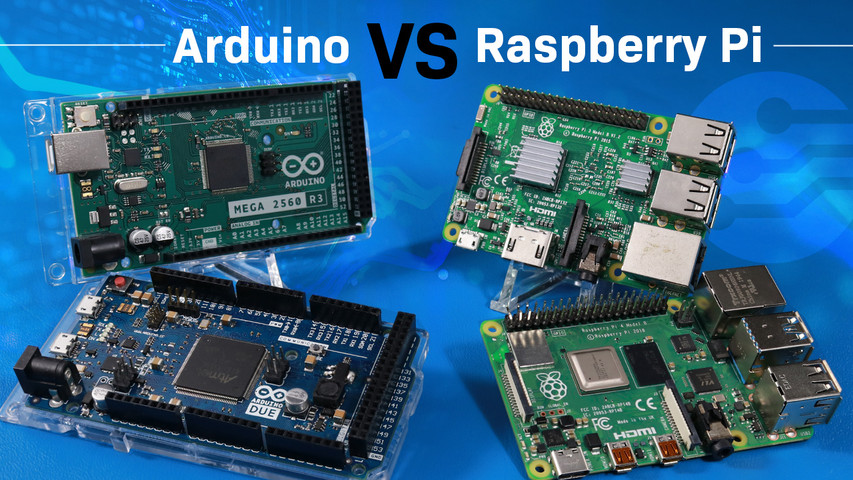
If you're working on an electronics project—whether it's for a DIY automated device, a digital sign, or an IoT device—you'll need to choose the right hardware. This often comes down to the debate of Arduino vs Raspberry Pi.
In this article, we’ll compare these two development boards side-by-side to help you decide which one best suits your project needs.
What this article covers:
- What is Arduino
- Arduino Features
- What is Raspberry Pi
- Raspberry Pi Features
- What is BeagleBone
- BeagleBone Features
- Difference Between Arduino, Raspberry Pi, & BeagleBone
- Arduino vs Raspberry Pi vs BeagleBone - Side-by-Side Comparison Table
- Arduino Applications
- Raspberry Pi Applications
- BeagleBone Applications
- Choosing a Platform
- Perguntas frequentes
- Conclusão
What is Arduino
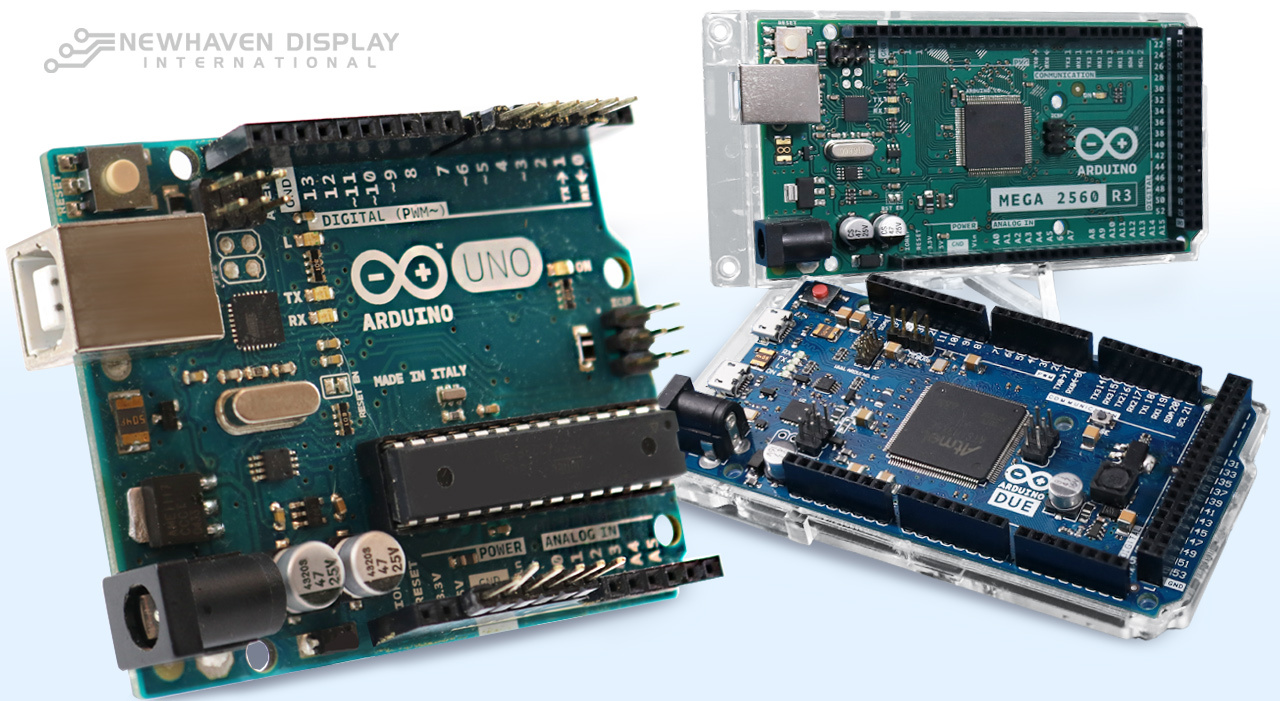
Arduino is an open-source electronics platform that combines a programmable circuit board (hardware) with a development environment (software) for writing and uploading code to the board to perform specific functions. It is known for its user-friendly nature, affordability, and extensive community support, which makes it widely accessible, particularly for beginners.
The platform's software, known as the Integrated Development Environment (IDE), supports programming in C and C++ languages and is compatible with Windows, Macintosh OSX, and Linux. Arduino boards can be connected to a variety of components, such as sensors, motors, and OLEDs, to perform specific tasks.
Learn more: How to connect Arduino to LCD
Arduino Features
- Microcontroller: Serves as the core processing unit, handling simple commands in real time.
- GPIO Pins: General-purpose input/output pins for connecting to external devices.
- Power Supply: Provides electricity to the board.
- USB: Connects to a computer for programming and power.
- Reset Button: Restarts the board.
- PWM: Modulates the width of pulses to simulate varying output levels and can be used to control LED brightness or motor speed.
- Serial Communication: Sends and receives bits sequentially.
- Parallel Communication: Sends multiple bits simultaneously.
- Interrupts: Responds to external events.
- Timers: Precisely controls timing.
- ADC: Converts analog signals to digital.
- Memory: Stores programs and data.
- Crystal Oscillator: Provides stable timing for the board.
Arduino boards can be expanded with peripherals called shields, which add versatility to projects. Shields attach directly to the Arduino board, enabling it to connect with other electronic devices, such as the Internet through an Ethernet port, or control components like LCDs. For a complete list of all Arduino products, visit the Arduino Hardware page.
Learn more: Serial vs Parallel Communication
What is Raspberry Pi
Raspberry Pi boards are essentially complete computers on a printed circuit board the size of a credit card. These devices contain a central processing unit (CPU), random access memory (RAM), WiFi and Bluetooth connectivity, input/output connectors, Ethernet and USB ports, an audio jack for headphones, HDMI ports to connect monitors, and a micro SD slot. These boards have no internal storage, so an SD or microSD card is necessary for these boards to function.
Raspberry Pi boards can connect to peripherals such as keyboards, mice, and monitors, turning them into fully functional desktops. With built-in Ethernet ports, they can connect to the Internet for browsing, file transfers, and networked tasks. Equipped with powerful CPUs, Raspberry Pi boards are capable of running full operating systems and handling multiple complex computing tasks, making them versatile tools for a wide range of applications.

Raspberry Pi Features
- CPU: The brain of the computer, responsible for processing information.
- RAM: Temporary storage for data the CPU is actively using.
- WiFi and Bluetooth: Wireless communication capabilities.
- Ethernet: Wired internet connection.
- USB Ports: Connect to peripherals like keyboards, mice, and external storage.
- HDMI: Connects to displays for video output.
- SD Card Slot: For storing operating systems, applications, and data.
- Audio Jack: For connecting headphones or speakers.
- GPIO Pins: General-purpose input/output pins for connecting to external devices.
- Power Supply: Provides electricity to the board.
There are different models of Raspberry Pi with various features to meet different needs. For detailed specifications, visit the official Raspberry Pi Products page.
Learn more: Differences Between OLED and LCD
What is BeagleBone
BeagleBone is a family of open-source, low-cost, compact computers built for embedded development. Originally created by Texas Instruments, these boards combine general-purpose computing with reliable I/O control, making them well-suited for applications that need both flexibility and performance.
BeagleBone is commonly used in automation, robotics, and industrial systems where quick Linux boot times and real-time I/O are important.
BeagleBone Features
BeagleBone boards offer a range of features that position them between Arduino and Raspberry Pi in terms of complexity and capability. Key highlights include:
- AM335x ARM Cortex-A8 processor, typically running at 1GHz
- 512MB DDR3 RAM (on most models)
- Onboard eMMC storage alongside microSD support
- USB, Ethernet, HDMI (on some models)
- Extensive GPIO pins, including analog inputs, PWM, I²C, SPI, and UART
- Built-in support for Linux distributions like Debian
- PRU (Programmable Real-time Unit) for precise timing control and low-latency tasks
This combination of processing power and I/O versatility makes BeagleBone a strong choice for projects that require real-time responsiveness, industrial-grade reliability, or complex peripheral handling.
Difference Between Arduino, Raspberry Pi & BeagleBone
Arduino is a microcontroller board designed for simpler, real-time control tasks, such as controlling sensors or automating simple devices, while Raspberry Pi operates as a mini-computer, capable of running full operating systems and managing more advanced computations, like hosting a web server or processing video. BeagleBone shares traits from both. It runs Linux like Raspberry Pi but features real-time processing capabilities and extensive I/O support closer to Arduino, making it suitable for industrial and control-focused applications.
Processing Power
- Arduino is primarily designed for microcontroller-based projects. Arduino offers limited processing power. It's ideal for simple tasks, sensor readings, and controlling actuators.
- Raspberry Pi functions as a mini-computer, providing significantly more processing power than Arduino. It can handle complex tasks like image processing, video playback, and running operating systems.
-
BeagleBone runs on a 1GHz ARM processor and handles multitasking. It has more processing capability than Arduino and includes real-time functionality for precision control.
Operating System
- Arduino operates without an operating system, making it simpler for beginners. Its code runs directly on the microcontroller.
- Raspberry Pi runs various operating systems, such as Raspberry Pi OS, Ubuntu, and Debian, offering flexibility and advanced capabilities.
-
BeagleBone runs a full Linux operating system, typically Debian. It boots quickly and is well-suited for applications that require real-time performance and I/O reliability.
Custo
- Arduino is generally more affordable due to its simpler hardware and focus on specific tasks.
- Raspberry Pi tends to be pricier due to its increased processing power, memory, and ability to run full-fledged operating systems.
-
BeagleBone boards generally cost more than Arduino but are priced similarly to Raspberry Pi. Pricing varies depending on onboard features like eMMC storage or HDMI.
Applications
- Arduino excels in robotics and IoT projects where real-time control is crucial, such as controlling sensors or actuators. Popular applications include weather stations, home automation systems, and wearable tech.
- Raspberry Pi is ideal for more complex tasks, like running a home media center, building a web server, or even creating AI-driven applications like facial recognition systems.
-
BeagleBone is used in industrial control systems, robotics, and automation projects that need reliable I/O and real-time responsiveness.
Development Environment
- Arduino uses a simplified IDE (Integrated Development Environment) that is beginner-friendly.
- Raspberry Pi can be programmed using various languages like Python, C++, and Java, offering more flexibility but requiring a steeper learning curve.
-
BeagleBone is compatible with languages like Python, C, and C++, and works well with Linux-based tools. It includes cloud-based and local options for code deployment.
Arduino vs Raspberry Pi vs BeagleBone - Side-by-Side Comparison Table
| Feature | Arduino | Raspberry Pi | BeagleBone |
|---|---|---|---|
| Architecture | Microcontroller | Microprocessor | Microprocessor |
| Usage | Controlling connected electrical components and devices. | Computing data and managing electrical components and devices. | Managing electrical components and performing embedded computing tasks. |
| Software Complexity | Simple | Complex | Moderate |
| Hardware Complexity | Simple | Complex | Moderate |
| CPU Architecture | 8-bit (Uno, Nano, etc.) 32-bit (Due, Zero, Portenta H7) |
32-bit (Zero, 1, 2) 64-bit (3, 4, 5, 400) |
32-bit ARM Cortex-A8 (AM335x) |
| RAM | UNO: About 2 kB / 32 KB flash Mega: 8 KB / 256 KB flash Due: 96 KB / 512 KB flash |
Pi 0 and 1: 512 MB Pi 2 and 3: 1 GB Pi 4 and 5: 2 GB, 4 GB, or 8 GB |
512MB DDR3 (standard on BeagleBone Black and Green) |
| Clock Speed | Uno, Nano, Mega: 16 MHz Zero: 48 MHz Nano 33 BLE: 64 MHz Due: 84 MHz Portenta H7: 480 MHz |
Pi 1: 700 MHz Pi 2: 900 MHz Pi 3: 1.2 GHz Pi 4: 1.5 GHz Pi 5: 2.4GHz |
1GHz |
| I/O Voltage | Uno, Nano, Mega: 5V Zero, Nano 33 BLE, Due, Portenta H7: 3.3V |
3.3V for all models | 3.3V |
| Consumo de energia | Low (varies by model) | High (varies by model) | Moderate (varies by model and peripherals) |
| Processing Power | Low | High | Medium to High |
| Memory | On-board flash memory | None (SD card needed) | On-board eMMC (4GB or 8GB) + microSD support |
| Operating Systems | No (RTOS possible in some cases) | Yes (based on Linux) | Yes (Linux-based, usually Debian) |
| Input/Output Capabilities | Digital and analog | Digital only | Digital and analog |
| Communication Interfaces | UART, SPI, I2C (varies by model) | UART, SPI, I2C, HDMI, Ethernet (varies by model) | UART, SPI, I2C, CAN, Ethernet, USB |
| Expandability | Limited shields | Extensive HATs | Capes (similar to Raspberry Pi HATs) |
| Ferramentas de Desenvolvimento | Arduino IDE | Multiple options (Python, C++, etc.) | Cloud9 IDE, Visual Studio Code, command-line tools (Python, C/C++) |
| Custo | Baixar | Mais alto | Middle of the line |
Arduino is a microcontroller-based platform designed for simplicity and low-power operation. Its core strength lies in real-time control of physical devices. With a smaller footprint and lower processing power, Arduino is ideal for projects that require direct interaction with sensors and actuators, such as robotics, automation, and wearable technology. Its ability to operate independently of a full-fledged operating system, combined with a user-friendly development environment, makes it accessible to beginners.
Learn more: How to Display Images on a TFT LCD
Raspberry Pi, on the other hand, is a single-board computer equipped with a more powerful processor and the capability to run full operating systems like Linux. This versatility makes it suitable for a wider range of applications, including media centers, web servers, and educational computing. While it offers greater computational power, Raspberry Pi typically consumes more energy and requires additional components like an SD card for storage.
BeagleBone bridges the gap between microcontroller simplicity and full Linux computing. It's designed for projects that rely on consistent I/O timing, access to analog input, and stable performance over long runtimes. Often used in embedded systems where responsiveness and reliability matter, BeagleBone boards provide a balance of control and computing without the overhead of additional hardware dependencies.
Arduino Applications
Arduino is great for performing simpler, more repetitive tasks, such as low-level control of electronics like lights, LCDs, motors, and sensors. Arduino boards are particularly useful for building DIY projects that can move, sense, and interact with users, and this has led to their widespread adoption in robotics, automation, and prototyping applications.
Most common Arduino applications
- Robotics
- Home automation
- Electronics prototyping
- IoT (Internet of Things)
- Data logging
- Hobby and educational projects
- Wearable technology

Tutorial: Connect Arduino to Character OLED
Raspberry Pi Applications
Raspberry Pi is a powerful mini-computer that can perform complex and several different operations simultaneously. Its capacity to run full operating systems, along with its GPIO pins for interacting with the physical world, makes it the preferred choice for projects requiring a robust computing environment, such as managing web servers, media centers, games, home security, and automation.
Most common Raspberry Pi applications
- Advanced robotics
- Industrial control systems
- Home automation
- Web server management
- Security systems
- Image and video systems
- IoT (Internet of Things)
- Educational computing
- Artificial intelligence
 Raspberry Pi application examples.
BeagleBone Applications
BeagleBone is a strong fit for embedded use cases that require reliable hardware control, long-term stability, and real-time performance. It’s commonly found in:
- Industrial automation and monitoring systems
- Robotics platforms needing low-latency motor control
- Data acquisition and logging equipment
- Building access and security systems
- Network-connected IoT devices with custom I/O needs
Choosing a Platform
Each board brings something different to the table. Arduino is a go-to option for hardware-level control in straightforward applications. Raspberry Pi handles more complex software tasks and multimedia processing. BeagleBone suits developers who need consistent I/O performance alongside Linux-based computing, especially in projects that rely on reliable uptime and integrated peripherals.
Perguntas frequentes
Here are some of the most commonly asked questions about Arduino and Raspberry Pi.
Yes, Arduino and Raspberry Pi can work together, and they are often used together to leverage the strengths of both platforms. Arduino handles basic tasks like motor and sensor control, while Raspberry Pi manages more complex functions.
Arduino is generally considered easier for beginners, especially for those with no prior electronics or programming experience.
No, Raspberry Pi and Arduino use different programming environments and are designed for different types of tasks. Arduino runs code directly on its microcontroller, typically written in C or C++, while Raspberry Pi runs a full operating system like Linux and supports a variety of programming languages, such as Python, Java, and C++.
Yes, Raspberry Pi is a more powerful platform than Arduino. Raspberry Pi is a mini-computer capable of running full operating systems and handling complex tasks, while Arduino is a microcontroller optimized for simpler, real-time control tasks.
Arduino is ideal for projects that require real-time control of hardware, such as robotics, home automation, and IoT devices. Raspberry Pi is better suited for projects that need more computational power, like video processing, web servers, or educational computing platforms.
While Arduino can control basic hardware for AI projects, it lacks the processing power required for tasks like machine learning. For AI, Raspberry Pi is a better choice.
Conclusão
Arduino, Raspberry Pi, and BeagleBone each play a unique role in the embedded development space. Understanding how they differ helps clarify their purpose and potential. For engineers and developers, choosing the right board starts with knowing what each one brings to the table.
If your project includes a display, Newhaven Display can help you find the right interface and hardware pairing to match your development platform. Contact us or request a same-day quote to get started.