
Capacitive vs Resistive Touchscreens
touchscreen displays have become a standard piece of technology in our daily lives. Many LCD and OLED applications now include touchscreen technology to improve functionality or enhance user experience.
However, there is not a universal touchscreen for every application. You'll need to decide which touchscreen is suitable for your project. Like deciding between OLED and LCD, choosing the right touchscreen will depend on your application's requirements.
이 문서에서
Capacitive touchscreen Displays
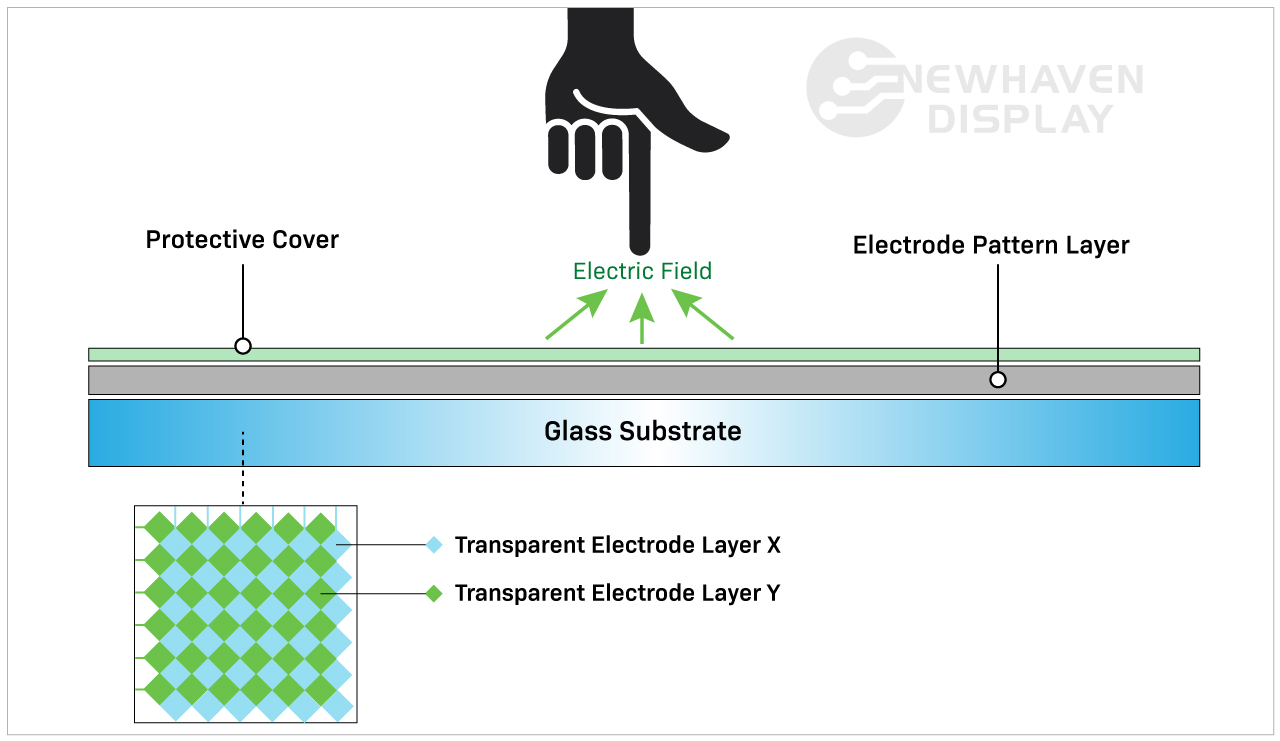
A capacitive touchscreen panel is made of an insulator, usually glass, that is coated with a transparent conductor. Capacitive touchscreen displays respond to conductive inputs like a fingertip and don't require pressure to activate a "touch event."
정전식 터치 패널은 고급 기능으로 인해 보다 현대적이고 진보된 터치스크린 옵션입니다. 스마트폰, 태블릿, 가전제품, 모니터와 같은 소비자 제품에서 흔히 볼 수 있습니다.
관련: IPS 디스플레이란?
정전식 터치스크린은 어떻게 작동하나요?
정전식 터치스크린은 화면 표면을 터치할 때 화면의 정전기로 인해 발생하는 정전 용량 변화를 감지하고 이에 반응합니다.
Capacitive touchscreen Advantages
정전식 터치스크린 디스플레이는 터치 제스처를 허용하고 멀티터치 입력에 반응합니다. 일반적으로 1~5개의 터치 입력을 동시에 입력할 수 있지만 일부 정전식 터치스크린은 더 많은 입력을 처리할 수 있습니다.
Capacitive touchscreens deliver brighter, higher contrast images due to the makeup of their panels. Displays with capacitive touchscreens are more durable than resistive touchscreens because they are designed with cover glass on their top layer. In fact, all of our capacitive TFT displays have standard 0.7mm thick built-in cover glass and can be further customized for extra durability.
Related: LCD Cover Glass Impact Test
Capacitive touchscreen Disadvantages
정전식 터치스크린은 제조 공정이 더 복잡하기 때문에 저항식 터치스크린 패널보다 비용이 약간 높습니다.
현재 정전식 터치스크린은 저항식 터치스크린보다 비용이 높지만, 터치스크린 기술의 업계 표준으로 빠르게 자리 잡고 있습니다.
향상된 반응성은 디스플레이를 사용하는 방법과 위치에 따라 단점이 될 수도 있습니다. 예를 들어 정전식 터치스크린은 특정 유형의 장갑을 착용한 상태에서 사용자에게 쉽게 반응하지 않을 수 있습니다. 정전식 터치스크린은 무기물 입력에는 반응하지 않지만 다른 전도성 요소에 의해 실수로 활성화될 수 있습니다. 중단을 일으키는 가장 일반적인 요소 중 하나는 물입니다.
정전식 터치스크린 표면에 비, 습기, 결로 현상이 발생하면 물기가 제거될 때까지 실수로 입력하거나 정확도가 저하되는 경우가 종종 있습니다. 이것이 특정 상황에서 정전식 터치스크린 대신 저항식 터치스크린을 선택하는 주된 이유 중 하나입니다.
Related: LCD Screen Types
When to Choose a Capacitive touchscreen
스와이프, 핀치 또는 멀티터치와 같은 터치 제스처를 사용하는 모든 디바이스에는 정전식 터치스크린이 필요합니다. 이러한 기능은 정전식 터치스크린 디스플레이를 저항식 터치스크린보다 더 직관적이고 사용자 친화적으로 만드는 데 도움이 되는 경우가 많습니다. 정전식 터치스크린은 향상된 터치 반응성과 더 나은 이미지 밝기 및 대비가 필요한 애플리케이션에 가장 적합합니다.
Applications By Industry
Capacitive touchscreens are well-suited for applications that depend on speed, visual clarity, and user interaction. These displays are frequently used in:
- Consumer electronics: Smartphones, tablets, smart appliances, and wearables that require responsive, multi-touch functionality.
- Medical devices: Equipment where fast, intuitive inputs improve workflows without requiring pressure-based actions. Because of the presence of a cover glass, these displays are also preferred in environments where heavy cleaners are needed.
- Industrial automation: Touch interfaces on control panels where high brightness, glass durability, and gesture input improve usability.
- Retail and kiosks: Interactive screens in point-of-sale systems or information terminals that benefit from multi-touch input and sharp visuals.
- Automotive: Infotainment systems and touch dashboards that require smooth responsiveness and clean image quality in varied lighting.
In these applications, capacitive touchscreens help streamline user experience while supporting faster input.
Resistive touchscreen Displays
Resistive touchscreen panels sense pressure on the display's top layer and send a signal to the circuit layer to activate the touchscreen functionality. Because they use pressure to activate the touch inputs, resistive touchscreen displays can be used with a stylus, gloves, and other items. Resistive touchscreens are built without cover glass and made of plastic, making them more susceptible to dents and scratches.
저항막 방식 터치 패널은 시장에 처음 등장한 터치스크린으로 여전히 널리 사용되고 있습니다.
저항성 터치스크린은 어떻게 작동하나요?
Resistive touchscreens are made of two resistive coating layers with a gap or space layer between them. A "touch event" occurs when these two layers make contact with each other (closing the circuit) by the user's action of pressing into the soft, semi-flexible top layer. Each layer consists of horizontal and vertical lines (x,y matrix) that detects the exact location of the touch.
갭 또는 스페이스 레이어는 일반적으로 공기 또는 불활성 가스와 소프트 탑 레이어를 하단 레이어에서 분리하는 데만 사용되는 일부 스페이서로 구성됩니다.

Resistive touchscreen Advantages
저항막 방식 터치스크린은 정전식 터치 패널에 비해 덜 발전된 터치 패널로 여겨지는 경우가 많습니다. 그러나 비유기 입력과 상호 작용할 수 있기 때문에 특정 산업 분야에서 관련성이 높은 터치스크린입니다.
저항막 방식 터치스크린 디스플레이는 정전식 터치스크린 디스플레이보다 덜 민감합니다. 이는 경우에 따라 장점으로 간주되며 특정 애플리케이션에 선택되는 이유이기도 합니다. 저항막 방식 터치스크린은 주변 환경의 우발적인 입력에 반응하지 않으므로 물을 흘리거나 가벼운 이물질이 화면에 떨어지는 등의 상황에서도 작동이 중단되지 않습니다.
이러한 유형의 터치스크린은 사용자의 의도적인 입력이 더 많이 필요하므로 거칠고 불안정한 환경에서 더 안정적입니다. 예를 들어, 저항막 터치스크린은 물이나 이물질이 화면에 떨어질 수 있는 건설 현장에서 완벽한 솔루션입니다. 또한 사용자가 장갑을 끼고 있는 상황에도 가장 적합한 터치스크린 디스플레이 옵션입니다.
Resistive touchscreen Disadvantages
저항성 터치스크린 패널은 안타깝게도 찌그러짐과 긁힘에 더 취약합니다. 직사광선 아래에서는 시인성이 좋지 않아 실외용으로 적합하지 않습니다. 멀티터치 입력에 반응하지 못한다는 점은 멀티터치가 필요한 빠른 속도의 애플리케이션에서 단점이 될 수 있습니다. 저항막 방식 터치스크린은 상단 레이어에 가해지는 압력에 의존하기 때문에 남용되거나 잘못 취급되는 경향이 있어 정전식 터치스크린보다 시간이 지남에 따라 내구성이 떨어집니다.
Related: How to Clean an Electronic Display
저항성 터치스크린을 선택해야 하는 경우
저항막 방식 터치스크린 기술은 거친 환경, 간접광선, 간단한 터치 기능이 필요한 저비용 애플리케이션에 이상적입니다. 실수로 터치 입력하는 경우가 적고 열과 습기에 대한 내성이 뛰어나며 스타일러스, 펜, 장갑, 손가락 등 거의 모든 도구로 조작할 수 있기 때문에 사용자 입력이 중요한 경우에 더욱 신뢰할 수 있는 솔루션입니다.
Applications by Industry
Resistive touchscreens continue to serve a wide range of environments where durability and input flexibility matter more than touch sensitivity. Common uses include:
- Medical equipment: Devices in sterile settings where accurate inputs are required.
- Industrial controls: Interfaces exposed to dust, debris, or moisture where false inputs must be avoided.
- Retail and kiosks: Point-of-sale environments where frequent cleaning, glove use, or stylus-based operation is common.
- Transportation systems: Public kiosks or ticketing machines that must function regardless of environmental conditions.
- Construction and agriculture equipment: Devices operated outdoors or in rugged environments where gloved hands are the norm.
In these scenarios, resistive touchscreens deliver reliable performance where precise, single-touch input is a higher priority than gesture control.
Cost & Integration Factors
Touchscreen selection often comes down to project scope, system requirements, and long-term cost. Capacitive displays offer advanced features and a modern user experience. Resistive displays, in contrast, are more cost-effective for basic input needs.
Key considerations include:
Material and component costs: Capacitive panels use higher-end materials like glass and conductive coatings, which increase overall cost.
Touch controller needs: Capacitive technology may require specialized controllers or firmware tuning depending on the display size and performance goals.
Input flexibility: Resistive touchscreens work reliably across a range of input types without additional tuning or calibration.
System design: Design teams may need to account for additional factors such as optical clarity, bezel compatibility, and multi-touch integration when using capacitive touch.
Replacement and maintenance: Resistive screens are more likely to be swapped out due to their lower cost and usage in high-wear environments, while capacitive displays offer better durability once installed.
Choosing the right panel early in the design cycle helps avoid added engineering time, system conflicts, or budget constraints later on.
Customization Options Available
Standard displays don’t always meet every project's needs. That’s why capacitive and resistive touchscreens can be customized to fit specific mechanical, electrical, or environmental requirements.
At Newhaven Display, we offer custom solutions for applications that go beyond what off-the-shelf panels provide. Common modifications include changes to cover glass, sensitivity tuning for gloves or styluses, and interface adjustments for SPI, I2C, USB, and other formats.
Additional enhancements include anti-glare coatings, optical bonding, screenprinting, and expanded temperature ranges. Mechanical refinements such as modified mounting points or adjusted dimensions make it easier to integrate displays into unique product designs.
When a standard panel isn’t a match, these options give teams the flexibility to move forward without adding unnecessary complexity.
정전 용량 방식과 저항 방식 비교 표
| 정전 용량 | 저항성 | |
| 활성화 유형 | 가벼운 터치(전도성) | 압력 터치 |
| 비용 | 더 높은 제조 비용 | 제조 비용 절감 |
| 터치 감도 | 더 민감하게 | 덜 민감함 |
| 밝기 및 대비 | 최고 | 양호 |
| 내구성 | 최고 | 양호 |
| 멀티 터치 지원 | 예 | 아니요 |
| 장갑, 펜 또는 스타일러스를 사용할 수 있나요? | 예(하지만 제한적) | 예 |
| 용도 | 멀티 터치, 정확한 애플리케이션. | 간단한 터치 기능으로 열악한 환경에서도 사용할 수 있습니다. |
결론
Capacitive touchscreens have become the go-to option for many modern devices, especially where multi-touch input and visual clarity are important. Still, resistive touchscreens offer practical advantages in rugged conditions or when simple, reliable interaction is the priority.
If your project calls for touch input in a demanding environment or on a tighter budget, a resistive touchscreen may be the better fit. For applications focused on responsiveness, sleek interfaces, or gesture-based controls, capacitive technology is often the right choice.
Newhaven Display can help you evaluate both options and determine which touchscreen best suits your product. Contact our team to discuss your design goals or request a quote.

최신 블로그 게시물
-
A Guide to TFT Display Interfaces
Display interfaces often get less attention than screen resolution or brightness, but they carry jus …Dec 16th 2025 -
Choosing the Right Display Resolution: A User-Friendly Guide
Display resolution is one of the most defining choices in product interface design. It determines ho …Dec 11th 2025 -

Arduino vs Raspberry Pi vs BeagleBone: Key Features and Differences
If you're working on an electronics project—whether it's for a DIY automated device, a digital sign, …Dec 8th 2025