


Capacitive vs Resistive Touchscreens
Sep 12th 2025
touchscreen displays have become a standard piece of technology in our daily lives. Many LCD and OLED applications now include touchscreen technology to improve functionality or enhance user experience.
However, there is not a universal touchscreen for every application. You'll need to decide which touchscreen is suitable for your project. Like deciding between OLED and LCD, choosing the right touchscreen will depend on your application's requirements.
Related: Touch Panel Details and Integration Guide
In this article:
Capacitive touchscreen Displays
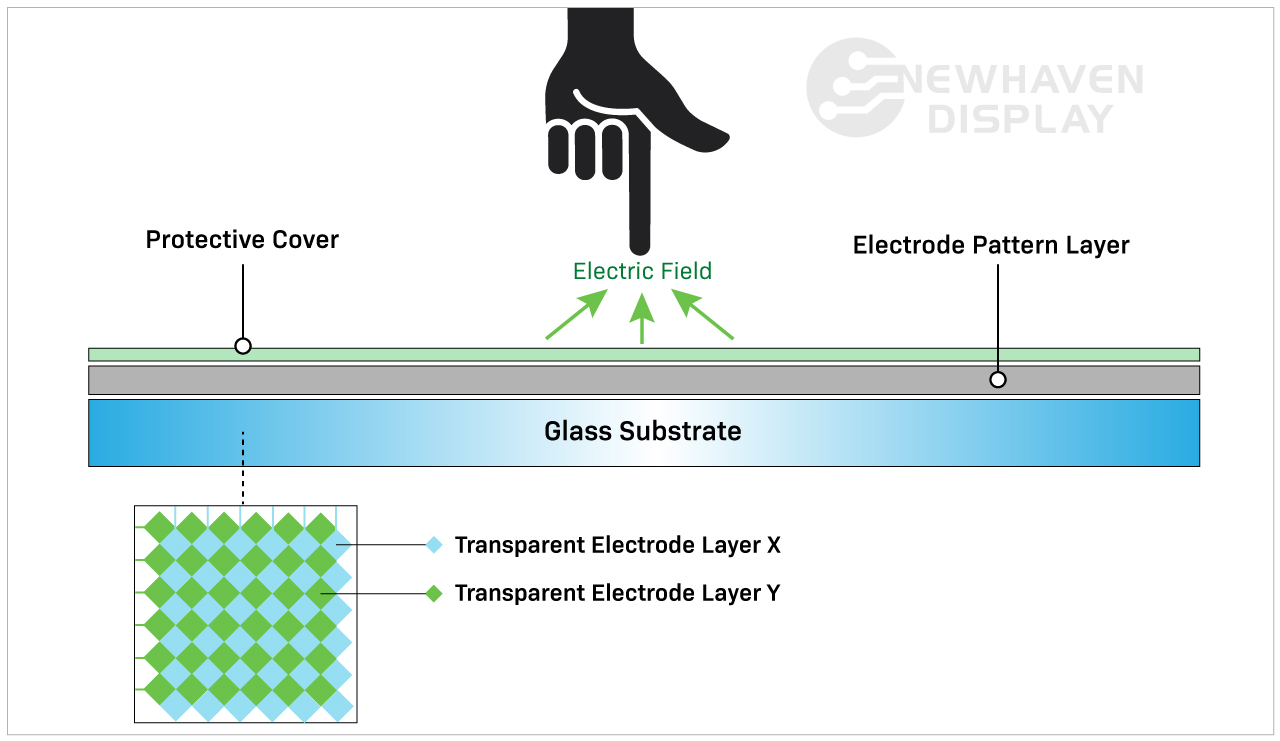
A capacitive touchscreen panel is made of an insulator, usually glass, that is coated with a transparent conductor. Capacitive touchscreen displays respond to conductive inputs like a fingertip and don't require pressure to activate a "touch event."
Capacitive touch panels are the more modern and advanced touchscreen option because of their advanced capabilities. They are commonly found in consumer products like smartphones, tablets, appliances, and monitors.
Related: What's an IPS Display
How do capacitive touchscreens work?
A capacitive touchscreen detects and responds to changes in capacitance caused by the screen's electrostatic field when the screen's surface is touched.
Capacitive touchscreen Advantages
Capacitive touchscreen displays allow for touch gestures and respond to multi-touch inputs. You’ll typically be able to enter one to five touch inputs simultaneously, but some capacitive touchscreens can process even more.
Capacitive touchscreens deliver brighter, higher contrast images due to the makeup of their panels. Displays with capacitive touchscreens are more durable than resistive touchscreens because they are designed with cover glass on their top layer. In fact, all of our capacitive TFT displays have standard 0.7mm thick built-in cover glass and can be further customized for extra durability.
Related: LCD Cover Glass Impact Test
Capacitive touchscreen Disadvantages
The cost of a capacitive touchscreen is slightly higher than a resistive touchscreen panel due to more complicated manufacturing processes.
While the cost is currently higher than resistive touchscreens, capacitive touchscreens are quickly becoming the industry standard in touchscreen technology.
The enhanced responsiveness can be a downside depending on how and where the display is used. For example, a capacitive touchscreen would not easily respond to the user while wearing certain types of gloves. Although capacitive touchscreens don’t respond to inorganic inputs, they can still be accidentally activated by other conductive elements. One of the the most common elements that causes interruptions is water.
Rain, humidity, and condensation on the surface of capacitive touchscreens will often cause accidental inputs and reduced accuracy until the water is removed. This is one of the main reasons why a resistive touchscreen would be chosen over a capacitive touchscreen in certain situations.
Related: LCD Screen Types
When to Choose a Capacitive touchscreen
Any device that utilizes touch gestures like swiping, pinching, or multi-touch will require a capacitive touchscreen. These features often help make capacitive touchscreen displays more intuitive and user-friendly than resistive touchscreens. Capacitive touchscreens are best suited for applications requiring improved touch responsiveness with better image brightness and contrast.
Applications By Industry
Capacitive touchscreens are well-suited for applications that depend on speed, visual clarity, and user interaction. These displays are frequently used in:
- Consumer electronics: Smartphones, tablets, smart appliances, and wearables that require responsive, multi-touch functionality.
- Medical devices: Equipment where fast, intuitive inputs improve workflows without requiring pressure-based actions. Because of the presence of a cover glass, these displays are also preferred in environments where heavy cleaners are needed.
- Industrial automation: Touch interfaces on control panels where high brightness, glass durability, and gesture input improve usability.
- Retail and kiosks: Interactive screens in point-of-sale systems or information terminals that benefit from multi-touch input and sharp visuals.
- Automotive: Infotainment systems and touch dashboards that require smooth responsiveness and clean image quality in varied lighting.
In these applications, capacitive touchscreens help streamline user experience while supporting faster input.
Resistive touchscreen Displays
Resistive touchscreen panels sense pressure on the display's top layer and send a signal to the circuit layer to activate the touchscreen functionality. Because they use pressure to activate the touch inputs, resistive touchscreen displays can be used with a stylus, gloves, and other items. Resistive touchscreens are built without cover glass and made of plastic, making them more susceptible to dents and scratches.
Resistive touch panels were the original touchscreen to enter the market and are still widely used.
How do resistive touchscreens work?
Resistive touchscreens are made of two resistive coating layers with a gap or space layer between them. A "touch event" occurs when these two layers make contact with each other (closing the circuit) by the user's action of pressing into the soft, semi-flexible top layer. Each layer consists of horizontal and vertical lines (x,y matrix) that detects the exact location of the touch.
The gap or space layer typically consists of air or inert gas and some spacers whose only purpose is to separate the soft top layer from the bottom layer.

Resistive touchscreen Advantages
Resistive touchscreens are often seen as the less advanced variety of touch panel compared to capacitive touch panels. However, being able to interact with non-organic inputs keeps these touchscreens relevant in specific industries.
Resistive touchscreen displays are less sensitive than capacitive touchscreen displays. This is considered an advantage in some cases and is why they’re chosen for specific applications. Resistive touchscreens will not respond to accidental inputs from the environment, so they won’t be interrupted by things like water spills or lightweight debris landing on the screen.
This type of touchscreen requires more intentional inputs from the user, making them more reliable in rugged and unstable environments. For example, a resistive touchscreen is the perfect solution on a construction site where water or debris might land on the screen. They’re also the best touchscreen display option for situations where the user is wearing gloves.
Resistive touchscreen Disadvantages
Resistive touchscreen panels are unfortunately more susceptible to dents and scratches. Their poor visibility in direct sunlight does not make them ideal for outdoor applications. Their inability to respond to multi-touch inputs can be a disadvantage in fast-paced applications requiring such. Because resistive touchscreens rely on the pressure applied to the top layer, they tend to be abused and mishandled, which makes them less durable over time than capacitive touchscreens.
Related: How to Clean an Electronic Display
When to Choose a Resistive Touchscreen
Resistive touchscreen technology is ideal for low-cost applications involving rugged environments, indirect sunlight, and simple touch features. Fewer accidental touch inputs, better resistance to heat and moisture, and the ability to be operated with pretty much anything (stylus, pen, gloves, fingers, etc.) make this touchscreen technology a more reliable solution when user input is crucial.
Applications by Industry
Resistive touchscreens continue to serve a wide range of environments where durability and input flexibility matter more than touch sensitivity. Common uses include:
- Medical equipment: Devices in sterile settings where accurate inputs are required.
- Industrial controls: Interfaces exposed to dust, debris, or moisture where false inputs must be avoided.
- Retail and kiosks: Point-of-sale environments where frequent cleaning, glove use, or stylus-based operation is common.
- Transportation systems: Public kiosks or ticketing machines that must function regardless of environmental conditions.
- Construction and agriculture equipment: Devices operated outdoors or in rugged environments where gloved hands are the norm.
In these scenarios, resistive touchscreens deliver reliable performance where precise, single-touch input is a higher priority than gesture control.
Cost & Integration Factors
Touchscreen selection often comes down to project scope, system requirements, and long-term cost. Capacitive displays offer advanced features and a modern user experience. Resistive displays, in contrast, are more cost-effective for basic input needs.
Key considerations include:
Material and component costs: Capacitive panels use higher-end materials like glass and conductive coatings, which increase overall cost.
Touch controller needs: Capacitive technology may require specialized controllers or firmware tuning depending on the display size and performance goals.
Input flexibility: Resistive touchscreens work reliably across a range of input types without additional tuning or calibration.
System design: Design teams may need to account for additional factors such as optical clarity, bezel compatibility, and multi-touch integration when using capacitive touch.
Replacement and maintenance: Resistive screens are more likely to be swapped out due to their lower cost and usage in high-wear environments, while capacitive displays offer better durability once installed.
Choosing the right panel early in the design cycle helps avoid added engineering time, system conflicts, or budget constraints later on.
Customization Options Available
Standard displays don’t always meet every project's needs. That’s why capacitive and resistive touchscreens can be customized to fit specific mechanical, electrical, or environmental requirements.
At Newhaven Display, we offer custom solutions for applications that go beyond what off-the-shelf panels provide. Common modifications include changes to cover glass, sensitivity tuning for gloves or styluses, and interface adjustments for SPI, I2C, USB, and other formats.
Additional enhancements include anti-glare coatings, optical bonding, screenprinting, and expanded temperature ranges. Mechanical refinements such as modified mounting points or adjusted dimensions make it easier to integrate displays into unique product designs.
When a standard panel isn’t a match, these options give teams the flexibility to move forward without adding unnecessary complexity.
Capacitive vs Resistive Comparison Table
| Capacitive | Resistive | |
| Activation type | Light touch (conductive) | Pressure touch |
| Cost | Higher manufacturing cost | Lower manufacturing cost |
| Touch sensitivity | More sensitive | Less sensitive |
| Brightness and contrast | Best | Good |
| Durability | Best | Good |
| Capable of multi-touch | Yes | No |
| Can gloves, pen or stylus be used? | Yes (but Limited) | Yes |
| Uses | Multi-touch, accurate applications. | Rugged environments with simple touch features. |
Conclusion
Capacitive touchscreens have become the go-to option for many modern devices, especially where multi-touch input and visual clarity are important. Still, resistive touchscreens offer practical advantages in rugged conditions or when simple, reliable interaction is the priority.
If your project calls for touch input in a demanding environment or on a tighter budget, a resistive touchscreen may be the better fit. For applications focused on responsiveness, sleek interfaces, or gesture-based controls, capacitive technology is often the right choice.
Newhaven Display can help you evaluate both options and determine which touchscreen best suits your product. Contact our team to discuss your design goals or request a quote.