
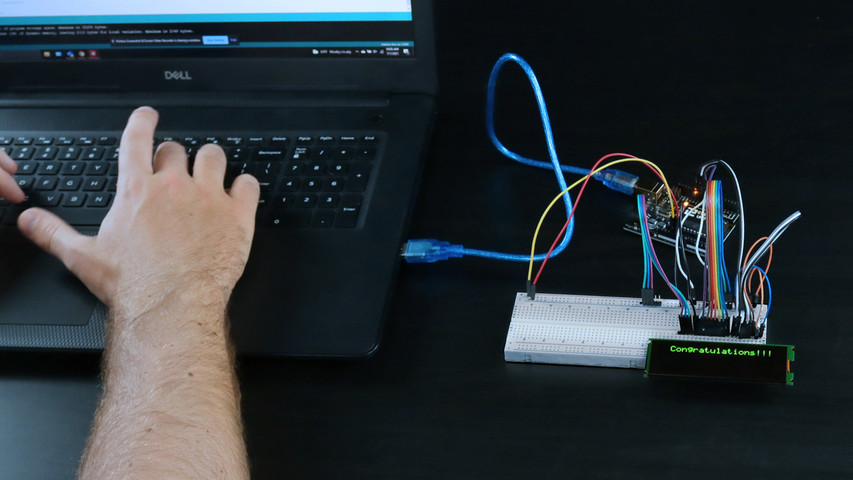
디스플레이 프로토타이핑 초보자 가이드
In this guide, you’ll learn how to locate example code and upload it to your microcontroller for prototyping with your display. This article is meant to be used as a tutorial using our 4×20 character OLED, but you can apply this guide to all of our displays.
시작하는 데 도움이 되는 무료 예제 코드를 찾을 수 있는 두 곳이 있습니다:
- 코드 라이브러리에서 다운로드
- GitHub 리포지토리에서 다운로드하세요.
코드 라이브러리에서 예제 코드 찾기
From our website, head to our Support Center to locate hundreds of free example code written by our engineers, designed specifically for our displays. These resources are organized by display type, but feel free to use the search bar to locate a specific part number that you are looking for code on. Here's a quick step-by-step guide to reference:
- 웹사이트에서 지원 센터를 클릭하거나 support.newhavendisplay.com으로 이동합니다.
- 예제 코드 카테고리 버튼을 클릭합니다.
- 표시 유형별로 코드를 찾아보고 필요한 경우 카테고리의 모든 문서를 확인하여 사용 가능한 항목을 확장하세요.
- 필요한 부품 번호를 찾아 문서를 클릭하면 예제 코드를 볼 수 있습니다.
- 코드를 복사하여 통합 개발 환경(IDE)에 붙여넣습니다.
- 코드를 편집하거나 마이크로 컨트롤러에 업로드하세요.
GitHub란 무엇인가요?
GitHub is a repository for open-source software where users can find code examples for our displays. You’ll find a wide variety of example codes here available for free. Using these codes will help you see the different features and functions our displays are capable of.

GitHub에서 코드 찾기
이제 시작하세요! 다음 단계에 따라 GitHub를 탐색하고 디스플레이에 예제 코드를 업로드하세요.
| 1. '리포지토리 찾기' 검색창에 표시되는 부품 번호를 입력하여 사용 가능한 코드를 확인합니다. 입력하는 동안 결과가 채워지기 시작합니다. 4x20 슬림 문자 OLED의 부품 번호는 "0420cw"입니다. | 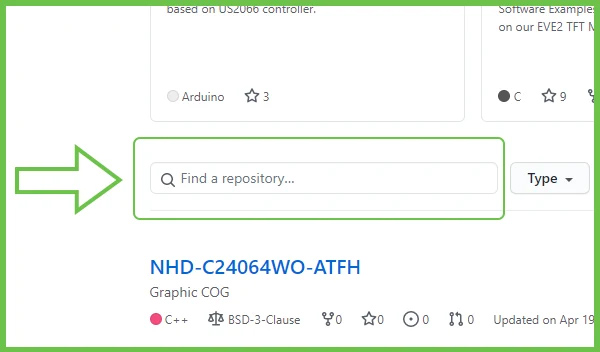 |
| 2. 클릭하여 리포지토리를 엽니다. | 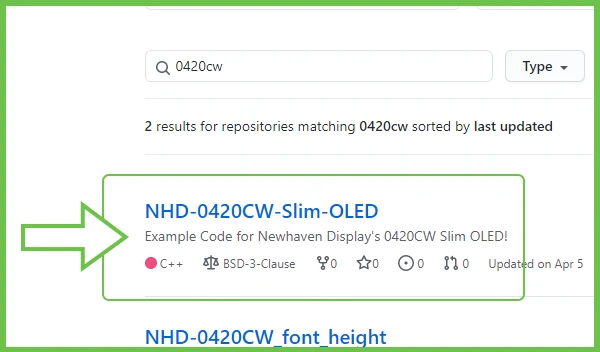 |
| 3. 3. 데모 코드 폴더를 열고 그 안에 있는 .ino 파일을 찾습니다. | 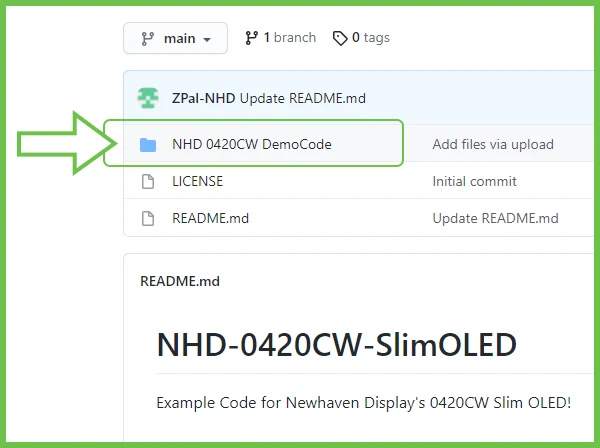 |
| 4. .ino 파일을 클릭하면 전체 코드가 확장됩니다. 이제 페이지에서 직접 코드를 복사하여 IDE에 붙여넣을 수 있습니다. 전체 코드를 처음부터 끝까지 복사해야 합니다. | 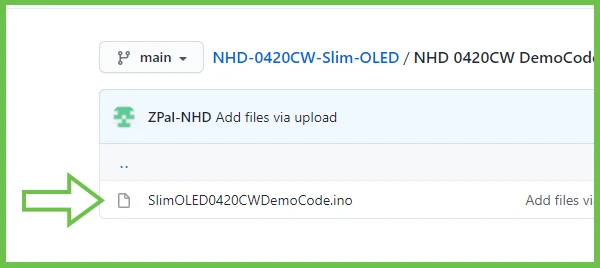 |
아두이노에 코드 업로드
| 1. 1. Arduino IDE를 열고 복사한 코드를 프로그램에 붙여넣습니다. | 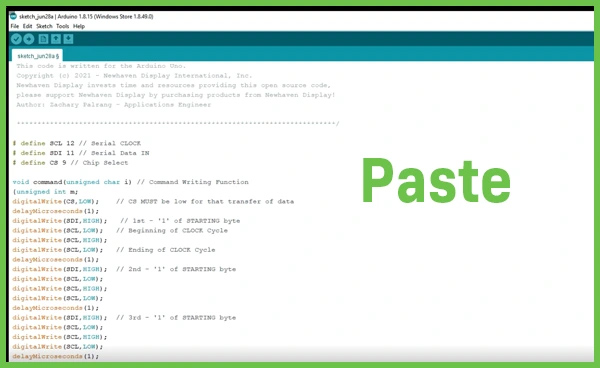 |
| 2. 2. 도구 탭을 열어 업로드할 올바른 아두이노 보드와 포트가 선택되었는지 확인합니다. | 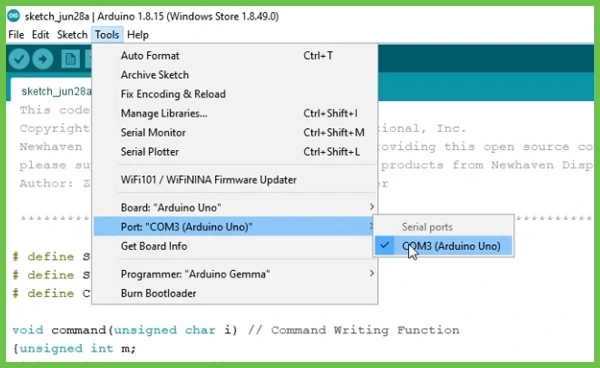 |
| 3. 3. 창 왼쪽 상단의 화살표 버튼을 클릭하여 아두이노에 프로그램 업로드를 시작합니다. | 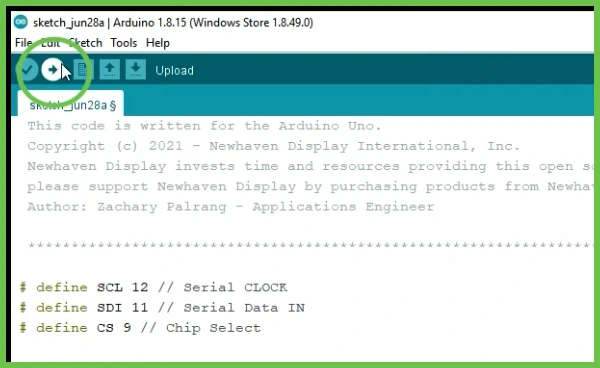 |
코드 업로드가 완료되면 디스플레이에 결과가 표시됩니다.
축하합니다!

4x20 슬림 캐릭터 OLED로 소통했습니다.
비디오 보기
더 자세히 알아보고 싶으신가요? 확장 동영상 튜토리얼에서는 이 게시물의 모든 내용을 다루며 코드를 사용자 지정 변경하는 방법을 보여줍니다.

최신 블로그 게시물
-
A Guide to TFT Display Interfaces
Display interfaces often get less attention than screen resolution or brightness, but they carry jus …Dec 16th 2025 -
Choosing the Right Display Resolution: A User-Friendly Guide
Display resolution is one of the most defining choices in product interface design. It determines ho …Dec 11th 2025 -

Arduino vs Raspberry Pi vs BeagleBone: Key Features and Differences
If you're working on an electronics project—whether it's for a DIY automated device, a digital sign, …Dec 8th 2025