
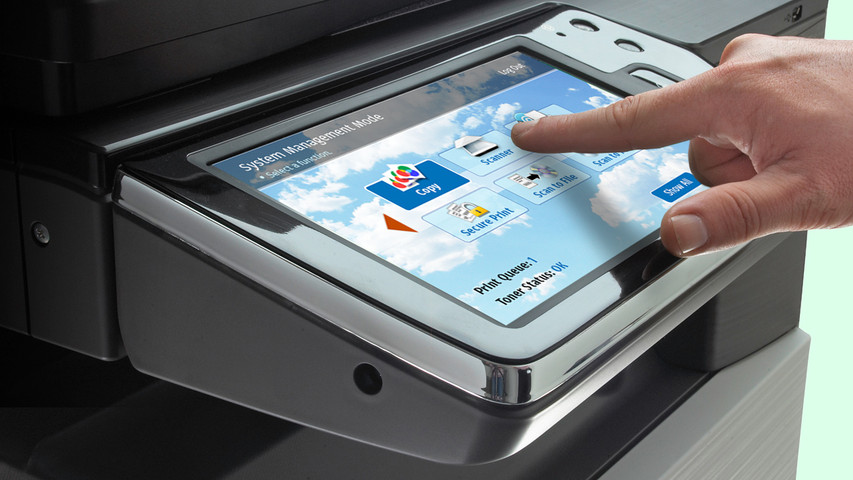
Capacitive vs Resistive Touchscreens
touchscreen displays have become a standard piece of technology in our daily lives. Many LCD and OLED applications now include touchscreen technology to improve functionality or enhance user experience.
However, there is not a universal touchscreen for every application. You'll need to decide which touchscreen is suitable for your project. Like deciding between OLED and LCD, choosing the right touchscreen will depend on your application's requirements.
Gerelateerd: Touch Panel Details en Integratiegids
In dit artikel:
Capacitive touchscreen Displays
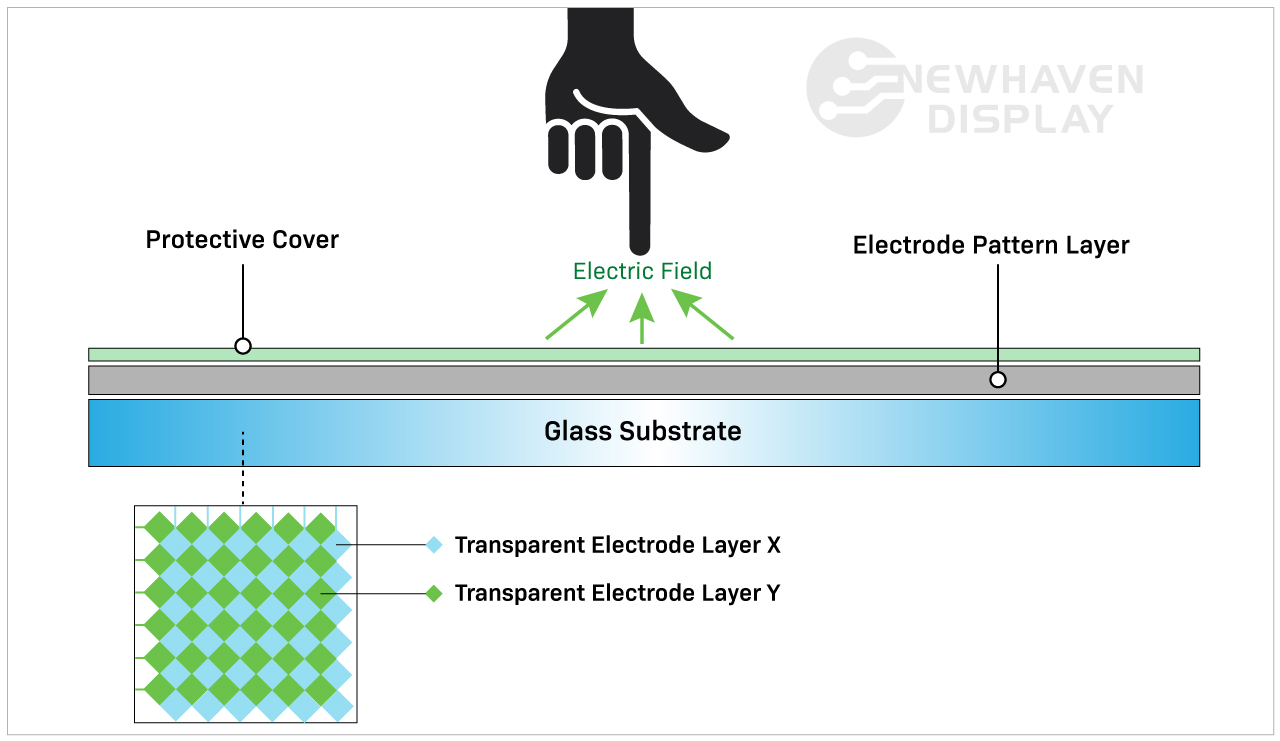
A capacitive touchscreen panel is made of an insulator, usually glass, that is coated with a transparent conductor. Capacitive touchscreen displays respond to conductive inputs like a fingertip and don't require pressure to activate a "touch event."
Capacitieve aanraakschermen zijn de modernere en meer geavanceerde touchscreen-optie vanwege hun geavanceerde mogelijkheden. Ze zijn vaak te vinden in consumentenproducten zoals smartphones, tablets, toestellen en monitoren.
Gerelateerd: Wat is een IPS-scherm?
Hoe werken capacitieve aanraakschermen?
Een capacitief touchscreen detecteert en reageert op veranderingen in de capaciteit die door het elektrostatische veld van het scherm worden veroorzaakt wanneer het schermoppervlak wordt aangeraakt.
Capacitive touchscreen Advantages
Capacitieve touchscreens maken aanraakbewegingen mogelijk en reageren op multi-touch inputs. Meestal kunt u één tot vijf aanrakingen tegelijk invoeren, maar sommige capacitieve touchscreens kunnen er nog meer verwerken.
Capacitive touchscreens deliver brighter, higher contrast images due to the makeup of their panels. Displays with capacitive touchscreens are more durable than resistive touchscreens because they are designed with cover glass on their top layer. In fact, all of our capacitive TFT displays have standard 0.7mm thick built-in cover glass and can be further customized for extra durability.
Related: LCD Cover Glass Impact Test
Capacitive touchscreen Disadvantages
De kosten van een capacitief aanraakscherm liggen iets hoger dan die van een resistief aanraakscherm, omdat de fabricageprocessen ingewikkelder zijn.
Hoewel de kosten momenteel hoger liggen dan bij resistieve touchscreens, worden capacitieve touchscreens snel de industriestandaard in touchscreentechnologie.
De grotere reactiesnelheid kan een nadeel zijn, afhankelijk van hoe en waar het scherm wordt gebruikt. Een capacitief touchscreen zou bijvoorbeeld niet gemakkelijk reageren als de gebruiker bepaalde soorten handschoenen draagt. Hoewel capacitieve touchscreens niet reageren op anorganische input, kunnen ze toch per ongeluk worden geactiveerd door andere geleidende elementen. Een van de meest voorkomende elementen die storingen veroorzaken is water.
Regen, vochtigheid en condensatie op het oppervlak van capacitieve touchscreens leiden vaak tot onbedoelde invoer en verminderde nauwkeurigheid totdat het water is verwijderd. Dit is een van de belangrijkste redenen waarom in bepaalde situaties een resistief touchscreen wordt verkozen boven een capacitief touchscreen.
Related: LCD Screen Types
When to Choose a Capacitive touchscreen
Elk apparaat dat gebruik maakt van aanraakbewegingen zoals vegen, knijpen of multi-touch heeft een capacitief touchscreen nodig. Deze eigenschappen maken capacitieve touchscreens vaak intuïtiever en gebruiksvriendelijker dan resistieve touchscreens. Capacitieve touchscreens zijn het meest geschikt voor toepassingen die een betere aanraakgevoeligheid met een betere beeldhelderheid en contrast vereisen.
Applications By Industry
Capacitive touchscreens are well-suited for applications that depend on speed, visual clarity, and user interaction. These displays are frequently used in:
- Consumer electronics: Smartphones, tablets, smart appliances, and wearables that require responsive, multi-touch functionality.
- Medical devices: Equipment where fast, intuitive inputs improve workflows without requiring pressure-based actions. Because of the presence of a cover glass, these displays are also preferred in environments where heavy cleaners are needed.
- Industrial automation: Touch interfaces on control panels where high brightness, glass durability, and gesture input improve usability.
- Retail and kiosks: Interactive screens in point-of-sale systems or information terminals that benefit from multi-touch input and sharp visuals.
- Automotive: Infotainment systems and touch dashboards that require smooth responsiveness and clean image quality in varied lighting.
In these applications, capacitive touchscreens help streamline user experience while supporting faster input.
Resistive touchscreen Displays
Resistive touchscreen panels sense pressure on the display's top layer and send a signal to the circuit layer to activate the touchscreen functionality. Because they use pressure to activate the touch inputs, resistive touchscreen displays can be used with a stylus, gloves, and other items. Resistive touchscreens are built without cover glass and made of plastic, making them more susceptible to dents and scratches.
Resistieve aanraakschermen waren de eerste aanraakschermen die op de markt kwamen en worden nog steeds veel gebruikt.
Hoe werken resistieve aanraakschermen?
Resistive touchscreens are made of two resistive coating layers with a gap or space layer between them. A "touch event" occurs when these two layers make contact with each other (closing the circuit) by the user's action of pressing into the soft, semi-flexible top layer. Each layer consists of horizontal and vertical lines (x,y matrix) that detects the exact location of the touch.
De spleet of ruimtelaag bestaat meestal uit lucht of inert gas en enkele afstandhouders die alleen dienen om de zachte bovenlaag van de onderlaag te scheiden.

Resistive touchscreen Advantages
Resistieve touchscreens worden vaak gezien als de minder geavanceerde variant van touchpanels in vergelijking met capacitieve touchpanels. De mogelijkheid tot interactie met niet-organische inputs houdt deze touchscreens echter relevant in specifieke industrieën.
Resistieve aanraakschermen zijn minder gevoelig dan capacitieve aanraakschermen. Dit wordt in sommige gevallen als een voordeel beschouwd en is de reden waarom zij voor specifieke toepassingen worden gekozen. Resistieve touchscreens reageren niet op toevallige input uit de omgeving en worden dus niet onderbroken door bijvoorbeeld gemorst water of lichte brokstukken die op het scherm terechtkomen.
Dit type touchscreen vereist meer bewuste input van de gebruiker, waardoor het betrouwbaarder is in ruwe en onstabiele omgevingen. Een resistief touchscreen is bijvoorbeeld de perfecte oplossing op een bouwplaats waar water of puin op het scherm terecht kan komen. Het is ook de beste touchscreen-optie voor situaties waarin de gebruiker handschoenen draagt.
Resistive touchscreen Disadvantages
Resistieve aanraakschermen zijn helaas gevoeliger voor deuken en krassen. Door hun slechte zichtbaarheid in direct zonlicht zijn ze niet ideaal voor toepassingen buitenshuis. Hun onvermogen om te reageren op multi-touch inputs kan een nadeel zijn bij snelle toepassingen die dit vereisen. Omdat resistieve touchscreens afhankelijk zijn van de druk die op de toplaag wordt uitgeoefend, worden ze vaak misbruikt en verkeerd behandeld, waardoor ze na verloop van tijd minder duurzaam zijn dan capacitieve touchscreens.
Related: How to Clean an Electronic Display
Wanneer een resistent aanraakscherm kiezen?
Resistieve touchscreen-technologie is ideaal voor goedkope toepassingen in ruwe omgevingen, indirect zonlicht en eenvoudige aanraakfuncties. Minder accidentele aanrakingen, betere weerstand tegen hitte en vocht, en de mogelijkheid om met vrijwel alles te worden bediend (stylus, pen, handschoenen, vingers, enz.) maken van deze touchscreen-technologie een betrouwbaardere oplossing wanneer gebruikersinvoer van cruciaal belang is.
Applications by Industry
Resistive touchscreens continue to serve a wide range of environments where durability and input flexibility matter more than touch sensitivity. Common uses include:
- Medical equipment: Devices in sterile settings where accurate inputs are required.
- Industrial controls: Interfaces exposed to dust, debris, or moisture where false inputs must be avoided.
- Retail and kiosks: Point-of-sale environments where frequent cleaning, glove use, or stylus-based operation is common.
- Transportation systems: Public kiosks or ticketing machines that must function regardless of environmental conditions.
- Construction and agriculture equipment: Devices operated outdoors or in rugged environments where gloved hands are the norm.
In these scenarios, resistive touchscreens deliver reliable performance where precise, single-touch input is a higher priority than gesture control.
Cost & Integration Factors
Touchscreen selection often comes down to project scope, system requirements, and long-term cost. Capacitive displays offer advanced features and a modern user experience. Resistive displays, in contrast, are more cost-effective for basic input needs.
Key considerations include:
Material and component costs: Capacitive panels use higher-end materials like glass and conductive coatings, which increase overall cost.
Touch controller needs: Capacitive technology may require specialized controllers or firmware tuning depending on the display size and performance goals.
Input flexibility: Resistive touchscreens work reliably across a range of input types without additional tuning or calibration.
System design: Design teams may need to account for additional factors such as optical clarity, bezel compatibility, and multi-touch integration when using capacitive touch.
Replacement and maintenance: Resistive screens are more likely to be swapped out due to their lower cost and usage in high-wear environments, while capacitive displays offer better durability once installed.
Choosing the right panel early in the design cycle helps avoid added engineering time, system conflicts, or budget constraints later on.
Customization Options Available
Standard displays don’t always meet every project's needs. That’s why capacitive and resistive touchscreens can be customized to fit specific mechanical, electrical, or environmental requirements.
At Newhaven Display, we offer custom solutions for applications that go beyond what off-the-shelf panels provide. Common modifications include changes to cover glass, sensitivity tuning for gloves or styluses, and interface adjustments for SPI, I2C, USB, and other formats.
Additional enhancements include anti-glare coatings, optical bonding, screenprinting, and expanded temperature ranges. Mechanical refinements such as modified mounting points or adjusted dimensions make it easier to integrate displays into unique product designs.
When a standard panel isn’t a match, these options give teams the flexibility to move forward without adding unnecessary complexity.
Capacitieve vs Resistieve Vergelijkingstabel
| Capacitieve | Resistief | |
| Type activering | Lichte aanraking (geleidend) | Druk aanraking |
| Kosten | Hogere productiekosten | Lagere productiekosten |
| Aanraakgevoeligheid | Meer gevoelig | Minder gevoelig |
| Helderheid en contrast | Beste | Goed |
| Duurzaamheid | Beste | Goed |
| Geschikt voor multi-touch | Ja | Geen |
| Kunnen handschoenen, pen of stylus worden gebruikt? | Ja (maar beperkt) | Ja |
| Gebruikt | Multi-touch, nauwkeurige toepassingen. | Robuuste omgevingen met eenvoudige aanraakfuncties. |
Conclusie
Capacitive touchscreens have become the go-to option for many modern devices, especially where multi-touch input and visual clarity are important. Still, resistive touchscreens offer practical advantages in rugged conditions or when simple, reliable interaction is the priority.
If your project calls for touch input in a demanding environment or on a tighter budget, a resistive touchscreen may be the better fit. For applications focused on responsiveness, sleek interfaces, or gesture-based controls, capacitive technology is often the right choice.
Newhaven Display can help you evaluate both options and determine which touchscreen best suits your product. Contact our team to discuss your design goals or request a quote.

Laatste Blog Berichten
-
A Guide to TFT Display Interfaces
Display interfaces often get less attention than screen resolution or brightness, but they carry jus …Dec 16th 2025 -
Choosing the Right Display Resolution: A User-Friendly Guide
Display resolution is one of the most defining choices in product interface design. It determines ho …Dec 11th 2025 -

Arduino vs Raspberry Pi vs BeagleBone: Key Features and Differences
If you're working on an electronics project—whether it's for a DIY automated device, a digital sign, …Dec 8th 2025