
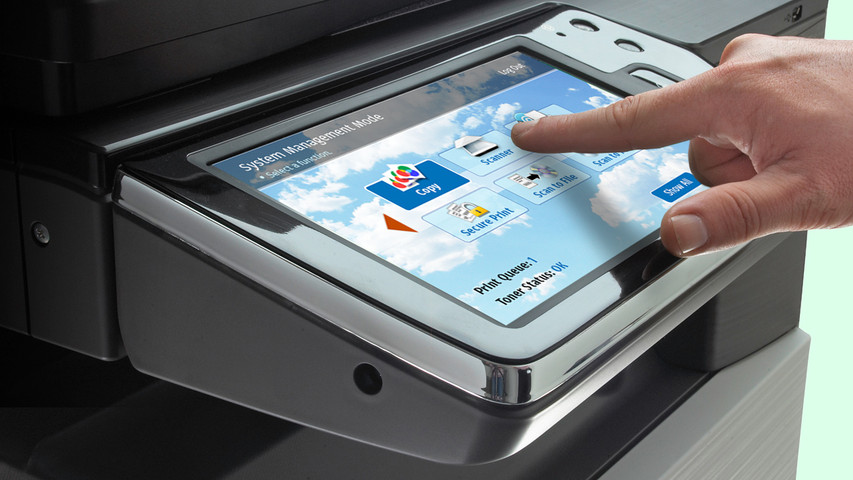
Capacitive vs Resistive Touchscreens
touchscreen displays have become a standard piece of technology in our daily lives. Many LCD and OLED applications now include touchscreen technology to improve functionality or enhance user experience.
However, there is not a universal touchscreen for every application. You'll need to decide which touchscreen is suitable for your project. Like deciding between OLED and LCD, choosing the right touchscreen will depend on your application's requirements.
Relacionado: Detalles del panel táctil y guía de integración
En este artículo:
Capacitive touchscreen Displays
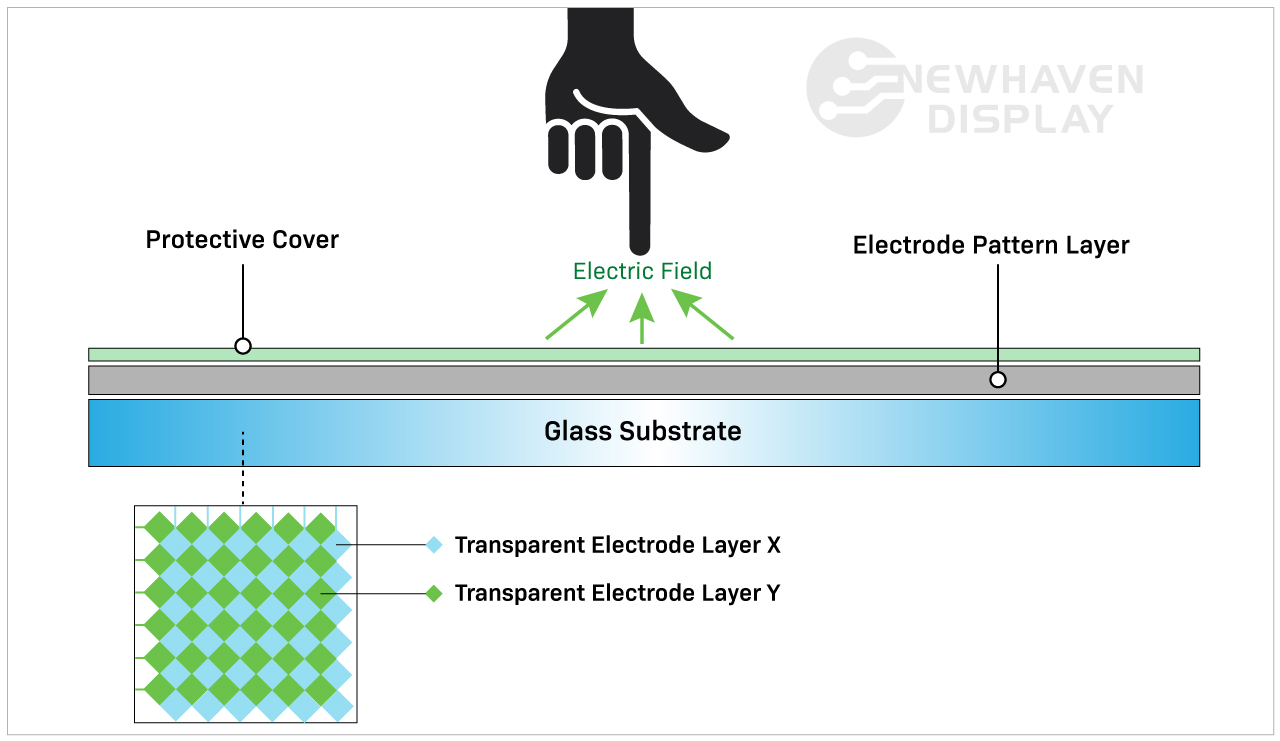
A capacitive touchscreen panel is made of an insulator, usually glass, that is coated with a transparent conductor. Capacitive touchscreen displays respond to conductive inputs like a fingertip and don't require pressure to activate a "touch event."
Los paneles táctiles capacitivos son la opción más moderna y avanzada de pantalla táctil por sus capacidades avanzadas. Se suelen encontrar en productos de consumo como smartphones, tabletas, electrodomésticos y monitores.
Relacionado: ¿Qué es una pantalla IPS?
¿Cómo funcionan las pantallas táctiles capacitivas?
Una pantalla táctil capacitiva detecta y responde a los cambios de capacitancia provocados por el campo electrostático de la pantalla cuando se toca su superficie.
Capacitive touchscreen Advantages
Las pantallas táctiles capacitivas permiten gestos táctiles y responden a entradas multitáctiles. Normalmente podrás introducir de una a cinco entradas táctiles simultáneamente, pero algunas pantallas táctiles capacitivas pueden procesar incluso más.
Capacitive touchscreens deliver brighter, higher contrast images due to the makeup of their panels. Displays with capacitive touchscreens are more durable than resistive touchscreens because they are designed with cover glass on their top layer. In fact, all of our capacitive TFT displays have standard 0.7mm thick built-in cover glass and can be further customized for extra durability.
Related: LCD Cover Glass Impact Test
Capacitive touchscreen Disadvantages
El coste de una pantalla táctil capacitiva es ligeramente superior al de un panel táctil resistivo debido a que los procesos de fabricación son más complicados.
Aunque su coste es actualmente más elevado que el de las pantallas táctiles resistivas, las capacitivas se están convirtiendo rápidamente en el estándar de la industria en tecnología de pantallas táctiles.
La mayor capacidad de respuesta puede ser un inconveniente dependiendo de cómo y dónde se utilice la pantalla. Por ejemplo, una pantalla táctil capacitiva no respondería fácilmente al usuario mientras llevara puestos ciertos tipos de guantes. Aunque las pantallas táctiles capacitivas no responden a entradas inorgánicas, pueden ser activadas accidentalmente por otros elementos conductores. Uno de los elementos que con más frecuencia provoca interrupciones es el agua.
La lluvia, la humedad y la condensación en la superficie de las pantallas táctiles capacitivas suelen provocar entradas accidentales y reducir la precisión hasta que se elimina el agua. Este es uno de los principales motivos por los que, en determinadas situaciones, se prefiere una pantalla táctil resistiva a una capacitiva.
Related: LCD Screen Types
When to Choose a Capacitive touchscreen
Cualquier dispositivo que utilice gestos táctiles como deslizar, pellizcar o multitoque necesitará una pantalla táctil capacitiva. Estas características hacen que las pantallas táctiles capacitivas sean más intuitivas y fáciles de usar que las resistivas. Las pantallas táctiles capacitivas son más adecuadas para aplicaciones que requieren una mejor respuesta táctil con un mayor brillo y contraste de imagen.
Applications By Industry
Capacitive touchscreens are well-suited for applications that depend on speed, visual clarity, and user interaction. These displays are frequently used in:
- Consumer electronics: Smartphones, tablets, smart appliances, and wearables that require responsive, multi-touch functionality.
- Medical devices: Equipment where fast, intuitive inputs improve workflows without requiring pressure-based actions. Because of the presence of a cover glass, these displays are also preferred in environments where heavy cleaners are needed.
- Industrial automation: Touch interfaces on control panels where high brightness, glass durability, and gesture input improve usability.
- Retail and kiosks: Interactive screens in point-of-sale systems or information terminals that benefit from multi-touch input and sharp visuals.
- Automotive: Infotainment systems and touch dashboards that require smooth responsiveness and clean image quality in varied lighting.
In these applications, capacitive touchscreens help streamline user experience while supporting faster input.
Resistive touchscreen Displays
Resistive touchscreen panels sense pressure on the display's top layer and send a signal to the circuit layer to activate the touchscreen functionality. Because they use pressure to activate the touch inputs, resistive touchscreen displays can be used with a stylus, gloves, and other items. Resistive touchscreens are built without cover glass and made of plastic, making them more susceptible to dents and scratches.
Los paneles táctiles resistivos fueron las primeras pantallas táctiles que entraron en el mercado y siguen siendo muy utilizadas.
¿Cómo funcionan las pantallas táctiles resistivas?
Resistive touchscreens are made of two resistive coating layers with a gap or space layer between them. A "touch event" occurs when these two layers make contact with each other (closing the circuit) by the user's action of pressing into the soft, semi-flexible top layer. Each layer consists of horizontal and vertical lines (x,y matrix) that detects the exact location of the touch.
La capa de separación o espacio suele consistir en aire o gas inerte y algunos espaciadores cuya única finalidad es separar la capa superior blanda de la capa inferior.

Resistive touchscreen Advantages
Las pantallas táctiles resistivas suelen considerarse la variedad menos avanzada de panel táctil en comparación con los paneles táctiles capacitivos. Sin embargo, al poder interactuar con entradas no orgánicas, estas pantallas táctiles siguen siendo relevantes en sectores específicos.
Las pantallas táctiles resistivas son menos sensibles que las capacitivas. Esto se considera una ventaja en algunos casos y es la razón por la que se eligen para aplicaciones específicas. Las pantallas táctiles resistivas no responden a entradas accidentales del entorno, por lo que no se verán interrumpidas por cosas como derrames de agua o residuos ligeros que caigan sobre la pantalla.
Este tipo de pantalla táctil requiere entradas más intencionadas por parte del usuario, lo que las hace más fiables en entornos resistentes e inestables. Por ejemplo, una pantalla táctil resistiva es la solución perfecta en una obra donde el agua o los escombros pueden caer sobre la pantalla. También son la mejor opción de pantalla táctil para situaciones en las que el usuario lleva guantes.
Resistive touchscreen Disadvantages
Por desgracia, los paneles táctiles resistivos son más susceptibles a abolladuras y arañazos. Su escasa visibilidad bajo la luz solar directa no los hace ideales para aplicaciones en exteriores. Su incapacidad para responder a entradas multitáctiles puede ser una desventaja en aplicaciones de ritmo rápido que lo requieran. Como las pantallas táctiles resistivas dependen de la presión aplicada a la capa superior, tienden a sufrir abusos y malos tratos, lo que las hace menos duraderas con el tiempo que las pantallas táctiles capacitivas.
Related: How to Clean an Electronic Display
Cuándo elegir una pantalla táctil resistiva
La tecnología de pantalla táctil resistiva es ideal para aplicaciones de bajo coste en entornos difíciles, con luz solar indirecta y funciones táctiles sencillas. El menor número de pulsaciones accidentales, la mayor resistencia al calor y la humedad y la posibilidad de utilizar prácticamente cualquier cosa (lápiz óptico, bolígrafo, guantes, dedos, etc.) hacen de esta tecnología una solución más fiable cuando la entrada del usuario es crucial.
Applications by Industry
Resistive touchscreens continue to serve a wide range of environments where durability and input flexibility matter more than touch sensitivity. Common uses include:
- Medical equipment: Devices in sterile settings where accurate inputs are required.
- Industrial controls: Interfaces exposed to dust, debris, or moisture where false inputs must be avoided.
- Retail and kiosks: Point-of-sale environments where frequent cleaning, glove use, or stylus-based operation is common.
- Transportation systems: Public kiosks or ticketing machines that must function regardless of environmental conditions.
- Construction and agriculture equipment: Devices operated outdoors or in rugged environments where gloved hands are the norm.
In these scenarios, resistive touchscreens deliver reliable performance where precise, single-touch input is a higher priority than gesture control.
Cost & Integration Factors
Touchscreen selection often comes down to project scope, system requirements, and long-term cost. Capacitive displays offer advanced features and a modern user experience. Resistive displays, in contrast, are more cost-effective for basic input needs.
Key considerations include:
Material and component costs: Capacitive panels use higher-end materials like glass and conductive coatings, which increase overall cost.
Touch controller needs: Capacitive technology may require specialized controllers or firmware tuning depending on the display size and performance goals.
Input flexibility: Resistive touchscreens work reliably across a range of input types without additional tuning or calibration.
System design: Design teams may need to account for additional factors such as optical clarity, bezel compatibility, and multi-touch integration when using capacitive touch.
Replacement and maintenance: Resistive screens are more likely to be swapped out due to their lower cost and usage in high-wear environments, while capacitive displays offer better durability once installed.
Choosing the right panel early in the design cycle helps avoid added engineering time, system conflicts, or budget constraints later on.
Customization Options Available
Standard displays don’t always meet every project's needs. That’s why capacitive and resistive touchscreens can be customized to fit specific mechanical, electrical, or environmental requirements.
At Newhaven Display, we offer custom solutions for applications that go beyond what off-the-shelf panels provide. Common modifications include changes to cover glass, sensitivity tuning for gloves or styluses, and interface adjustments for SPI, I2C, USB, and other formats.
Additional enhancements include anti-glare coatings, optical bonding, screenprinting, and expanded temperature ranges. Mechanical refinements such as modified mounting points or adjusted dimensions make it easier to integrate displays into unique product designs.
When a standard panel isn’t a match, these options give teams the flexibility to move forward without adding unnecessary complexity.
Tabla comparativa capacitiva frente a resistiva
| Capacitivo | Resistivo | |
| Tipo de activación | Tacto ligero (conductor) | Toque de presión |
| Coste | Mayor coste de fabricación | Menor coste de fabricación |
| Sensibilidad táctil | Más sensible | Menos sensible |
| Brillo y contraste | Mejor | Bien |
| Durabilidad | Mejor | Bien |
| Capacidad multitáctil | Sí | No |
| ¿Se pueden utilizar guantes, bolígrafo o lápiz óptico? | Sí (pero limitado) | Sí |
| Utiliza | Aplicaciones multitáctiles y precisas. | Entornos resistentes con funciones táctiles sencillas. |
Conclusión
Capacitive touchscreens have become the go-to option for many modern devices, especially where multi-touch input and visual clarity are important. Still, resistive touchscreens offer practical advantages in rugged conditions or when simple, reliable interaction is the priority.
If your project calls for touch input in a demanding environment or on a tighter budget, a resistive touchscreen may be the better fit. For applications focused on responsiveness, sleek interfaces, or gesture-based controls, capacitive technology is often the right choice.
Newhaven Display can help you evaluate both options and determine which touchscreen best suits your product. Contact our team to discuss your design goals or request a quote.

Últimas entradas del blog
-
A Guide to TFT Display Interfaces
Display interfaces often get less attention than screen resolution or brightness, but they carry jus …Dec 16th 2025 -
Choosing the Right Display Resolution: A User-Friendly Guide
Display resolution is one of the most defining choices in product interface design. It determines ho …Dec 11th 2025 -

Arduino vs Raspberry Pi vs BeagleBone: Key Features and Differences
If you're working on an electronics project—whether it's for a DIY automated device, a digital sign, …Dec 8th 2025