
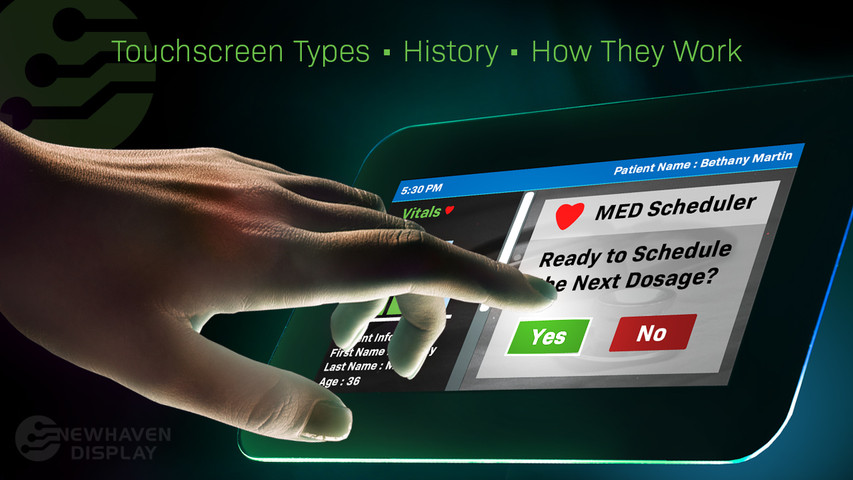
タッチパネルの種類、歴史、仕組み
タッチスクリーンは、より直感的で直接的なデバイスとの対話を可能にし、スマートフォンから自動精算機まで、現代社会でユビキタスになっており、その普及によってテクノロジーとの関わり方が変化しています。
この記事の中で
タッチスクリーンとは?
タッチスクリーンは、ディスプレイ入力インターフェースであり、一般的には透明なディスプレイスクリーンで、スクリーン表面のタッチ入力を識別することによって、ユーザーがデバイスと対話することを可能にします。タッチスクリーンの大部分は、人体の電気的特性、特に指先の導電性を利用してタッチ入力を検出します。この導電性により、デバイスはタッチを入力として認識し、登録することができます。
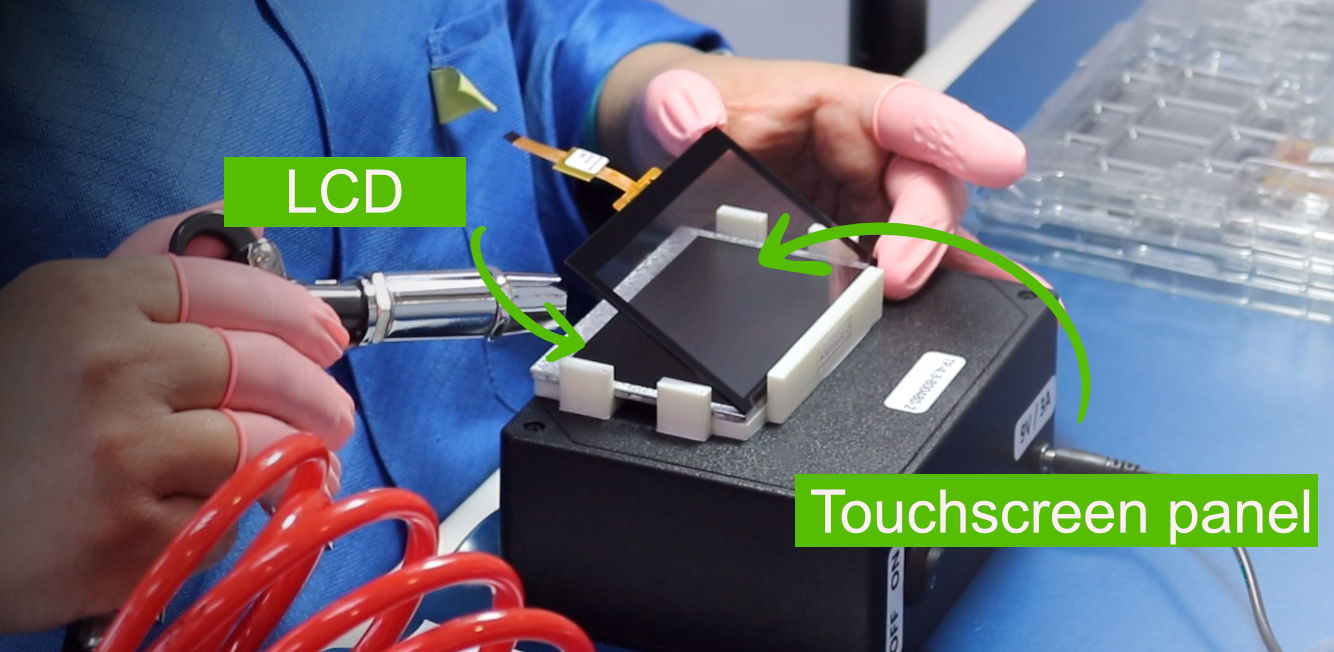
Two widely used touchscreen technologies, resistive and capacitive, involve placing a touch panel over electronic displays like LCDs or OLEDs to enable touch detection. Users can perform various actions, including selecting, scrolling, zooming, drawing, sliding, etc.
関連 液晶と有機ELの比較
タッチスクリーンの主な利点の1つは、マウス、キーボード、物理ボタンなどの従来の入力デバイスが不要になることです。タッチスクリーンでは、指やスタイラスを使ってタップ、スワイプ、ピンチ、スライド、ズームなどの操作を行い、デジタルコンテンツに直接触れることができるためです。特に、スマートフォンやタブレット端末のような小型の端末では、従来の入力デバイスが実用的でない場合があります。
touchscreen Type Examples
タッチスクリーンの歴史
タッチスクリーンの歴史は、制御盤やその他の特殊なアプリケーションに使用するために初期のタッチベースの入力デバイスが開発された1960年代に遡ります。この年表では、タッチスクリーンの開発初期から現在に至るまで、重要な出来事や革新的な技術をご紹介しています。
タッチパネルディスプレイの歴史を年表で振り返る
| 発明者・所属団体 | 意義 | 年 |
|---|---|---|
| Leon D Harmon Bell Telephone Laboratories Inc (AT&T) |
初のスタイラスタッチスクリーン。 | 1960 |
| E.A. Johnson UK Royal Radar Establishment |
初の指で操作するタッチパネル。 | 1965 |
| Dr. Samuel Hurst Elographics Inc |
初の抵抗膜方式タッチパネル(透明ではない)。 | 1971 |
| イリノイ大学 | 赤外線センサーとフォトトランジスタを用いたタッチパネル。 | 1972 |
| Frank Beck & Bent Stumpe CERN |
初の静電容量式透明タッチパネル。 | 1973 |
| Dr. Samuel Hurst Elographics Inc |
初の抵抗膜式透明タッチパネル。 | 1974 |
| Input Research Group University of Toronto |
First multi-touchscreen. | 1982 |
| アイビーエム | IBM Simon - スタイラスで操作する抵抗膜式タッチスクリーンを備えた初の携帯電話。 | 1994 |
| エルジー | LG KE850 Prada - 静電容量式タッチスクリーンを搭載した初の携帯電話。アップルが初代iPhoneを発表したのは、その1カ月後だった。 | 2006 |
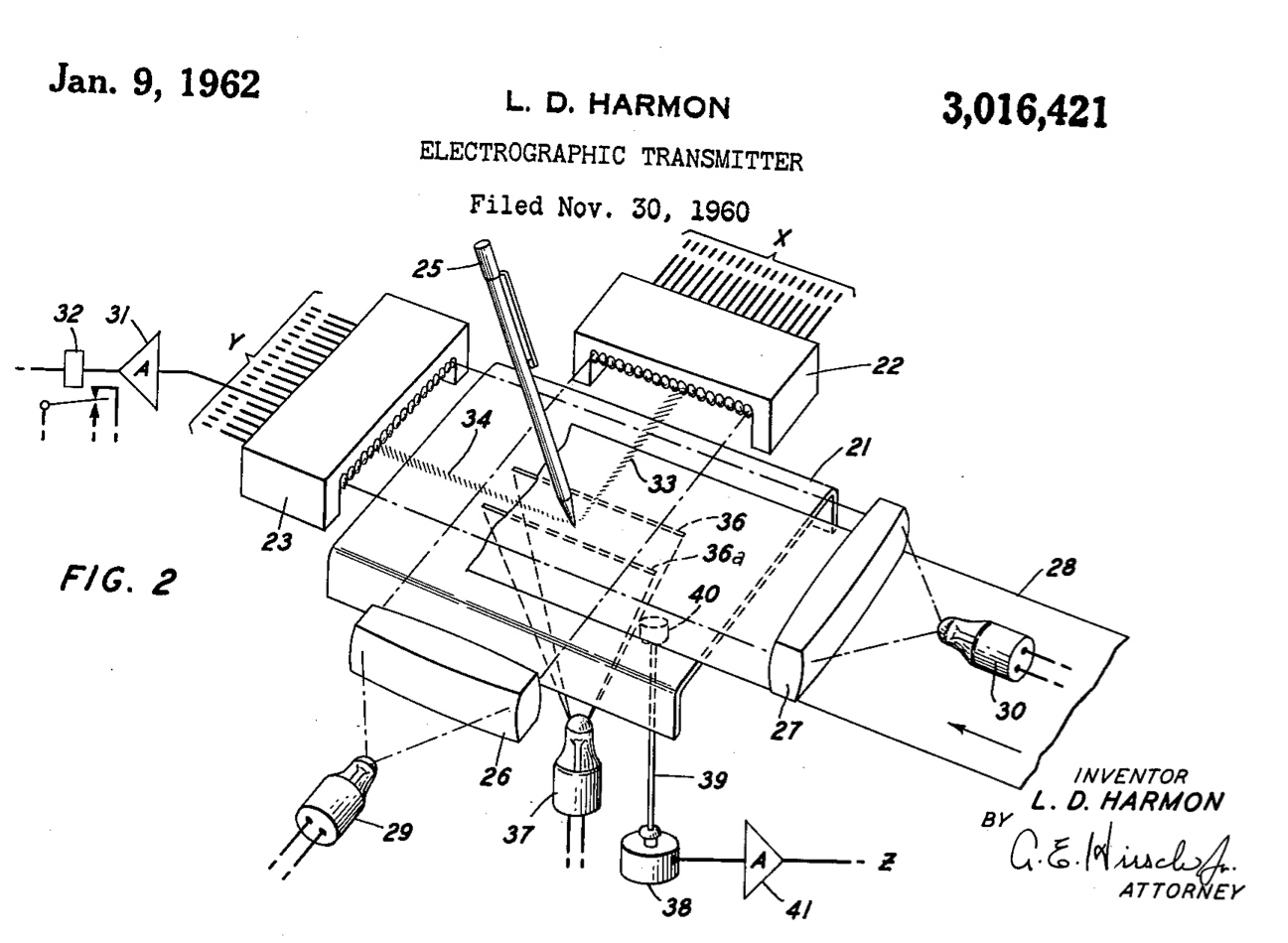
1960年-- 初めて記録されたタッチスクリーン(スタイラスで駆動する)。
Bell Telephone Laboratories Inc (now AT&T) published one of the earliest versions of a touchscreen in 1960, which was later patented in 1962 under the US 3016421A. This touchscreen uses a grid of straight lights that aim straight down onto the surface and is designed to work only with a stylus, not a finger. The photodetectors register a touch when a beam of light in the grid is interrupted by the touch of the stylus.
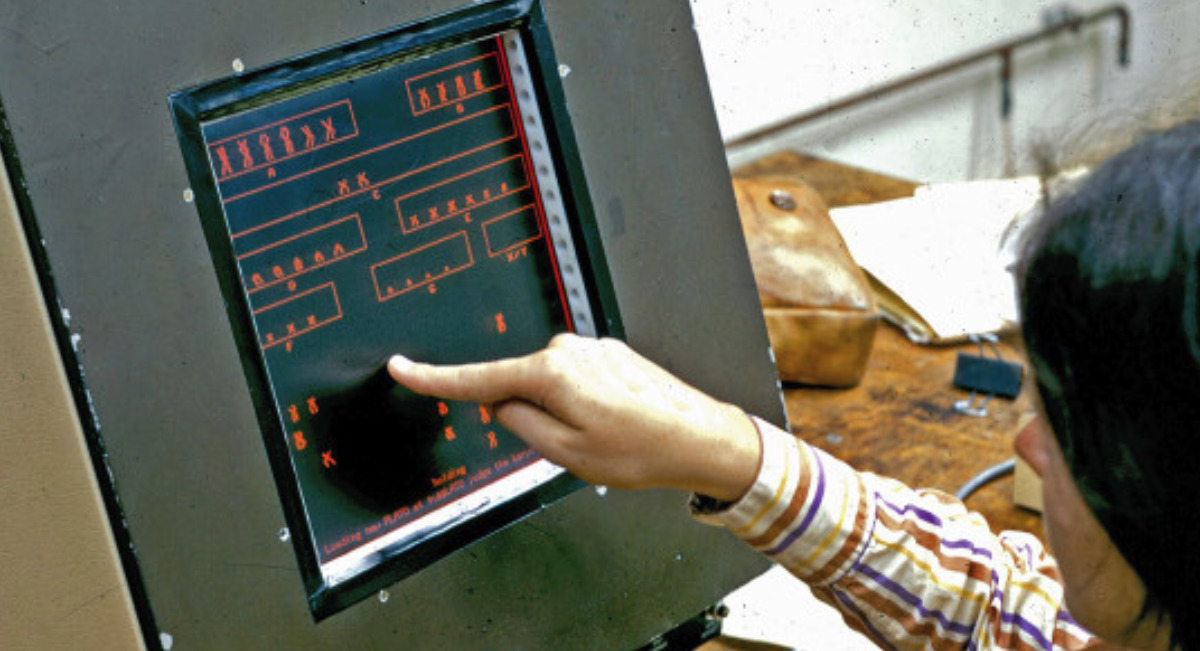
1965年--初めて指で操作するタッチスクリーンを開発。
Eric Johnson, who was based at the Royal Radar Establishment in Malvern, England, developed the first touchscreen that could be operated by a finger to aid traffic control. His work on capacitive touchscreens was initially described in 1965, and he later elaborated on it with photographs and diagrams in an article published in 1967. He filed for a patent in the UK (GB3352465) in 1965, and the US patent US3482241A was granted in 1969.
1971年--初の抵抗膜式タッチパネルを開発。
サミュエル・ハースト博士は、1971年に、透明ではないが、最初の抵抗膜式タッチスクリーンを開発したとされている。1974年には、透明なタッチスクリーンを開発しました。
1972年--赤外線センサーとフォトトランジスタを搭載したタッチスクリーン。
In 1972, the University of Illinois developed a touchscreen for a terminal system called the PLATO IV, which was used in educational settings. The touchscreen had an array of 16x16 infrared sensors made up of LEDs and phototransistors on the edges of the screen that allowed it to detect touch when an object was in close proximity to the screen.
1973年-- 初の透明な静電容量式タッチスクリーン。
70年代初頭、CERN(欧州原子核研究機構)の2人のエンジニア、フランク・ベックとベント・スタンペは、スタンペが1960年代初頭にテレビ工場で行っていた仕事をもとに、シースルーのタッチパネルを作りました。CERNは1973年に製造を開始しました。
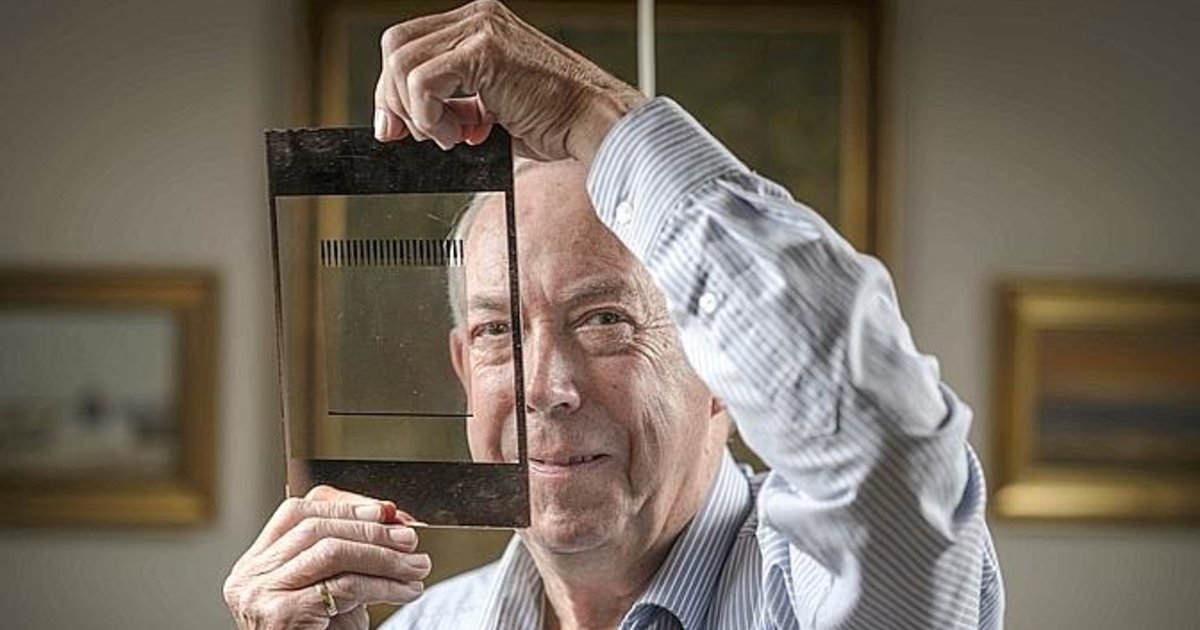
1974年--初の透明抵抗膜式タッチパネル。
Dr. Samuel Hurst created the first resistive touchscreen that included a transparent surface which he filed patent US3911215A that was granted in 1975 for the company he founded - Elographics Inc.
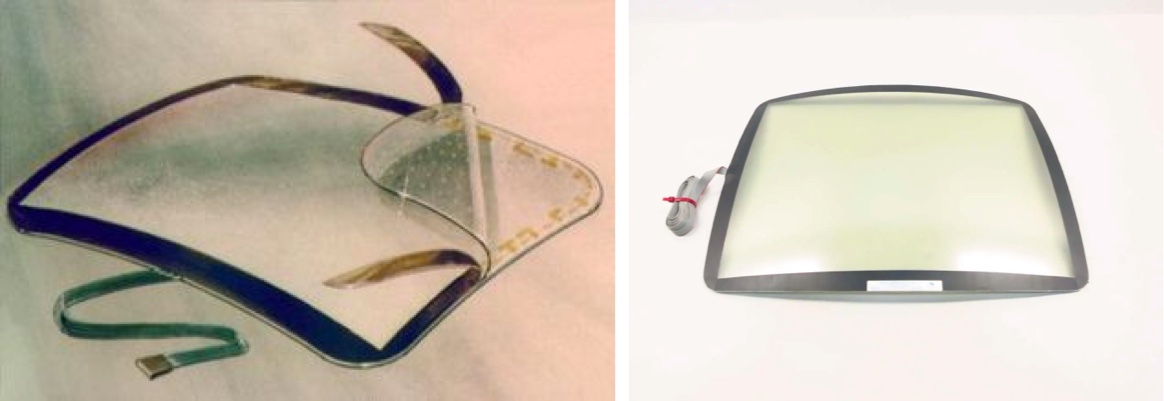
In the early 1980s, touchscreens began to be used in consumer electronics, particularly in kiosks and ATMs.
1982年-- マルチタッチ技術。
1982年、トロント大学のInput Research Groupが、曇りガラスのパネルとその背後に配置されたカメラを使って、最初のマルチタッチタッチパネルシステムを作り、マルチタッチ技術の始まりとなったのです。
80年代前半~90年代後半-- タッチスクリーンのジェスチャーを使った機能とその開発
80年代から90年代にかけて、タッチスクリーンの精度と機能性を高めるための研究が進められ、スライド、スワイプ、タップクリック、リフトオフ、マルチタッチなど、ジェスチャーを使ったさまざまな機能が盛り込まれた。
携帯電話
スタイラスで操作する抵抗膜式タッチスクリーンは、1993年にIBMが発表した「IBM Simon」が最初である。2006年12月12日、LGは初の静電容量式タッチスクリーンを搭載した携帯電話「LG KE850 Prada」を発表しました。Appleは1ヵ月後の2007年1月、静電容量式タッチスクリーンを搭載した初のiPhoneを発表した。
2000年~現在--静電容量式タッチパネルの世界的な普及と発展
タッチパネルは60年代から存在し、80年代から90年代にかけて大幅な改良が加えられたが、携帯電話やノートパソコン、タブレット端末などの家電製品に広く使われるようになったのは2000年代に入ってからである。その背景には、静電容量式タッチパネルなどの新技術が開発され、より正確で応答性の高いタッチ入力が可能になったことがあります。
DisplaySearchの調査によると、2018年の世界出荷台数のうち、静電容量式タッチスクリーンが70%以上を占め、抵抗膜式タッチスクリーンはわずか3%であることが明らかになりました。
How Do touchscreens Work?
The primary components of a touchscreen display are the touch sensor, controller, and software. The touch sensor, also known as a touch panel, consists of a touch-sensitive surface that detects changes in electrical properties such as current, voltage, capacitance, or resistance. The controller, a hardware component, converts the electrical changes detected by the touch panel into signals that are used to interpret touch gestures such as touching, sliding, zooming, swiping, etc. Finally, upon receiving these touch signals, the software can process them and react to them by completing specific functions and, if needed, transmit instructions to the device, triggering actions like activating a motor, changing screen information, shutting down equipment, adjusting brightness, increasing volume, and so on.
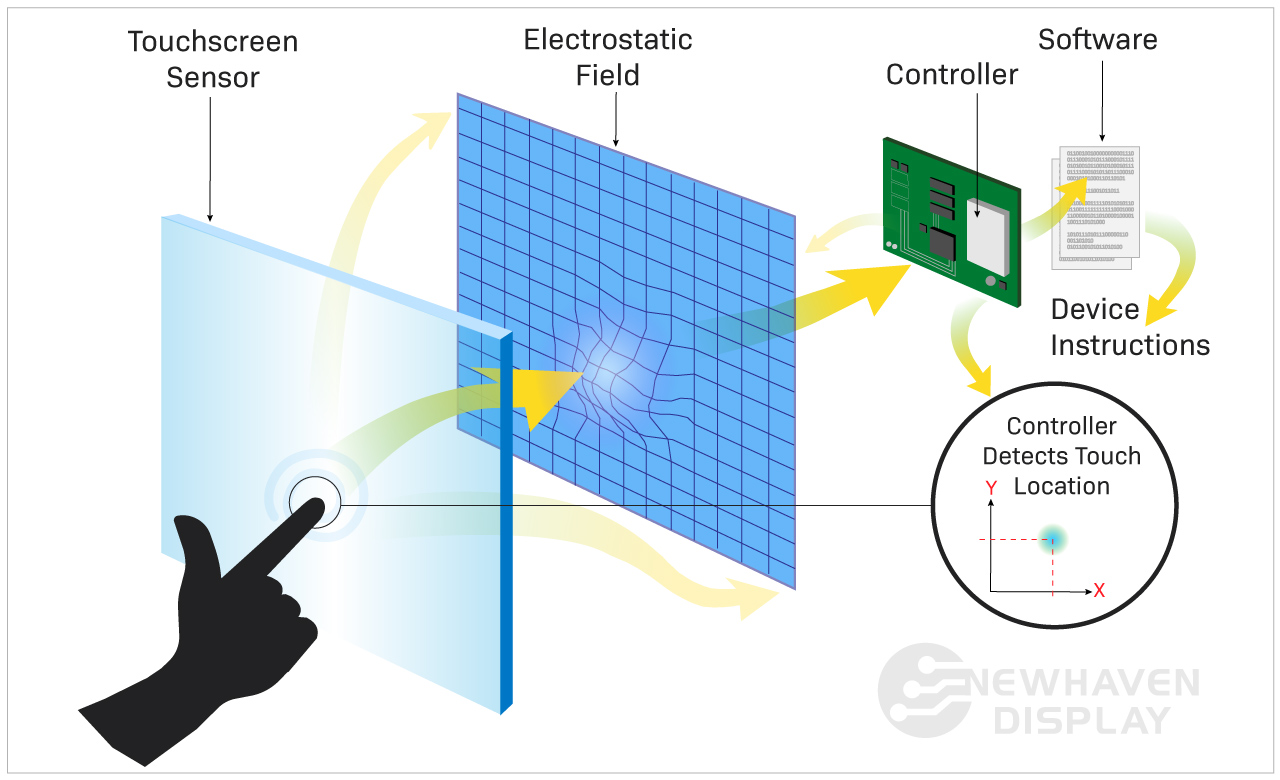
タッチパネルのしくみ:ステップバイステップ
- タッチセンサーの起動 - ユーザーがタッチセンサーの表面に触れることで、電流、電圧、静電容量、抵抗などの電気的特性に変化が生じます。
- コントローラ処理- ハードウェアコントローラは、タッチパネルの電気的変化を検出し、特定のタッチジェスチャー(タッチ、スライド、ズーム、スワイプなど)を識別して信号に変換し、ソフトウェアに送信します。
- ソフトウェア応答- ソフトウェアがタッチ信号を受信し、特定の機能またはタスクを実行するために処理します。
タッチパネルの種類
タッチパネルは抵抗膜方式と静電容量方式の2種類が一般的ですが、他にも様々な種類があり、それぞれに特徴や機能性があります。
touchscreen technologies
- 抵抗膜方式
- 静電容量方式
- 投影型静電容量方式(P-Cap)
- 赤外線
- SAW(Surface Acoustic Wave):表面弾性波
- 光イメージング
もっと詳しく知りたい方はこちら液晶ディスプレイの種類
抵抗膜方式タッチパネル
抵抗膜方式のタッチパネルは、画面にかかる圧力を検知することで動作します。ポリエステルとガラスからなる2つの柔軟な層で構成され、ITO(酸化インジウムスズ)などの導電性材料の薄い層でコーティングされているのが一般的です。この2つの層は、小さなスペーサードットで隔てられています。
スクリーンに圧力をかけると、上部の柔軟な層が下部の層に向かって押し出され、2つの導電層が接触します。この物理的な接触によって電気抵抗が変化し、タッチスクリーンのコントローラーがそれを処理してタッチの正確な位置を特定します。

抵抗膜方式のタッチパネルは比較的安価で、指やスタイラス、手袋など様々な入力デバイスで操作することができます。しかし、他のタッチスクリーン技術に比べ、感度と鮮明度が低い傾向にあります。
Advantages
Work with thick gloves, pens, and styluses. Cost-effective and resistant to dust and moisture, making them ideal for industrial or outdoor use.
Disadvantages
Require pressure to register input. Lower clarity and limited multi-touch support. Shorter lifespan under heavy use. More design work is required for the user (no built-in controller).
Use Cases
Common in industrial devices, kiosks, and outdoor equipment, where thick gloves are required.
静電容量式タッチスクリーン
静電容量式タッチスクリーンは、スクリーンの表面に触れたときに、スクリーンの静電場によって引き起こされる静電容量の変化を識別し、反応する。
静電容量式タッチパネルは、抵抗膜式タッチパネルとは異なり、画面の圧力に頼らずタッチイベントを検出することができます。
ユーザーが導電性素材でできた指やスタイラスでスクリーンに触れると、接触点でスクリーンの静電容量に変化が生じます。この変化を静電容量式タッチコントローラーが検知し、入力を処理してタッチイベントの正確な位置を決定します。
静電容量方式のタッチパネルは、感度、精度、応答性が高いため、スマートフォンやタブレット端末などの電子機器に広く使われています。また、マルチタッチに対応しており、ピンチやズームなどのジェスチャーを複数の同時タッチ入力で行うことができます。しかし、手袋や通常のペンのような非導電性の素材は、スクリーンの静電場と相互作用しないため、うまく動作しない場合があります。
Advantages
Higher clarity, fast response, and multi-touch support. Built-in controller.
Disadvantages
Do not work well with thick gloves. Sensitive to moisture and more costly.
Use Cases
Popular in smartphones, tablets, and modern consumer appliance interfaces.
Projected Capacitive (PCAP)
投影型静電容量式タッチスクリーンは、タッチ入力を検出するために電極のグリッドを使用します。電極は通常、透明な導電材料でできており、ディスプレイを覆うガラスやプラスチックの薄いシートに配置されています。
指やスタイラスがタッチスクリーンの表面に触れると、電極間の静電容量が変化し、それをコントローラー回路が検出します。そして、コントローラーは静電容量の変化からタッチした位置を計算し、対応する入力をデバイスに送ります。
投影型静電容量式タッチパネルは、電界を投影し、静電容量の変化で感知する方式であるため、この名前がついています。
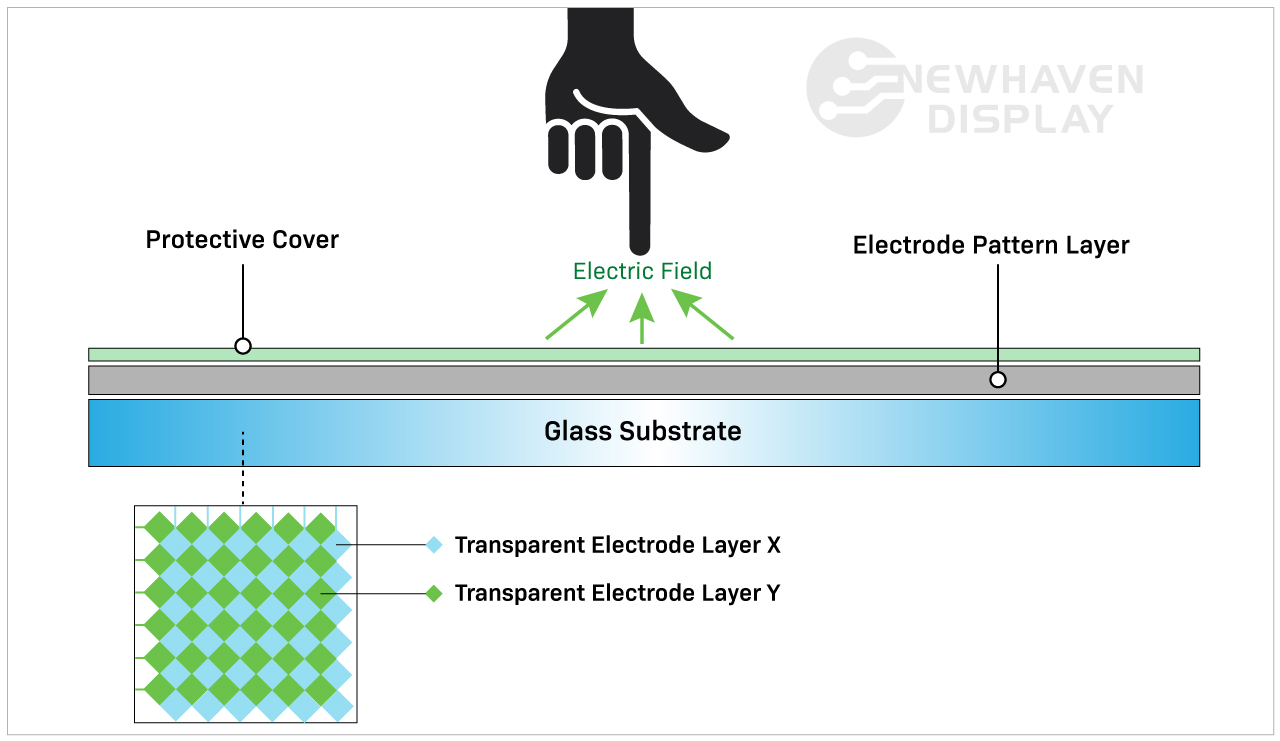
Projected capacitive touchscreens are known for their high accuracy, sensitivity, and durability. They are commonly used in smartphones, tablets, and other electronic devices. They also support multi-touch gestures, allowing users to interact with the device using two or more fingers simultaneously.
Advantages
Durable glass surface. Works through protective layers and supports full multi-touch.
Disadvantages
Requires bare skin, special styluses, or nitrile gloves. Higher cost and sensitive to interference.
Use Cases
Found in medical, high-end industrial, and consumer products.
静電容量方式と投影型静電容量方式の違い
静電容量方式と投影型静電容量方式のタッチスクリーンの主な違いは、電極の構成と配置の方法です。一般的に投影型静電容量式タッチスクリーンの方が高感度で正確なため、スマートフォンやタブレット、産業用制御パネルなどのハイエンドアプリケーションに適しています。
Read our article explaining the differences between resistive and capacitive touchscreens to learn more about these two leading display technologies.
IR(赤外線)タッチスクリーン
赤外線タッチパネルは、発光ダイオード(LED)と受光素子を格子状に配置し、タッチ入力を検出する。LEDは赤外線を放出し、画面の縁に水平・垂直方向に配列されています。LEDの反対側にある受光素子は、この赤外線を連続的に受光します。
ユーザーがスクリーンに触れると、指やスタイラスが赤外線ビームを遮り、グリッドに切れ目が生じます。そして、中断された特定のビームをもとに、タッチポイントの座標を計算します。この情報はデバイスの処理ユニットに送られ、処理ユニットはタッチ入力を解釈して対応するアクションを実行します。
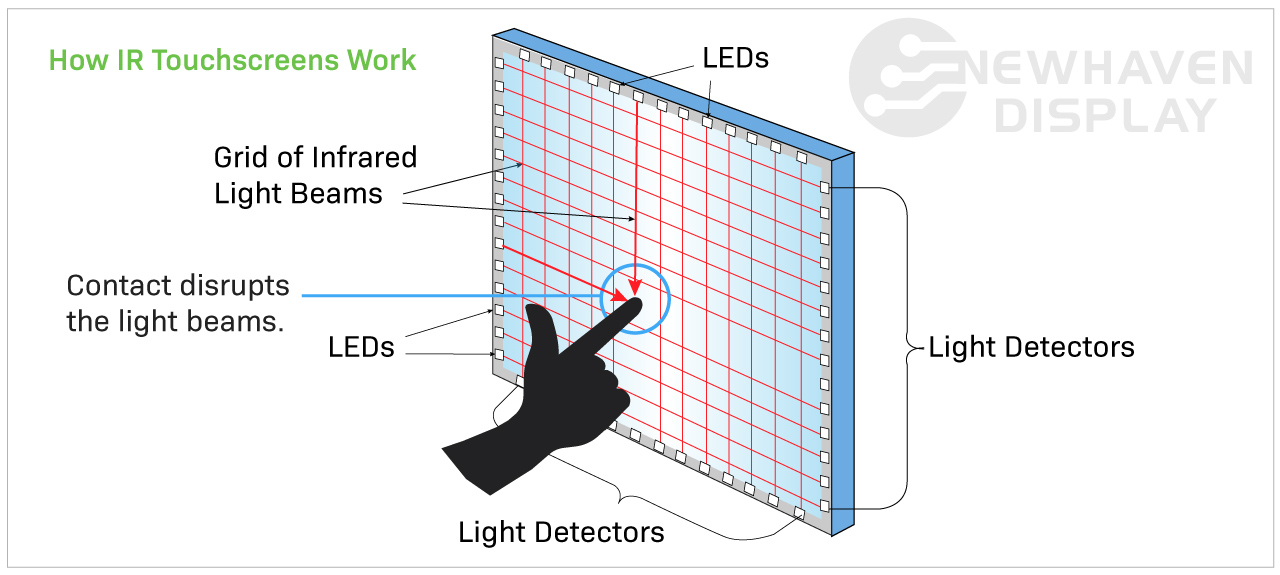
赤外線タッチパネルは、傷や埃、水などに強く、耐久性が高いという特長があります。また、タッチを登録するために圧力をかける必要がないため、スタイラスや手袋をした手など、ほとんどすべてのものに対応することができます。IRスクリーンは、スクリーンの上に余分なガラスやフィルムの層を持たないため、驚くべき光透過率と画質を持っています。しかし、明るい日差しの下では機能性が低下するため、一般的には屋内で使用されます。また、高さが制限される場合があるため、大きな画面サイズに最適です。
Advantages
Detects input by interrupting infrared light beams, rather than requiring pressure or direct contact. Supports various input types with excellent clarity.
Disadvantages
Affected by dust or debris. Requires a bezel, which adds size.
Use Cases
Used in kiosks, signage, and large-format interactive displays.
SAW(Surface Acoustic Wave):表面弾性波
表面弾性波(SAW)タッチスクリーンは、タッチ技術の一種で、超音波を利用してスクリーン表面のタッチ入力を検出するものである。スクリーンはガラスなどの透明な素材の層で構成され、ガラス層の表面には薄い反射材の層があります。
画面の四隅に設置された振動子から発生した超音波を、ガラスの表面に送り込みます。指やスタイラスなどが画面に触れると、超音波の一部が吸収され、波形の乱れが発生します。トランスデューサはこの乱れを検出し、タッチ入力の場所と種類を計算することができます。
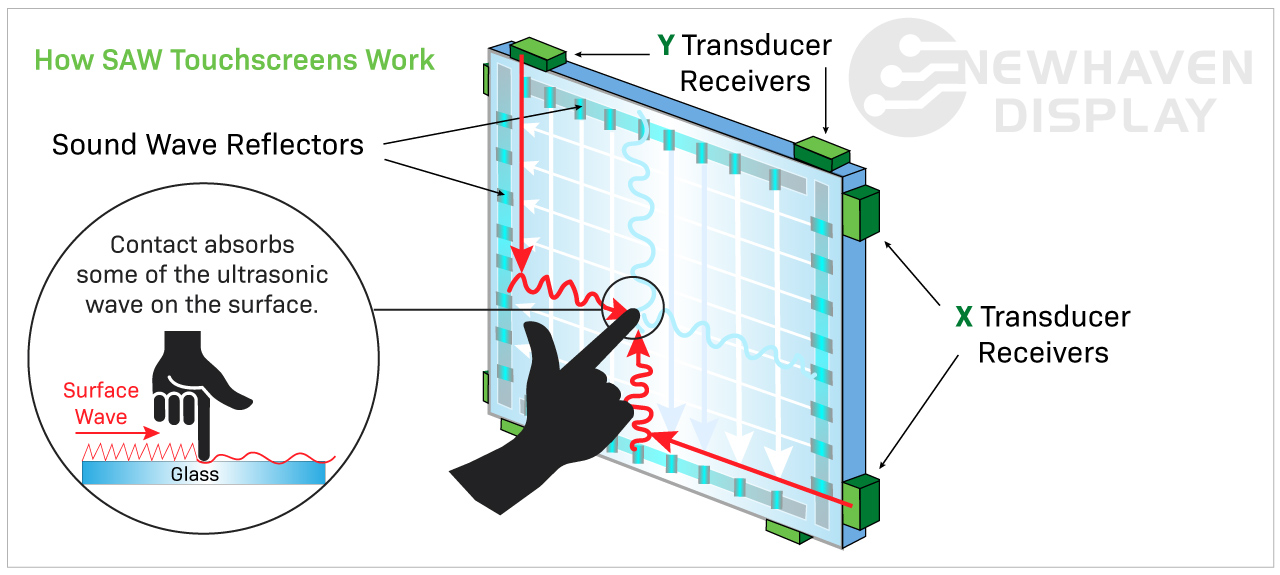
SAWタッチスクリーンは、高い透明度、耐久性、信頼性など、いくつかの利点があります。また、反応性が高く、軽いタッチやジェスチャーでも検知することができます。しかし、他のタッチスクリーンよりも高価であり、大量の汚れ、埃、水などが懸念される過酷な環境での使用には適さない場合があります。
Advantages
Accurate with a light touch from a finger or soft object.
Disadvantages
Not glove-compatible. Sensitive to contaminants and requires a clean environment.
Use Cases
Best for indoor kiosks, ticketing machines, and information terminals.
詳しくはこちら 透過型、反射型、半透過型ディスプレイの比較
光学式イメージングタッチスクリーン
光学式画像処理タッチスクリーンは、カメラのようなセンサーと画像処理アルゴリズムを用いて、赤外線タッチスクリーンと同様にタッチ入力を検出する。ユーザーがタッチスクリーンの表面に触れると、センサーはタッチの圧力と動きによって生じる光と影の変化を検出します。
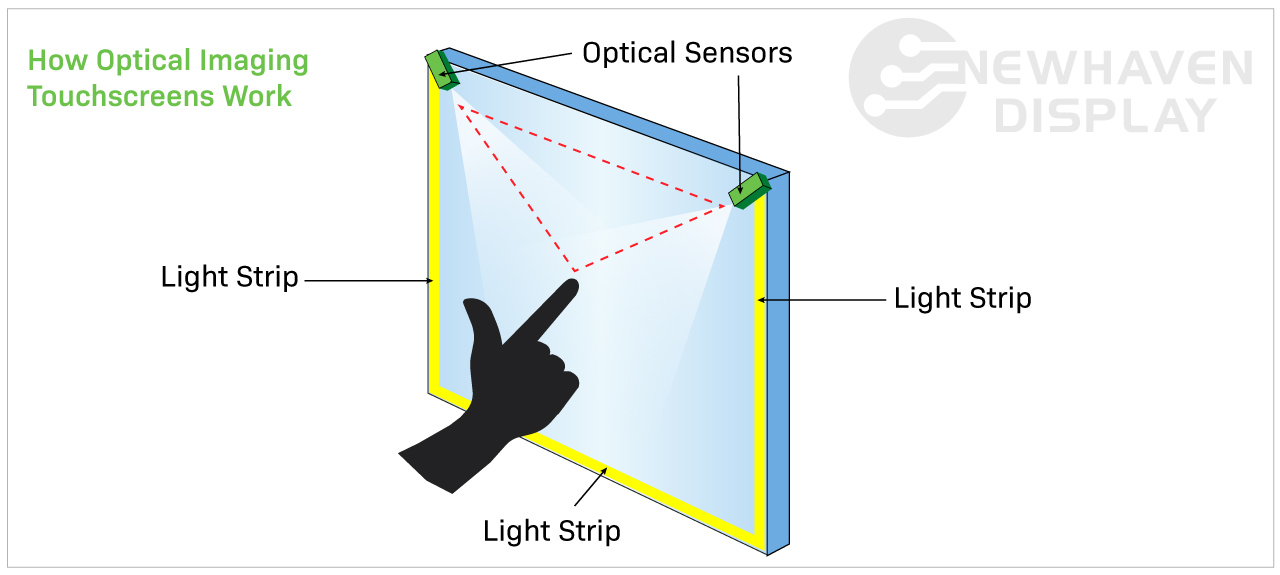
静電容量方式や抵抗膜方式のタッチパネルに比べ、光学式画像処理方式のタッチパネルは市場であまり普及しておらず、広く使われていない。
光学式タッチスクリーンは、他のタッチスクリーンのように物理的な接触による摩耗や損傷の影響を受けにくいため、耐久性に優れていることで知られています。公共施設のキオスク端末やインタラクティブ・ディスプレイ、ゲーム用途などによく使われています。しかし、他のタイプのタッチスクリーンと比べると反応や感度が悪く、マルチタッチジェスチャーに対応していない場合があります。
Advantages
Works with any input. Suitable for large displays and preserves clarity.
Disadvantages
Less precise for small inputs. Affected by ambient light and requires space for sensors.
Use Cases
Used in conference displays, whiteboards, and public kiosks.
Future Outlook: What’s Next for touchscreen Tech?
Touchscreen technology is shifting from surface interaction to seamless integration. In-cell and on-cell designs are reducing thickness and improving clarity by embedding the touch layer directly into the display. Flexible and bendable screens are expanding design possibilities, especially in wearables and next-generation interfaces.
Looking ahead, bezel-free infinity displays and projectable touch systems that turn any surface into a screen point toward a future where displays are no longer fixed. As these innovations mature, the challenge will be balancing performance, durability, and cost.
At Newhaven Display, we believe the next generation of touch systems will prioritize adaptability. These displays will not only respond to touch but also be designed around how people move, work, and interact across environments.
結論
Touchscreens have become central to modern technology, powering everything from industrial systems to consumer electronics. While capacitive and resistive touchscreens lead in adoption, other types like infrared, surface acoustic wave, and optical imaging continue to serve important roles in specialized environments.
Each technology offers its own set of strengths, shaped by how and where it is used. As touch interfaces become more adaptable and integrated, their role in product design continues to grow to meet the changing needs of users and industries. Newhaven Display helps manufacturers explore these options, delivering touch solutions that are reliable, functional, and built for long-term success.
If you're planning a new project, contact our team or request a same-day quote to get started.

最新のブログ記事
-
A Guide to TFT Display Interfaces
Display interfaces often get less attention than screen resolution or brightness, but they carry jus …Dec 16th 2025 -
Choosing the Right Display Resolution: A User-Friendly Guide
Display resolution is one of the most defining choices in product interface design. It determines ho …Dec 11th 2025 -

Arduino vs Raspberry Pi vs BeagleBone: Key Features and Differences
If you're working on an electronics project—whether it's for a DIY automated device, a digital sign, …Dec 8th 2025