


Capacitive vs Resistive Touchscreens
Sep 12th 2025
touchscreen displays have become a standard piece of technology in our daily lives. Many LCD and OLED applications now include touchscreen technology to improve functionality or enhance user experience.
However, there is not a universal touchscreen for every application. You'll need to decide which touchscreen is suitable for your project. Like deciding between OLED and LCD, choosing the right touchscreen will depend on your application's requirements.
関連するものタッチパネルの詳細とインテグレーションガイド
この記事の中で
Capacitive touchscreen Displays
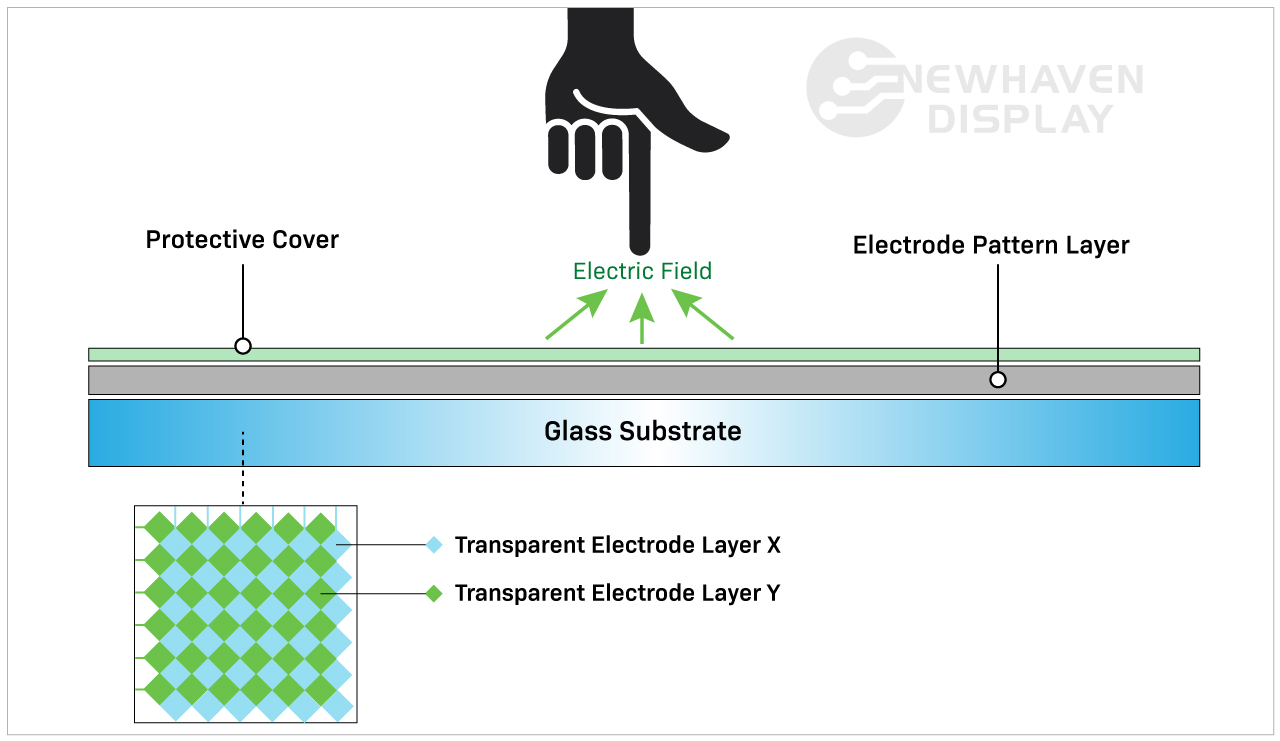
A capacitive touchscreen panel is made of an insulator, usually glass, that is coated with a transparent conductor. Capacitive touchscreen displays respond to conductive inputs like a fingertip and don't require pressure to activate a "touch event."
静電容量式タッチパネルは、その高度な機能から、より現代的で高度なタッチスクリーンの選択肢となっています。スマートフォンやタブレット端末、家電製品、モニターなどのコンシューマー向け製品によく見られます。
関連記事IPSディスプレイとは
静電容量方式タッチパネルの仕組みは?
静電容量方式タッチパネルは、画面表面に触れたときに発生する静電容量の変化を検知し、反応させるものです。
Capacitive touchscreen Advantages
静電容量式タッチスクリーンディスプレイは、タッチジェスチャーが可能で、マルチタッチ入力に対応します。通常、1~5個のタッチ入力を同時に入力できますが、一部の静電容量式タッチスクリーンはさらに多くの入力を処理することができます。
Capacitive touchscreens deliver brighter, higher contrast images due to the makeup of their panels. Displays with capacitive touchscreens are more durable than resistive touchscreens because they are designed with cover glass on their top layer. In fact, all of our capacitive TFT displays have standard 0.7mm thick built-in cover glass and can be further customized for extra durability.
Related: LCD Cover Glass Impact Test
Capacitive touchscreen Disadvantages
静電容量方式タッチパネルは、抵抗膜方式タッチパネルに比べ、製造工程が複雑なため、コストが若干高くなります。
静電容量方式のタッチパネルは、抵抗膜方式のタッチパネルよりもコストが高いのが現状ですが、タッチパネル技術の業界標準として急速に普及しつつあります。
ディスプレイの使用方法や使用場所によっては、応答性の向上がデメリットになることもあります。例えば、ある種の手袋をしていると、静電容量方式のタッチスクリーンは簡単に反応しません。静電容量式タッチスクリーンは無機物の入力には反応しませんが、他の導電性要素によって誤って作動することがあります。その代表的なものが「水」です。
静電容量式タッチパネルの表面に雨や湿気、結露が発生すると、水分を取り除くまで誤入力や精度の低下を招くことがよくあります。これが、静電容量式ではなく抵抗膜式タッチパネルが選ばれる主な理由のひとつです。
Related: LCD Screen Types
When to Choose a Capacitive touchscreen
スワイプ、ピンチ、マルチタッチなどのタッチジェスチャーを利用するデバイスには、静電容量式タッチスクリーンが必要です。静電容量式タッチスクリーンは、抵抗膜式タッチスクリーンよりも直感的でユーザーフレンドリーなディスプレイとなることが多い。静電容量式タッチパネルは、タッチの応答性を高め、画像の輝度やコントラストを改善する必要があるアプリケーションに最適です。
Applications By Industry
Capacitive touchscreens are well-suited for applications that depend on speed, visual clarity, and user interaction. These displays are frequently used in:
- Consumer electronics: Smartphones, tablets, smart appliances, and wearables that require responsive, multi-touch functionality.
- Medical devices: Equipment where fast, intuitive inputs improve workflows without requiring pressure-based actions. Because of the presence of a cover glass, these displays are also preferred in environments where heavy cleaners are needed.
- Industrial automation: Touch interfaces on control panels where high brightness, glass durability, and gesture input improve usability.
- Retail and kiosks: Interactive screens in point-of-sale systems or information terminals that benefit from multi-touch input and sharp visuals.
- Automotive: Infotainment systems and touch dashboards that require smooth responsiveness and clean image quality in varied lighting.
In these applications, capacitive touchscreens help streamline user experience while supporting faster input.
Resistive touchscreen Displays
Resistive touchscreen panels sense pressure on the display's top layer and send a signal to the circuit layer to activate the touchscreen functionality. Because they use pressure to activate the touch inputs, resistive touchscreen displays can be used with a stylus, gloves, and other items. Resistive touchscreens are built without cover glass and made of plastic, making them more susceptible to dents and scratches.
抵抗膜式タッチパネルは、最初に市場に登場したタッチパネルであり、現在でも広く使われている。
抵抗膜方式タッチパネルはどのような仕組みになっているのですか?
Resistive touchscreens are made of two resistive coating layers with a gap or space layer between them. A "touch event" occurs when these two layers make contact with each other (closing the circuit) by the user's action of pressing into the soft, semi-flexible top layer. Each layer consists of horizontal and vertical lines (x,y matrix) that detects the exact location of the touch.
ギャップまたはスペース層は、通常、空気または不活性ガスと、柔らかいトップ層とボトム層を分離することだけを目的としたいくつかのスペーサーで構成されています。

Resistive touchscreen Advantages
抵抗膜式タッチパネルは静電容量式タッチパネルに比べ、先進的でないように思われがちです。しかし、無機質な入力に対応できるため、特定の産業において重要な役割を担っています。
抵抗膜式タッチスクリーンディスプレイは、静電容量式タッチスクリーンディスプレイよりも感度が低い。これは場合によっては利点と見なされ、特定の用途に選ばれる理由にもなっています。抵抗膜式タッチパネルは、環境からの偶発的な入力には反応しないため、水がこぼれたり、軽いゴミが画面に落ちたりしても動作が中断されません。
このタイプのタッチスクリーンは、ユーザーからの意図的な入力をより多く必要とするため、過酷で不安定な環境下での信頼性がより高くなります。例えば、抵抗膜方式タッチパネルは、水やゴミが画面に付着する可能性のある建設現場での完璧なソリューションです。また、ユーザーが手袋を着用する場合にも最適なタッチスクリーンディスプレイです。
Resistive touchscreen Disadvantages
抵抗膜方式タッチパネルは、残念ながらへこみや傷の影響を受けやすい。また、直射日光下での視認性が悪く、屋外での使用には向いていません。また、マルチタッチ入力に対応できないため、高速な操作が必要なアプリケーションでは不利になります。抵抗膜方式タッチパネルは、表層にかかる圧力に依存しているため、乱暴に扱われやすく、静電容量方式タッチパネルに比べて耐久性に劣ります。
Related: How to Clean an Electronic Display
抵抗膜式タッチパネルを選ぶポイント
抵抗膜式タッチスクリーンテクノロジーは、過酷な環境、間接的な太陽光、シンプルなタッチ機能を含む低コストなアプリケーションに最適です。誤入力が少なく、熱や湿気に強く、スタイラス、ペン、手袋、指など、あらゆるもので操作できるため、ユーザー入力が重要な場合、このタッチスクリーン技術はより信頼性の高いソリューションとなります。
Applications by Industry
Resistive touchscreens continue to serve a wide range of environments where durability and input flexibility matter more than touch sensitivity. Common uses include:
- Medical equipment: Devices in sterile settings where accurate inputs are required.
- Industrial controls: Interfaces exposed to dust, debris, or moisture where false inputs must be avoided.
- Retail and kiosks: Point-of-sale environments where frequent cleaning, glove use, or stylus-based operation is common.
- Transportation systems: Public kiosks or ticketing machines that must function regardless of environmental conditions.
- Construction and agriculture equipment: Devices operated outdoors or in rugged environments where gloved hands are the norm.
In these scenarios, resistive touchscreens deliver reliable performance where precise, single-touch input is a higher priority than gesture control.
Cost & Integration Factors
Touchscreen selection often comes down to project scope, system requirements, and long-term cost. Capacitive displays offer advanced features and a modern user experience. Resistive displays, in contrast, are more cost-effective for basic input needs.
Key considerations include:
Material and component costs: Capacitive panels use higher-end materials like glass and conductive coatings, which increase overall cost.
Touch controller needs: Capacitive technology may require specialized controllers or firmware tuning depending on the display size and performance goals.
Input flexibility: Resistive touchscreens work reliably across a range of input types without additional tuning or calibration.
System design: Design teams may need to account for additional factors such as optical clarity, bezel compatibility, and multi-touch integration when using capacitive touch.
Replacement and maintenance: Resistive screens are more likely to be swapped out due to their lower cost and usage in high-wear environments, while capacitive displays offer better durability once installed.
Choosing the right panel early in the design cycle helps avoid added engineering time, system conflicts, or budget constraints later on.
Customization Options Available
Standard displays don’t always meet every project's needs. That’s why capacitive and resistive touchscreens can be customized to fit specific mechanical, electrical, or environmental requirements.
At Newhaven Display, we offer custom solutions for applications that go beyond what off-the-shelf panels provide. Common modifications include changes to cover glass, sensitivity tuning for gloves or styluses, and interface adjustments for SPI, I2C, USB, and other formats.
Additional enhancements include anti-glare coatings, optical bonding, screenprinting, and expanded temperature ranges. Mechanical refinements such as modified mounting points or adjusted dimensions make it easier to integrate displays into unique product designs.
When a standard panel isn’t a match, these options give teams the flexibility to move forward without adding unnecessary complexity.
静電容量方式と抵抗膜方式の比較表
| 静電容量方式 | 抵抗膜方式 | |
| アクティベーションタイプ | ライトタッチ(導電性) | プレッシャータッチ |
| コスト | 製造コスト上昇 | 製造コストの低減 |
| タッチ感度 | より高感度 | 感度が低い |
| 輝度・コントラスト | ベスト | 良い |
| 耐久性 | ベスト | 良い |
| マルチタッチ対応 | はい | いいえ |
| 手袋やペン、タッチペンは使用できますか? | あり(ただし制限あり) | はい |
| 用途 | マルチタッチで、正確なアプリケーションを。 | 堅牢な環境とシンプルなタッチ機能。 |
結論
Capacitive touchscreens have become the go-to option for many modern devices, especially where multi-touch input and visual clarity are important. Still, resistive touchscreens offer practical advantages in rugged conditions or when simple, reliable interaction is the priority.
If your project calls for touch input in a demanding environment or on a tighter budget, a resistive touchscreen may be the better fit. For applications focused on responsiveness, sleek interfaces, or gesture-based controls, capacitive technology is often the right choice.
Newhaven Display can help you evaluate both options and determine which touchscreen best suits your product. Contact our team to discuss your design goals or request a quote.