


Ekrany dotykowe pojemnościowe a rezystancyjne
12 września 2025 r.
touchscreen displays have become a standard piece of technology in our daily lives. Many LCD and OLED applications now include touchscreen technology to improve functionality or enhance user experience.
However, there is not a universal touchscreen for every application. You'll need to decide which touchscreen is suitable for your project. Like deciding between OLED and LCD, choosing the right touchscreen will depend on your application's requirements.
Related: Szczegóły dotyczące panelu dotykowego i przewodnik integracji
W tym artykule:
Capacitive touchscreen Displays
A capacitive touchscreen panel is made of an insulator, usually glass, that is coated with a transparent conductor. Capacitive touchscreen displays respond to conductive inputs like a fingertip and don't require pressure to activate a "touch event."
Pojemnościowe panele dotykowe są bardziej nowoczesną i zaawansowaną opcją ekranu dotykowego ze względu na ich zaawansowane możliwości. Są one powszechnie spotykane w produktach konsumenckich, takich jak smartfony, tablety, urządzenia i monitory.
Powiązane: Co to jest wyświetlacz IPS
Jak działają pojemnościowe ekrany dotykowe?
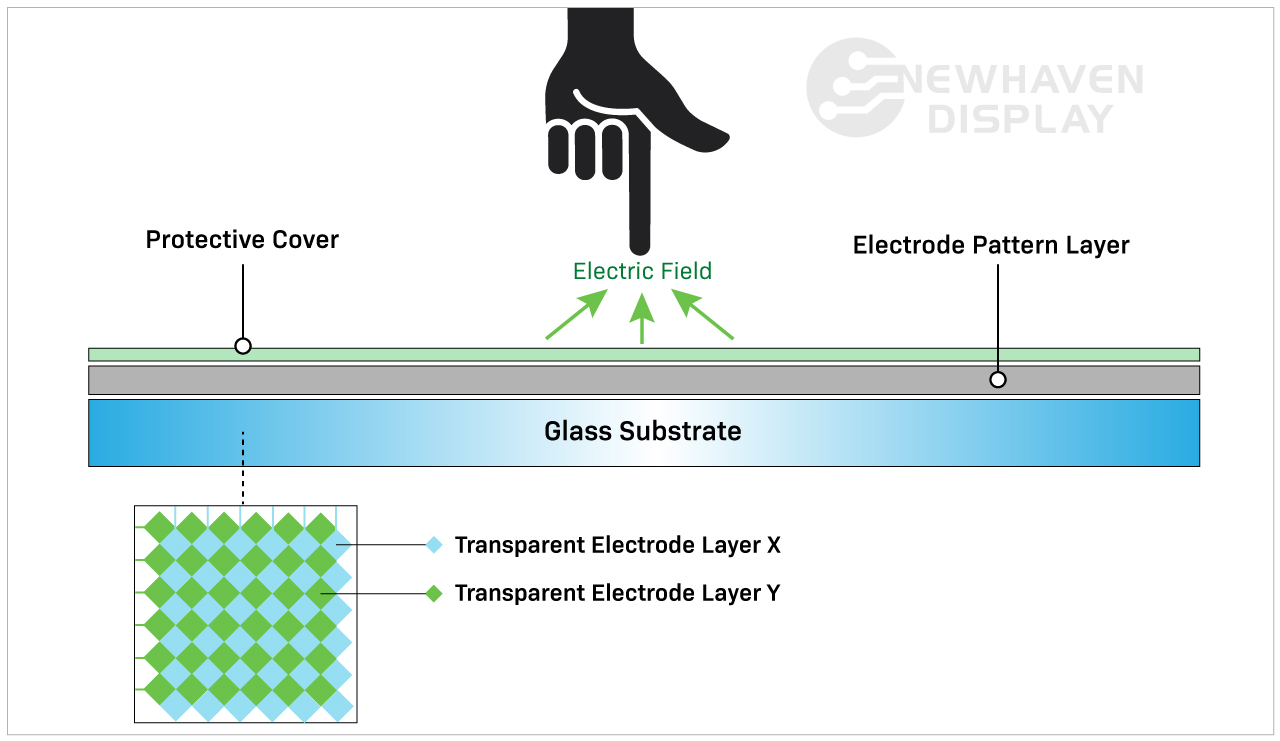
Pojemnościowy ekran dotykowy wykrywa i reaguje na zmiany pojemności spowodowane przez pole elektrostatyczne ekranu w momencie dotknięcia jego powierzchni.
Capacitive touchscreen Advantages
Pojemnościowe ekrany dotykowe umożliwiają wykonywanie gestów dotykowych i reagują na wejścia wielodotykowe. Zazwyczaj możliwe jest jednoczesne wprowadzenie od jednego do pięciu poleceń dotykowych, ale niektóre pojemnościowe ekrany dotykowe mogą przetwarzać nawet więcej.
Capacitive touchscreens deliver brighter, higher contrast images due to the makeup of their panels. Displays with capacitive touchscreens are more durable than resistive touchscreens because they are designed with cover glass on their top layer. In fact, all of our capacitive TFT displays have standard 0.7mm thick built-in cover glass and can be further customized for extra durability.
Related: LCD Cover Glass Impact Test
Capacitive touchscreen Disadvantages
Koszt pojemnościowego ekranu dotykowego jest nieco wyższy niż rezystancyjnego panelu dotykowego ze względu na bardziej skomplikowane procesy produkcyjne.
Chociaż koszt jest obecnie wyższy niż rezystancyjnych ekranów dotykowych, pojemnościowe ekrany dotykowe szybko stają się standardem branżowym w technologii ekranów dotykowych.
Zwiększona responsywność może być wadą w zależności od sposobu i miejsca użytkowania wyświetlacza. Na przykład, pojemnościowy ekran dotykowy nie będzie łatwo reagować na użytkownika podczas noszenia niektórych rodzajów rękawic. Chociaż pojemnościowe ekrany dotykowe nie reagują na wejścia nieorganiczne, nadal mogą być przypadkowo aktywowane przez inne elementy przewodzące. Jednym z najczęstszych elementów powodujących zakłócenia jest woda.
Deszcz, wilgoć i kondensacja na powierzchni pojemnościowych ekranów dotykowych często powodują przypadkowe wejścia i zmniejszoną dokładność, dopóki woda nie zostanie usunięta. Jest to jeden z głównych powodów, dla których w pewnych sytuacjach rezystancyjny ekran dotykowy byłby wybierany zamiast pojemnościowego ekranu dotykowego.
Powiązane: Rodzaje ekranów LCD
When to Choose a Capacitive touchscreen
Każde urządzenie wykorzystujące gesty dotykowe, takie jak przeciąganie, szczypanie lub wielodotyk, będzie wymagało pojemnościowego ekranu dotykowego. Te cechy często pomagają uczynić pojemnościowe ekrany dotykowe bardziej intuicyjnymi i przyjaznymi dla użytkownika niż rezystancyjne ekrany dotykowe. Pojemnościowe ekrany dotykowe najlepiej nadają się do zastosowań wymagających ulepszonej reakcji na dotyk z lepszą jasnością obrazu i kontrastem.
Applications By Industry
Capacitive touchscreens are well-suited for applications that depend on speed, visual clarity, and user interaction. These displays are frequently used in:
- Consumer electronics: Smartphones, tablets, smart appliances, and wearables that require responsive, multi-touch functionality.
- Medical devices: Equipment where fast, intuitive inputs improve workflows without requiring pressure-based actions. Because of the presence of a cover glass, these displays are also preferred in environments where heavy cleaners are needed.
- Industrial automation: Touch interfaces on control panels where high brightness, glass durability, and gesture input improve usability.
- Retail and kiosks: Interactive screens in point-of-sale systems or information terminals that benefit from multi-touch input and sharp visuals.
- Automotive: Infotainment systems and touch dashboards that require smooth responsiveness and clean image quality in varied lighting.
In these applications, capacitive touchscreens help streamline user experience while supporting faster input.
Resistive touchscreen Displays
Resistive touchscreen panels sense pressure on the display's top layer and send a signal to the circuit layer to activate the touchscreen functionality. Because they use pressure to activate the touch inputs, resistive touchscreen displays can be used with a stylus, gloves, and other items. Resistive touchscreens are built without cover glass and made of plastic, making them more susceptible to dents and scratches.
Rezystancyjne panele dotykowe były pierwszymi ekranami dotykowymi, które pojawiły się na rynku i nadal są szeroko stosowane.
Jak działają rezystancyjne ekrany dotykowe?
Resistive touchscreens are made of two resistive coating layers with a gap or space layer between them. A "touch event" occurs when these two layers make contact with each other (closing the circuit) by the user's action of pressing into the soft, semi-flexible top layer. Each layer consists of horizontal and vertical lines (x,y matrix) that detects the exact location of the touch.
Warstwa szczeliny lub przestrzeni składa się zazwyczaj z powietrza lub gazu obojętnego oraz niektórych przekładek, których jedynym zadaniem jest oddzielenie miękkiej warstwy wierzchniej od warstwy spodniej.

Resistive touchscreen Advantages
Rezystancyjne ekrany dotykowe są często postrzegane jako mniej zaawansowana odmiana panelu dotykowego w porównaniu z pojemnościowymi panelami dotykowymi. Jednak możliwość interakcji z nieorganicznymi danymi wejściowymi sprawia, że te ekrany dotykowe są istotne w określonych branżach.
Rezystancyjne wyświetlacze dotykowe są mniej czułe niż pojemnościowe wyświetlacze dotykowe. W niektórych przypadkach jest to uważane za zaletę i dlatego są one wybierane do konkretnych zastosowań. Rezystancyjne ekrany dotykowe nie będą reagować na przypadkowe wejścia z otoczenia, więc nie zostaną przerwane przez takie rzeczy jak rozlana woda lub lekkie odłamki lądujące na ekranie.
Ten typ ekranu dotykowego wymaga bardziej celowych działań ze strony użytkownika, dzięki czemu jest bardziej niezawodny w trudnych i niestabilnych środowiskach. Na przykład, rezystancyjny ekran dotykowy jest idealnym rozwiązaniem na placu budowy, gdzie woda lub gruz mogą wylądować na ekranie. Są one również najlepszą opcją ekranu dotykowego w sytuacjach, gdy użytkownik nosi rękawice.
Resistive touchscreen Disadvantages
Rezystywne panele dotykowe są niestety bardziej podatne na wgniecenia i zarysowania. Ich słaba widoczność w bezpośrednim świetle słonecznym nie czyni ich idealnymi do zastosowań zewnętrznych. Ich niezdolność do reagowania na wprowadzanie wielodotykowe może być wadą w szybko zmieniających się zastosowaniach, które tego wymagają. Ponieważ rezystancyjne ekrany dotykowe polegają na nacisku wywieranym na górną warstwę, mają tendencję do nadużywania i niewłaściwego obchodzenia się z nimi, co sprawia, że są mniej trwałe w czasie niż pojemnościowe ekrany dotykowe.
Related: How to Clean an Electronic Display
Kiedy wybrać rezystywny ekran dotykowy
Technologia rezystancyjnych ekranów dotykowych jest idealna do tanich zastosowań obejmujących trudne warunki pracy, pośrednie światło słoneczne i proste funkcje dotykowe. Mniejsza liczba przypadkowych dotknięć, lepsza odporność na ciepło i wilgoć oraz możliwość obsługi za pomocą niemal wszystkiego (rysika, pióra, rękawiczek, palców itp.) sprawiają, że ta technologia ekranów dotykowych jest bardziej niezawodnym rozwiązaniem, gdy wprowadzanie danych przez użytkownika ma kluczowe znaczenie.
Applications by Industry
Resistive touchscreens continue to serve a wide range of environments where durability and input flexibility matter more than touch sensitivity. Common uses include:
- Medical equipment: Devices in sterile settings where accurate inputs are required.
- Industrial controls: Interfaces exposed to dust, debris, or moisture where false inputs must be avoided.
- Retail and kiosks: Point-of-sale environments where frequent cleaning, glove use, or stylus-based operation is common.
- Transportation systems: Public kiosks or ticketing machines that must function regardless of environmental conditions.
- Construction and agriculture equipment: Devices operated outdoors or in rugged environments where gloved hands are the norm.
In these scenarios, resistive touchscreens deliver reliable performance where precise, single-touch input is a higher priority than gesture control.
Cost & Integration Factors
Touchscreen selection often comes down to project scope, system requirements, and long-term cost. Capacitive displays offer advanced features and a modern user experience. Resistive displays, in contrast, are more cost-effective for basic input needs.
Key considerations include:
Material and component costs: Capacitive panels use higher-end materials like glass and conductive coatings, which increase overall cost.
Touch controller needs: Capacitive technology may require specialized controllers or firmware tuning depending on the display size and performance goals.
Input flexibility: Resistive touchscreens work reliably across a range of input types without additional tuning or calibration.
System design: Design teams may need to account for additional factors such as optical clarity, bezel compatibility, and multi-touch integration when using capacitive touch.
Replacement and maintenance: Resistive screens are more likely to be swapped out due to their lower cost and usage in high-wear environments, while capacitive displays offer better durability once installed.
Choosing the right panel early in the design cycle helps avoid added engineering time, system conflicts, or budget constraints later on.
Customization Options Available
Standard displays don’t always meet every project's needs. That’s why capacitive and resistive touchscreens can be customized to fit specific mechanical, electrical, or environmental requirements.
At Newhaven Display, we offer custom solutions for applications that go beyond what off-the-shelf panels provide. Common modifications include changes to cover glass, sensitivity tuning for gloves or styluses, and interface adjustments for SPI, I2C, USB, and other formats.
Additional enhancements include anti-glare coatings, optical bonding, screenprinting, and expanded temperature ranges. Mechanical refinements such as modified mounting points or adjusted dimensions make it easier to integrate displays into unique product designs.
When a standard panel isn’t a match, these options give teams the flexibility to move forward without adding unnecessary complexity.
Tabela porównawcza pojemnościowe vs rezystancyjne
| Pojemnościowa | Oporny | |
| Typ aktywacji | Lekki dotyk (przewodzący) | Nacisk na dotyk |
| Koszt | Wyższy koszt produkcji | Niższy koszt produkcji |
| Czułość na dotyk | Bardziej wrażliwy | Mniej wrażliwy |
| Jasność i kontrast | Najlepsza | Dobra |
| Trwałość | Najlepsza | Dobra |
| Możliwość obsługi wielodotyku | Tak | Nie |
| Czy można używać rękawiczek, długopisu lub rysika? | Tak (ale w ograniczonym zakresie) | Tak |
| Wykorzystuje | Wielodotykowe, precyzyjne aplikacje. | Wytrzymałe środowiska z prostymi funkcjami dotykowymi. |
Wniosek
Capacitive touchscreens have become the go-to option for many modern devices, especially where multi-touch input and visual clarity are important. Still, resistive touchscreens offer practical advantages in rugged conditions or when simple, reliable interaction is the priority.
If your project calls for touch input in a demanding environment or on a tighter budget, a resistive touchscreen may be the better fit. For applications focused on responsiveness, sleek interfaces, or gesture-based controls, capacitive technology is often the right choice.
Newhaven Display can help you evaluate both options and determine which touchscreen best suits your product. Contact our team to discuss your design goals or request a quote.