


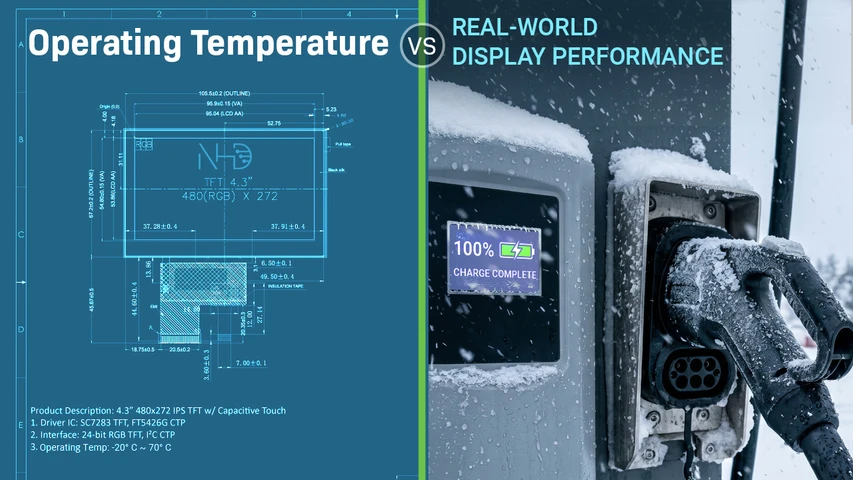
Operating Temperature vs. Real-World Display Performance
Oct 28th 2026
A display operating temperature range can look definitive on a datasheet. In practice, it only establishes the outer limits of expected operation. Performance can begin changing well before those limits are reached, especially in applications exposed to sustained heat, cold, or repeated temperature shifts.
Those changes can affect response time, image quality, readability, backlight behavior, and long-term reliability. A stronger specification process accounts for actual operating conditions and expected display behavior throughout the full temperature range, giving engineers a more accurate basis for product design.
What Does a Display Operating Temperature Range Mean?
Operating temperature defines the temperature span in which a display is specified to function. That specification gives engineers a necessary qualification boundary, but it does not describe uniform performance from one end of the range to the other.
Near either limit, display behavior can begin to shift even though the unit remains inside its rated operating range. Response time may slow, contrast may change, and backlight performance may vary. These effects matter because a display can remain technically operational while no longer meeting the performance expectations of the finished product.
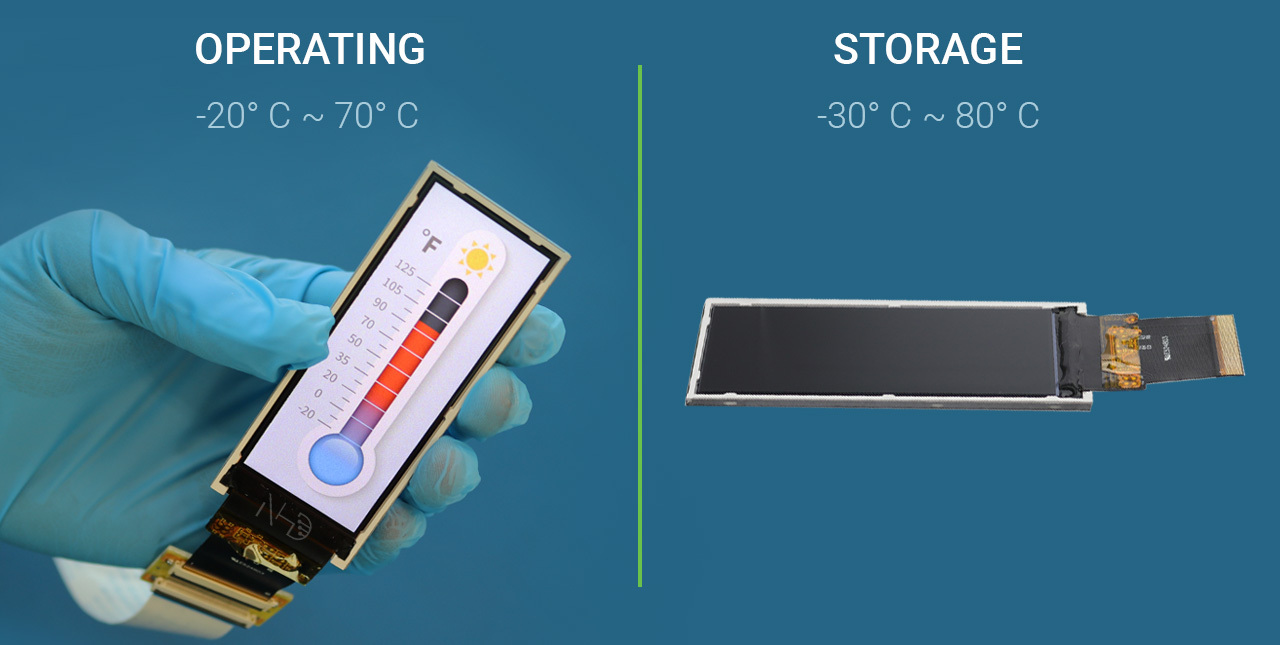
Storage temperature represents a separate specification. It refers to the conditions an unpowered display can tolerate before returning to service. Operating range concerns powered use, while storage range concerns exposure during periods when the display is not active. Treating those specifications interchangeably can create gaps between datasheet qualification and actual field performance.
A more complete specification process looks beyond the published limits. It considers expected temperature exposure, required visual performance near each boundary, and conditions inside the finished assembly. That approach gives engineering teams a more realistic basis for display selection and reduces the risk of choosing a display that meets the datasheet requirement but falls short in actual use.
Why Operating Temperature Does Not Tell the Whole Story
Temperature specifications compress a complex performance profile into two numbers. Between those limits, display behavior can shift gradually across electrical, optical, and material characteristics.
Those changes do not carry the same significance in every application. A control interface that refreshes slowly during a cold start creates a different concern than a display presenting mostly static information. Exposure duration, enclosure design, power dissipation, and viewing requirements all influence how much those changes matter.
For engineering teams, the more useful interpretation is to treat temperature as a performance variable. Rated limits establish the boundary, while actual product requirements determine what level of behavior is acceptable inside it.
How Temperature Extremes Affect Display Performance
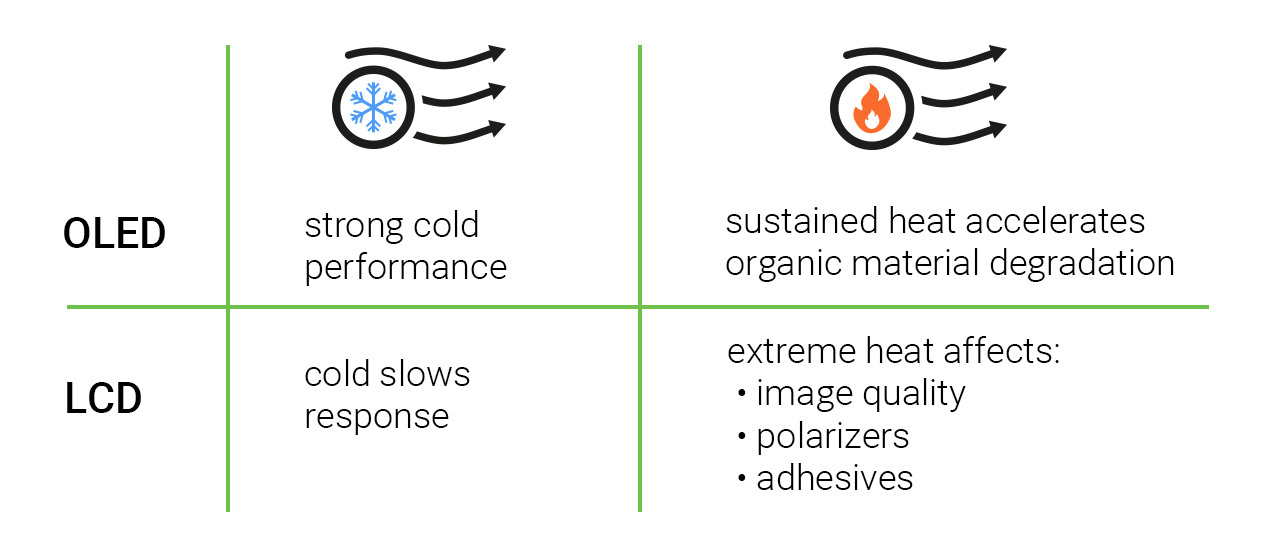
Temperature affects the materials inside a display, so performance changes can emerge well before a component reaches a failure point. Cold tends to slow physical response inside an LCD, while heat can alter optical behavior and accelerate material aging. The engineering significance depends on the display technology, exposure time, and performance requirements of the finished product.
LCD Performance at Low Temperatures
An LCD relies on liquid-crystal material changing orientation to form an image. When temperature falls, that material becomes more viscous and requires more time to reorient. Response time increases, which can appear on screen as sluggish transitions, ghosting, or smearing. The effect becomes more pronounced at progressively lower temperatures.
Cold temperatures can also affect the LED backlight. Electrical behavior changes at lower temperatures, which can influence brightness and color output. That means successful startup alone does not define acceptable cold-temperature performance. The display still needs to remain readable and visually consistent enough for the application throughout operation.
The impact of slower response depends heavily on the role of the display. A minor delay may be acceptable for static information, yet the same behavior can interfere with equipment that relies on frequent screen updates, changing status indicators, or immediate operator feedback. Cold-temperature performance therefore needs to be evaluated in relation to the display’s intended function, not simply its ability to remain operational.
Display Performance at High Temperatures
Heat creates a different set of concerns. In an LCD, elevated temperature changes the behavior of the liquid-crystal material. Near its upper material limits, image quality can deteriorate, producing a washed-out or darkened appearance. Excessive heat can also affect polarizers, optical adhesives, and other materials inside the display stack.
OLED technology responds differently. Cold performance is generally strong, but sustained heat can accelerate degradation of the organic materials that produce light. Over time, that can shorten operational life and contribute to uneven aging across the panel.
These differences reinforce a broader engineering principle: a temperature rating should never be interpreted independently from display technology and application behavior. The upper and lower ends of the range create different physical effects, and each one can influence usability, visual consistency, and service life in a different way.
Why Display Self-Heating Matters
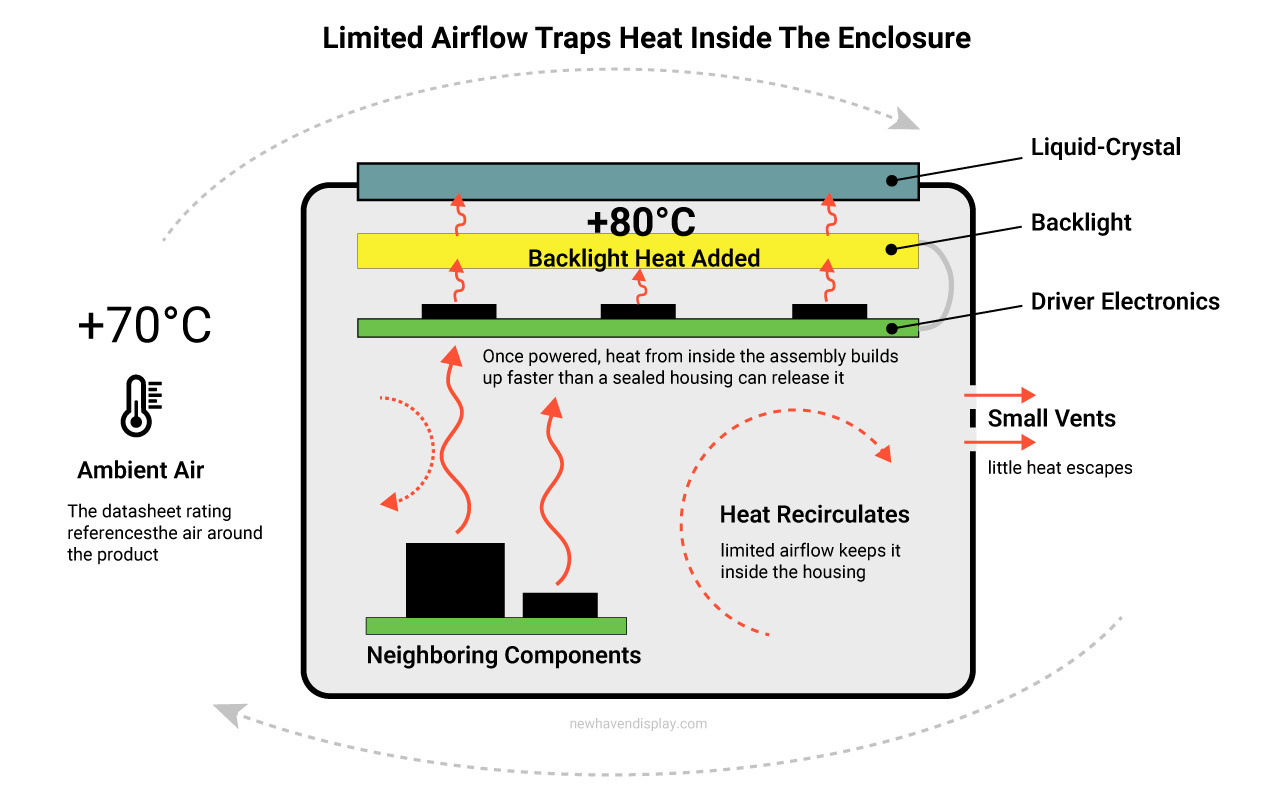
A datasheet temperature rating usually references the surrounding environment, but the display itself can run warmer once power is applied. Backlights, driver electronics, and neighboring components all contribute heat inside the assembly. In enclosed products, that heat can accumulate and create a thermal condition that differs noticeably from ambient air.
That distinction becomes especially important in sealed or compact housings. Limited airflow, nearby heat sources, and enclosure materials can influence how quickly heat leaves the system. An application operating comfortably below the published maximum temperature may still place the display under greater thermal stress than the ambient reading suggests.
Cold-start behavior introduces the opposite challenge. Before the system has generated meaningful internal heat, the LCD may still be exposed to the lowest temperature in the application. Integrated heaters can raise the liquid-crystal temperature faster, improving response during startup in severe cold. Some applications may still require a preheating period before the liquid crystal reaches the target performance level, which makes startup timing an important part of the thermal design.
Temporary Performance Changes vs. Permanent Damage
Temperature-related performance changes do not always indicate permanent failure. Some effects can reverse after the display returns to a suitable temperature, while exposure beyond material limits can lead to lasting damage.
Recovery deserves attention during qualification. A display may regain normal image quality or response after conditions improve, but performance may not return immediately. Recovery time can influence startup behavior, equipment availability, and the acceptable operating profile for the finished product.
Recoverability and permanent damage should therefore be evaluated separately. A display that returns to normal after exposure presents a different engineering consideration from one experiencing lasting material degradation.
Temperature Rarely Acts Alone in Real Applications
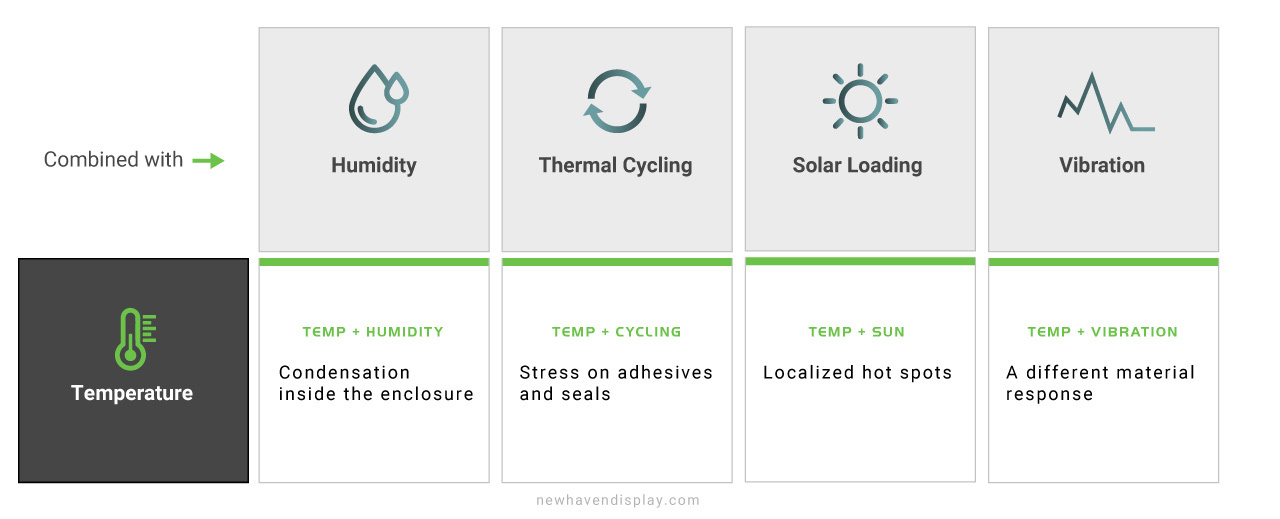
Real operating environments rarely isolate temperature from other stresses. Humidity, vibration, solar exposure, mechanical loading, and repeated thermal cycling can occur during the same service period. Their combined effect can produce behavior that a single temperature specification cannot fully represent.
Temperature can also change how materials respond to other environmental forces. Adhesives, seals, optical layers, and connection points may react differently after repeated heating and cooling cycles. Moisture introduces another variable because temperature shifts can create condensation inside an enclosure, even when humidity alone would not appear severe. Outdoor equipment adds solar loading, which can raise localized temperatures and place additional stress on the display assembly.
A display exposed to heat, rapid cooling, and vibration may experience a different material response than one exposed to each condition independently. Real-world reliability depends on the complete operating profile, including how often conditions change and which stressors occur at the same time.
For engineering teams, the practical takeaway is to define the environment in terms of actual use rather than isolated maximum values. Temperature remains an important specification, but its effect becomes far more meaningful when considered alongside the surrounding conditions the finished product will experience.
Designing for Reliable Performance Across Temperature Extremes
Temperature performance is easier to manage when environmental requirements are defined early in the design process. Standard commercial display modules often cover approximately −20°C to +70°C, while wide-temperature configurations can extend to −40°C to +85°C. Those ranges introduce very different material, startup, and thermal-management considerations.
Reaching a wider operating range can require changes inside the display itself. Higher-grade liquid-crystal materials, integrated heater panels, backlight thermal management, optical bonding materials, and polarizer selection can all play a role. For cold-start applications, an indium tin oxide (ITO) heater can raise the liquid-crystal temperature before normal operation. Applications exposed to sustained heat may require greater attention to heat dissipation and material compatibility across the optical stack.
A display operating inside a +70°C enclosure can reach approximately +80°C at the liquid-crystal layer once backlight heat is introduced. A design that appears comfortably inside the ambient rating can therefore move much closer to its material limits during powered operation.
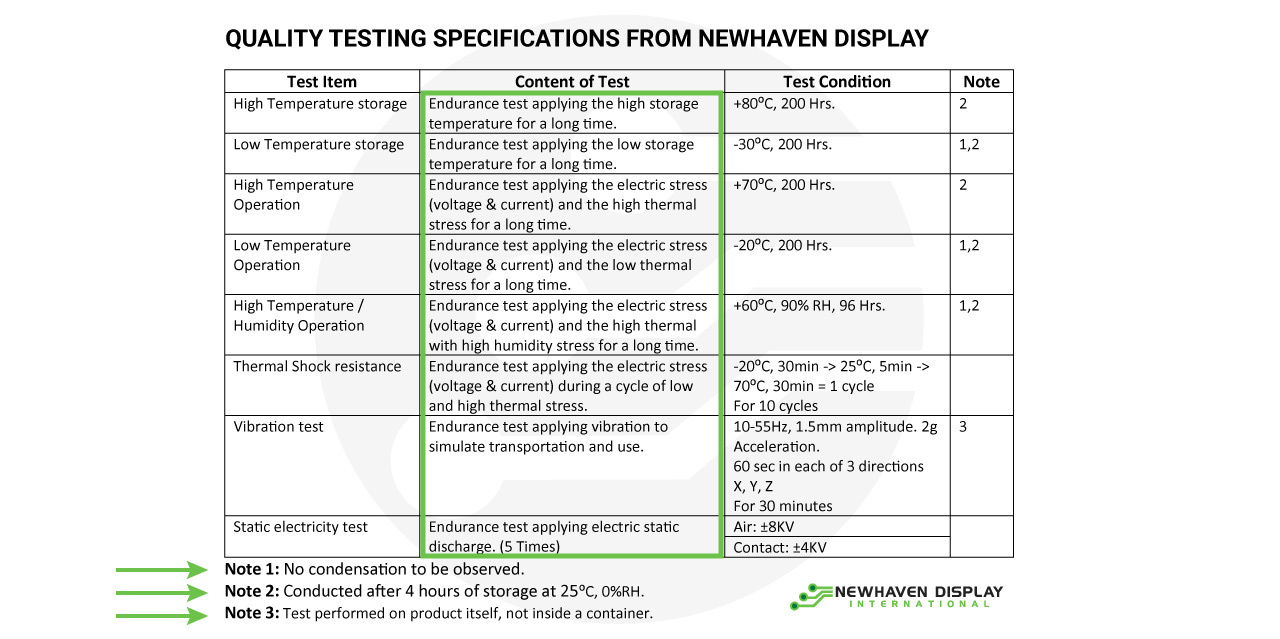
Qualification helps reveal those conditions before the display enters the field. Newhaven’s environmental process includes powered operation at temperature extremes, storage testing, recovery evaluation, and rapid temperature transitions. Wide-temperature programs can also be developed around −40°C to +85°C requirements when the application calls for that range.
How to Evaluate a Wide-Temperature Display Specification
A wide-temperature label should never be treated as a universal performance class. Two displays can carry similar minimum and maximum ratings yet reach those limits under different test conditions, operating states, or acceptance criteria. The useful comparison sits in the supporting documentation, including test notes, powered and unpowered conditions, recovery expectations, and stated limits on optical performance.
Engineers should also look for evidence behind the rating. Temperature values carry more weight when the supplier can explain how the display was evaluated, what constituted acceptable operation, and how performance was checked after exposure. A number without that context leaves too much room for interpretation.
For applications requiring deeper qualification, Newhaven can provide access to environmental test history, application-specific engineering input, and supporting qualification data. This gives design teams greater visibility into how a display reached its published rating and what that rating means for the intended product.
Specify Real-World Performance, Not Just a Temperature Range
A temperature specification is most useful when it supports a broader engineering decision. The strongest display selection comes from understanding how the product will be used, how long it will remain in service, and what level of performance the application requires throughout its operating life.
Temperature ratings still matter, but they should sit inside a larger qualification process that connects the display to the finished product. Material choices, environmental exposure, recovery behavior, enclosure conditions, and long-term reliability all contribute to the final result.
For engineering teams developing products for demanding environments, early collaboration can reduce uncertainty before those conditions become a factor in the field. Newhaven can support that process through display selection, customization, and application-specific engineering input for programs that require more than a standard configuration.
Get a custom display solution or contact sales to discuss the operating conditions and performance requirements for your next design.