


Serial vs Parallel Communication
Sep 26th 2025
Communication between electronic devices is a crucial aspect of modern technology, playing an integral role in the functionality and efficiency of countless devices and systems. At the heart of this process are two core data transfer methods - serial and parallel communication.
In this article, we'll discuss both forms of communication, considering their advantages, disadvantages, and appropriate use cases.
この記事の中で
An Insight into Data Transmission
To understand the principles of serial and parallel communication, we must first understand the fundamental concept of a bit, the smallest unit of data in an electronic circuit.
A bit, in its simplest terms, is like a single piece of digital information. You can think of it like a light switch that can only be in one of two positions: 'on' or 'off'. In the language of computers, instead of 'on' or 'off', we say that a bit can be either '1' or '0'.
All the complex information electronic devices handle, from your favorite songs and photos to the text of this article, is ultimately broken down into a long sequence of 0s and 1s and are collectively referred to as 'bits'.
Serial Communication
In serial communication, data transmission occurs bit by bit on a single communication line or channel. This process means that data bits are sent one after the other in a sequence or series (hence the term 'serial'), with the receiving device collecting and reassembling these bits into a complete message.
In simple terms, serial data transmission is like a single-lane road where cars can only travel one after the other, not side by side. Here is a simple breakdown of how serial data is transmitted:
- Start of communication: The device sending the data, called the transmitter, sends a start bit to the device receiving the data, known as the receiver. The start bit is like a heads-up, signaling, "Hey, I'm about to send some data."
- Data transmission: Next, the transmitter sends the data bit by bit in a specific order. It's like sending a long message, one letter at a time.
- End of communication: When all the data bits have been sent, the transmitter sends a stop bit, saying, "That's it, I've sent everything I had to send."
- Error checking (optional): The receiver then checks if it has received the data correctly. This is done through a process known as parity checking. If the data isn't correct, the receiver can ask the transmitter to resend the data.
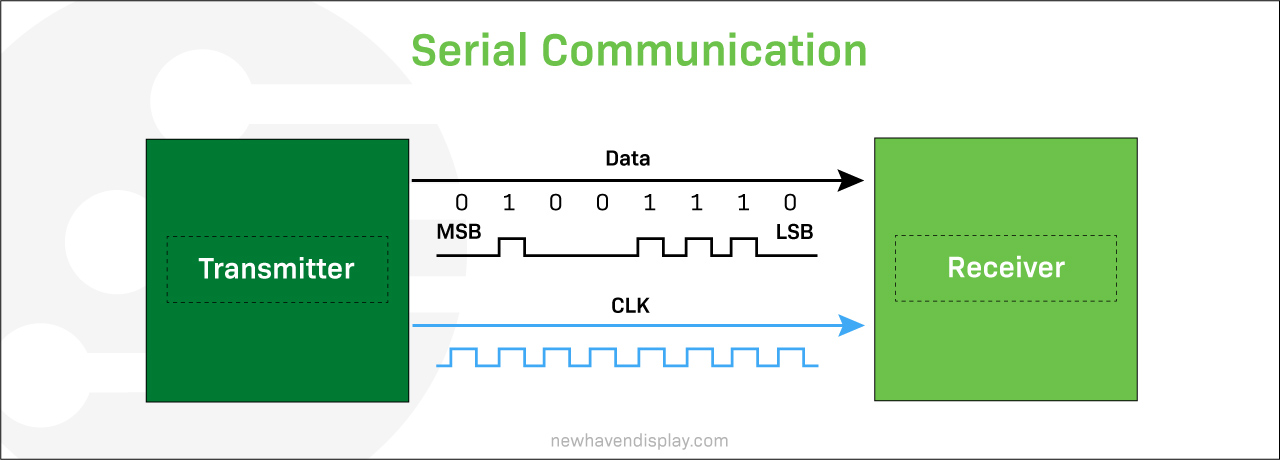
The telegraph was one of the first devices for long-distance serial communication, using a single wire to transmit data. Serial communication protocols and standards began to develop in the 1960s. These protocols, such as RS-232, SPI, I²C, RS485, USB, and MIPI, are widely used in electronic circuits, LCDs, OLEDs, computer systems, embedded systems, and telecommunications.
Serial Communication Advantages
Serial communication requires fewer lines or wires than parallel communication, which leads to lower implementation costs, less complex hardware, and simpler data transfer processes over long distances, making it the preferred choice for telecommunication networks.
Serial Communication Disadvantages
Serial communication can be slower than parallel communication. It can only transmit a certain amount of data per unit of time, which limits bandwidth. Serial communication has a higher processing overhead because the data has to be organized, synchronized, and packaged before sending, and once it reaches the receiver, it needs to be decoded.
Parallel Communication
Parallel communication is a method of transmitting data in which multiple bits are sent simultaneously over multiple channels or cables. These bits are generally sent in data groups of 8 bits, known as bytes, in a single clock pulse. This means each bit is transmitted over a dedicated cable. This technique is like a multi-lane highway, with each 'bit' having its own lane, allowing for simultaneous data transmission.
Here is a simple breakdown of how parallel data is transmitted:
- Start of communication: The transmitter signals the receiver about data transmission readiness.
- Data transmission: The data is divided into multiple bit groups, and the transmitter sends all the bits simultaneously over separate communication lines or cables.
- Data reception: The receiver gets all the data streams and arranges them in the correct order to reconstruct the original data.
- End of communication: Once all parallel bits are received, and data is reconstructed, the communication is complete.
- Error checking (optional): Some systems may use error-checking mechanisms to verify data accuracy.
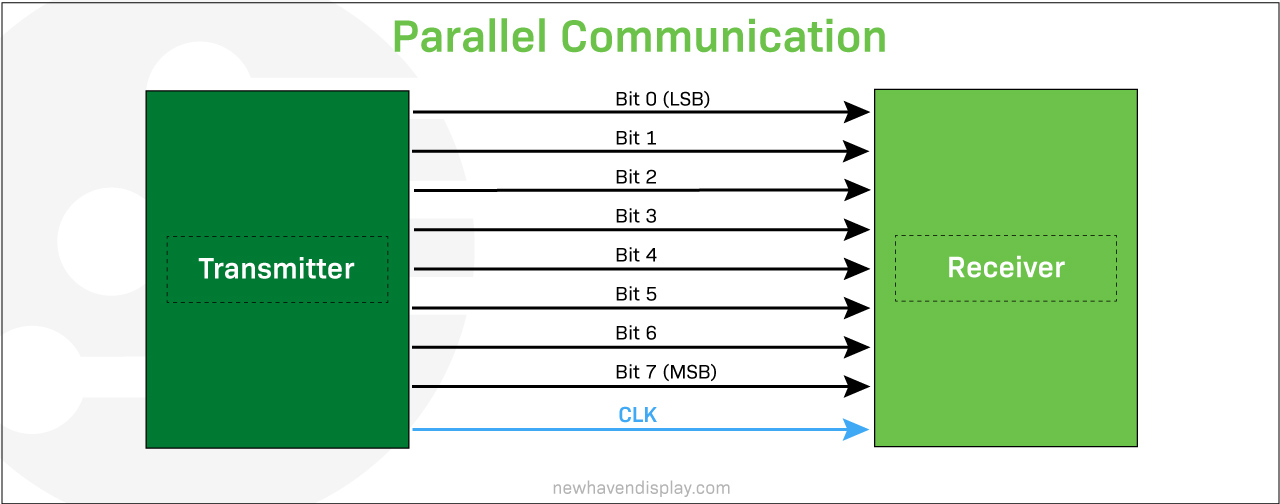
Parallel communication is typically faster than serial communication, as it can transmit more data in the same amount of time. However, it is also more complex and requires more hardware.
Parallel communication is often used in applications where high data rates are required, such as in printers, scanners, and external hard drives. It is also used in some internal computer buses, such as the PCI bus.
Parallel Communication Advantages
Parallel communication offers fast data transfer rates, making it optimal for high data rate demands like printers, scanners, and external drives. Over short distances, parallel communication is less prone to errors and simplifies data synchronization because it transmits multiple bits simultaneously. This is a crucial aspect of digital audio and video applications.
Parallel Communication Disadvantages
Parallel communication requires multiple communication channels, which increases cost, size, and data processing operations. Over longer distances, parallel communication can suffer from 'skew' as signals on different wires can arrive at different times. Because parallel communication sends data over multiple lines in close proximity, there is a chance of crosstalk which can cause errors.
Learn more: All about electromagnetic interference (EMI)
Real-World Applications of Serial and Parallel Communication
Understanding where and how each communication method is used can help clarify its practical value. In real-world settings, the choice between serial and parallel communication often comes down to speed, wiring simplicity, and distance.
Serial communication is commonly used in embedded systems, industrial controls, and display modules that need to transmit data over longer distances or through fewer pin connections. It works reliably over USB ports, UART interfaces, and protocols like I²C and SPI, which are widespread in sensor integration, microcontroller communication, and compact electronics.
Parallel communication is used in applications that need high data transfer rates over short distances. It sends multiple bits at once across separate lines, which increases speed but also wiring complexity. Standards such as the Centronics printer port, parallel ATA, and the PCI bus relied on this method in devices like printers and scanners. Today, parallel signaling is still used on printed circuit boards where timing between lines can be tightly managed.
Both methods support reliable data exchange, but their roles have shifted as hardware has evolved. The choice between serial and parallel communication largely depends on the capabilities of the microcontroller, along with layout and data requirements.
Interface Options in Display Modules
Display modules use a variety of connection methods. The right choice often depends on how much data needs to move, how many pins are available, and how the rest of the system is designed.
Serial Interfaces
SPI (Serial Peripheral Interface): A fast, low-pin option often used in small to mid-sized displays. Well-suited for designs where space is tight.
I²C (Inter-Integrated Circuit): Requires just two lines for communication. Common in simpler systems where speed isn’t the top concern.
UART (Universal Asynchronous Receiver-Transmitter): A straightforward, point-to-point method often found in microcontroller setups.
USB (Universal Serial Bus): Widely used for data transfer and power. Provides simple connectivity for many modern devices and is supported across a variety of Newhaven Display modules.
Parallel Interfaces
Parallel MCU Interface: Uses an 8-bit or 16-bit bus to send data one byte or word at a time. This method is common in smaller TFTs (such as 1.8" or 2.4") that include a built-in display controller. It provides straightforward communication and is well-suited for compact modules.
Parallel RGB Interface: Transfers pixel data across multiple lines simultaneously, with bus widths that can range from 8-bit to 24-bit. This approach is typically found in larger TFTs (such as 3.5" or 4.3") that do not include a built-in controller, allowing for faster updates and smoother graphics.
Serial vs Parallel
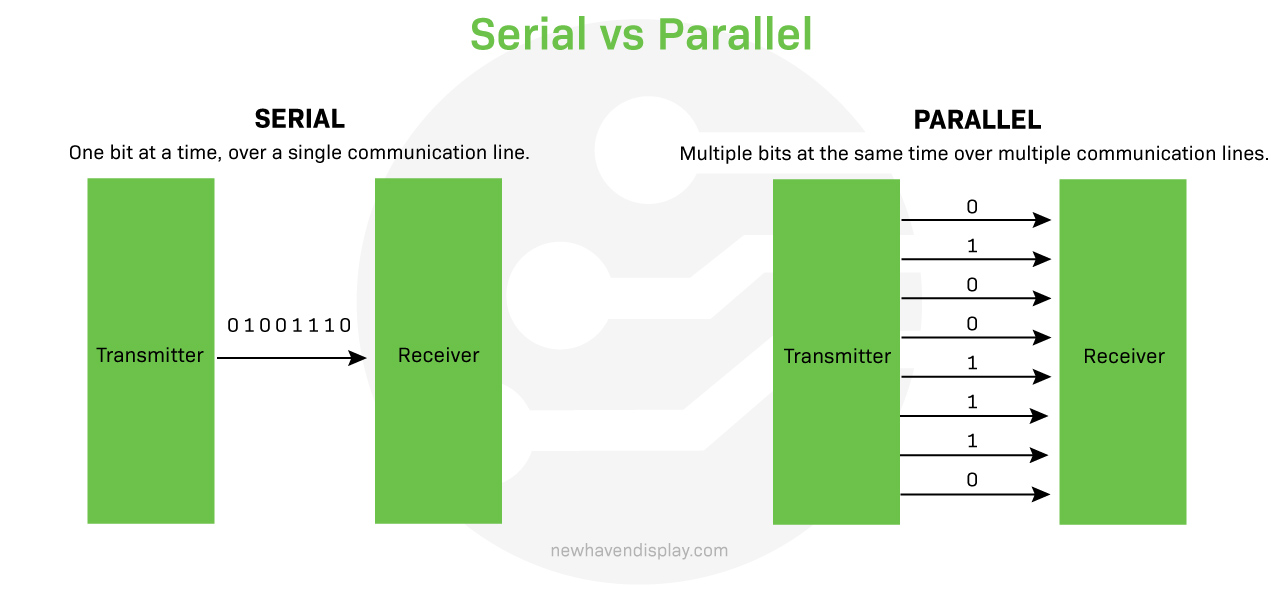
In a nutshell, serial and parallel communication differ in the way they transfer data - serial communication sends data bit by bit over a single channel, while parallel communication sends multiple bits at the same time over multiple channels.
Learn more: What is baud rate?
Serial Vs Parallel communication summary:
| Serial | パラレル | |
|---|---|---|
| スピード | Typically slower for short distances than parallel communication. | Typically faster as multiple bits are sent at once |
| 複雑性 | Simple for long distances | Simple for short distances |
| コスト | Typically cheaper for long distances | Typically more expensive for long connections |
| Reliability | Reliable over long distances | May suffer signal degradation over long distances |
| Interference | Less prone to crosstalk | More prone to crosstalk in longer connections |
| Synchronization | Complex at very high speeds | Easier to synchronize at short distances |
| Scalability | High-speed scalability can be challenging | Can be easily scaled for short distances |
| Wiring | Requires fewer wires, reducing bulk | Requires more wires, increasing bulk |
| 帯域幅 | Bandwidth limited by channel characteristics | High bandwidth potential |
Choosing the Right Communication Method
Selecting between serial and parallel communication often starts with the product’s technical requirements, but practical constraints usually guide the final decision.
Serial interfaces tend to be easier to implement when working within a tight layout or pin-limited environment. They’re commonly used in compact devices or when data needs to travel outside the enclosure.
Parallel interfaces come into play when a display demands high-speed updates and the system can handle a wider data bus. They're typically chosen when performance outweighs simplicity.
Newhaven Display offers modules that include multiple interface options in a single footprint. This flexibility makes it easier to adapt designs during prototyping or shift between connection types across different products in a series, without needing to rework the entire layout.
結論
There’s no universal answer for how to move data between devices. The right communication method depends on the goals of the system, the environment it operates in, and how the hardware comes together.
Flexibility plays a key role in that decision. Newhaven Display provides high-quality display modules backed by expert guidance, so you can focus on building products that perform reliably.
If you're comparing options or planning your next development cycle, get in touch with our team. We’ll help you find a display that fits your application and your timeline.