


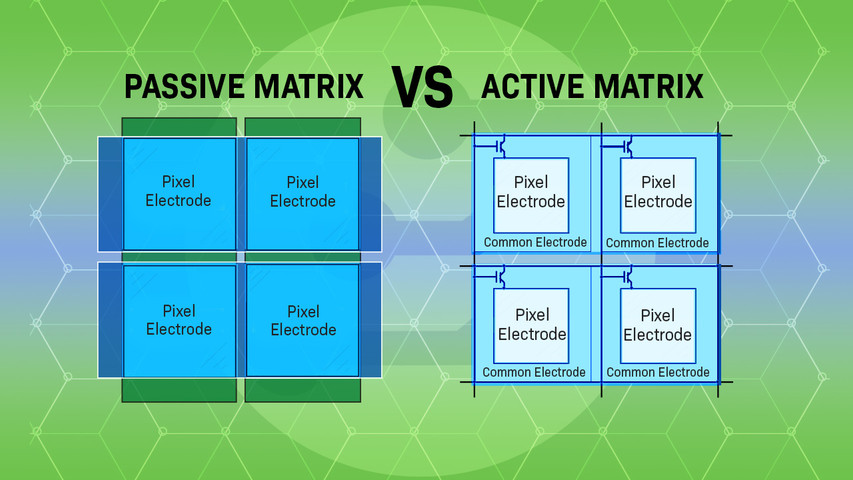
Matrice passive vs matrice active - Guide pour débutants
5 décembre 2025
Have you ever wondered how display screens are able to produce sharp images and vibrant colors? The answer lies in how millions of tiny pixels are controlled via pixel addressing, which is primarily managed through active matrix and passive matrix technology.
Dans cet article :
What Are Matrix Displays?
Matrix displays are electronic displays made up of a grid of tiny light elements called pixels. By turning individual pixels on or off, they create characters, symbols, images, and video animations. These displays are extremely common in modern digital screens, such as TVs, smartphones, laptops, industrial and commercial displays, and more.
Both LCDs and OLEDs use matrix technology. LCDs are simply known as passive or active matrix LCDs, while OLEDs are referred to as PMOLED (Passive Matrix OLED) or AMOLED (Active Matrix OLED).
How Matrix Displays Work
Matrix displays generate images by managing the on and off state of every pixel within a grid of rows and columns. Each pixel can be addressed separately using a method called multiplexing, where rows and columns are selectively activated to illuminate specific pixels. The way these intersections are controlled is what differentiates active matrix from passive matrix displays.

Matrix Displays in LCD vs OLED Technologies
Matrix technology is used in both LCD and OLED displays to control pixels, but the way they manage light differs.
LCDs use a backlight that shines through liquid crystal cells. The matrix tells each cell when to twist open or closed, adjusting how much light passes through. Passive LCDs use a simple grid of electrodes, while active LCDs assign a transistor to each pixel for more control.
OLEDs don’t need a backlight. Each pixel lights up on its own. PMOLEDs (Passive Matrix OLED) use basic grids, while AMOLEDs (Active Matrix OLED) use individual transistors for faster response and sharper images.
Both display types use matrix addressing, but the matrix choice affects performance, power use, and image quality.
PMOLED vs. AMOLED
Passive matrix and active matrix are two ways of controlling OLED displays. Both use self-emitting pixels, but the difference lies in how those pixels are addressed.
PMOLEDs rely on simple row-and-column grids to activate pixels. This setup limits resolution and size but works well for compact displays where simplicity and low power use matter most.
AMOLEDs use a thin-film transistor at each pixel, allowing faster switching, higher contrast, and better motion clarity. This makes them a strong fit for larger or more advanced applications, such as smartphones and industrial interfaces.
The choice between PMOLED and AMOLED depends on the level of performance needed: PMOLED for basic tasks, AMOLED for high-speed, high-detail visuals.
Evolution of Matrix Technologies
Matrix addressing has progressed alongside growing demands for better screen performance. Early implementations used passive matrix systems due to their simple construction and lower cost. These were commonly found in devices like gaming controllers, USB accessories, and compact electronics such as password keychains, where display demands were minimal.
As expectations for image quality and speed increased, active matrix technology became more common. Today, active matrix displays are standard in advanced applications, including smartphones, high-end televisions, gaming monitors, and devices like the Nintendo Switch. Passive matrix remains a practical choice for designs that prioritize low power use and basic visual output.
Passive Matrix Displays
Passive matrix displays are a type of display technology that controls each pixel using a grid of vertical and horizontal conductive lines known as electrodes. Pixels are located at the intersections of these rows and columns, and when a voltage is applied, the pixel at that intersection is activated, changing its optical properties and causing it to light up.
Structure of Passive Matrix Displays
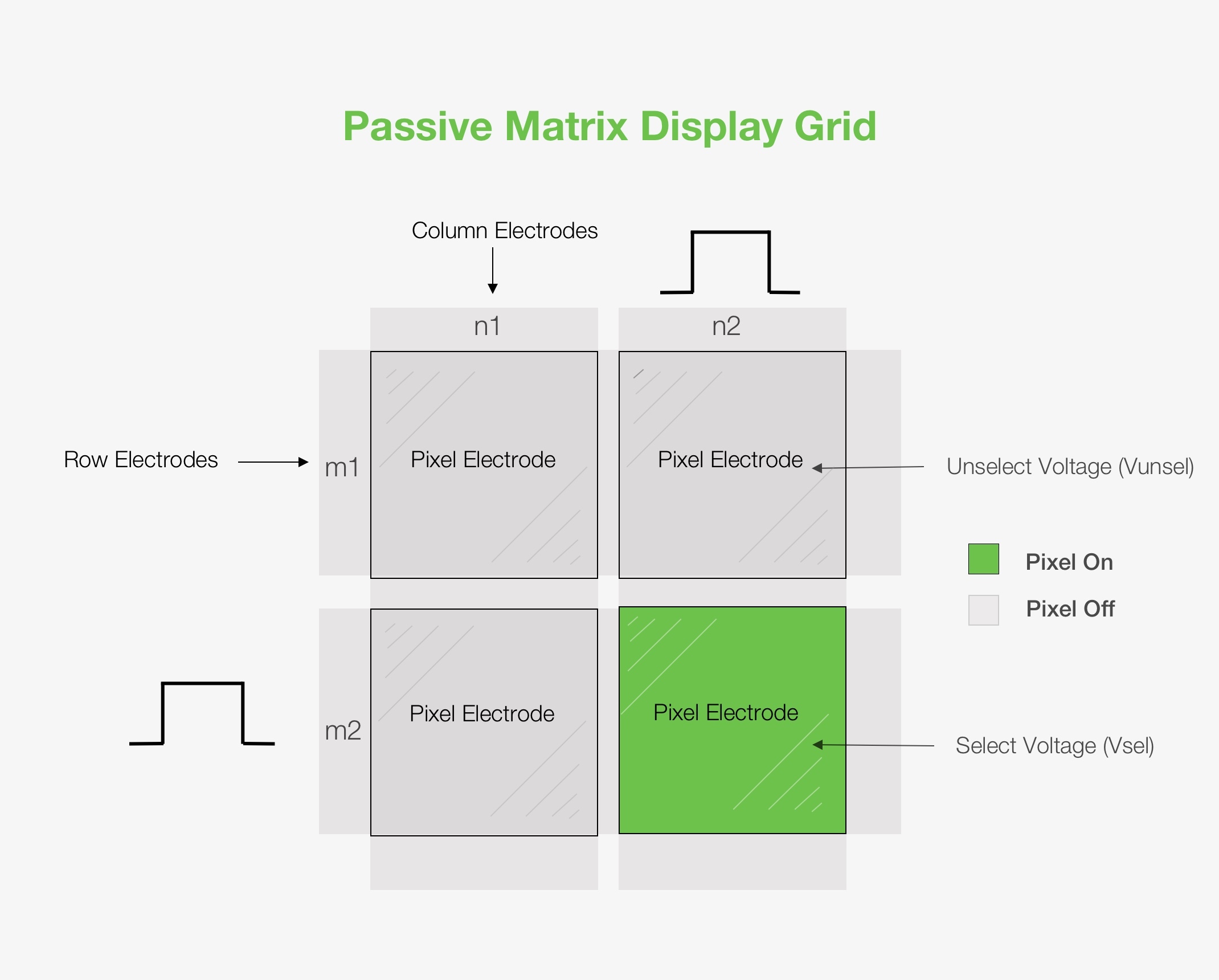
Passive matrix displays have a simpler structure compared to active matrix displays. They rely on a grid of electrodes to control pixels at their intersections instead of individual transistors. Here's a breakdown of the key components:
- Row Electrodes: These are horizontal lines conducting electrical signals. They connect to all the pixels in a specific row.
- Column Electrodes: These are vertical lines conducting electrical signals. They connect to all the pixels in a specific column.
- Pixel Electrodes: These are located at the intersections of the row and column electrodes and determine the light properties of each pixel (brightness, color) based on the applied voltage. In Liquid Crystal Display (LCD) panels, the pixel electrode properties are manipulated by the electric field to control the backlight passing through. In Organic Light-Emitting Diode (OLED) panels, the pixel electrode itself is the light-emitting element. Applying a voltage directly to the pixel electrode causes it to emit light.
Related: Difference Between LCD and OLED
How Passive Matrix Displays Work
Passive matrix displays use a grid of thin wires (electrodes) to control each pixel on the screen. This grid addressing system is what makes passive matrix displays simple and cost-effective. It only requires two sets of control lines: one for the rows (m lines) and another for the columns (n lines). This adds up to a total of (m+n) control lines, a much simpler design compared to other display technologies.
The word "passive" in passive matrix displays refers to the fact that the pixels don't contain any active circuitry. Instead, they rely on the row and column addressing scheme and their inherent properties, such as threshold voltage, to determine their on or off state.
Here's how it works:
Grid addressing: Passive matrix displays rely on a grid of electrodes (rows and columns) to control pixels at their intersections. To activate a specific pixel, a voltage is applied to its corresponding row and column simultaneously. This creates a voltage difference (Vsel - Von or Vunsel - Voff) at the desired pixel intersection, turning it on or off. In LCD panels, this electric field changes the orientation of liquid crystals, allowing more or less backlight to pass through (bright pixel) or block light (dark pixel). In OLED displays, the applied voltage directly controls the brightness of the individual OLED element.
Refreshing the Image: Since the pixels can't hold their own state for long, the screen needs to be refreshed constantly by repeating this process very quickly, line by line.
Learn more: Transmissive vs Reflective vs Transflective Displays
Passive Matrix Advantages:
- Affordable: Passive matrix displays are cheaper to produce because they require fewer components.
- Lower power consumption (for static images): Since the pixels aren't actively controlled continuously, passive matrix displays can consume less power when displaying static images.
- Suitable for basic applications: Well-suited for basic applications that don't need high resolution or fast refresh rates.
Passive Matrix Disadvantages:
- Slower response time: The refresh process of passive matrix displays is slower than active matrix displays, which can cause ghosting and blurring, especially noticeable in fast-moving images or videos.
- Limited viewing angles: The way passive matrix controls pixels restricts viewing angles. The picture quality might significantly degrade if you don't look at the screen straight on.
- Lower contrast: Passive matrix displays generally have lower contrast compared to active matrix displays. This means blacks might appear more grayish, reducing the overall image quality.
Passive Matrix Applications
Passive matrix displays are typically found in applications where high resolution and refresh rates are not critical. Examples include calculators, e-book readers, alarm clocks, digital thermometers, and some basic digital watches.
Active Matrix Displays
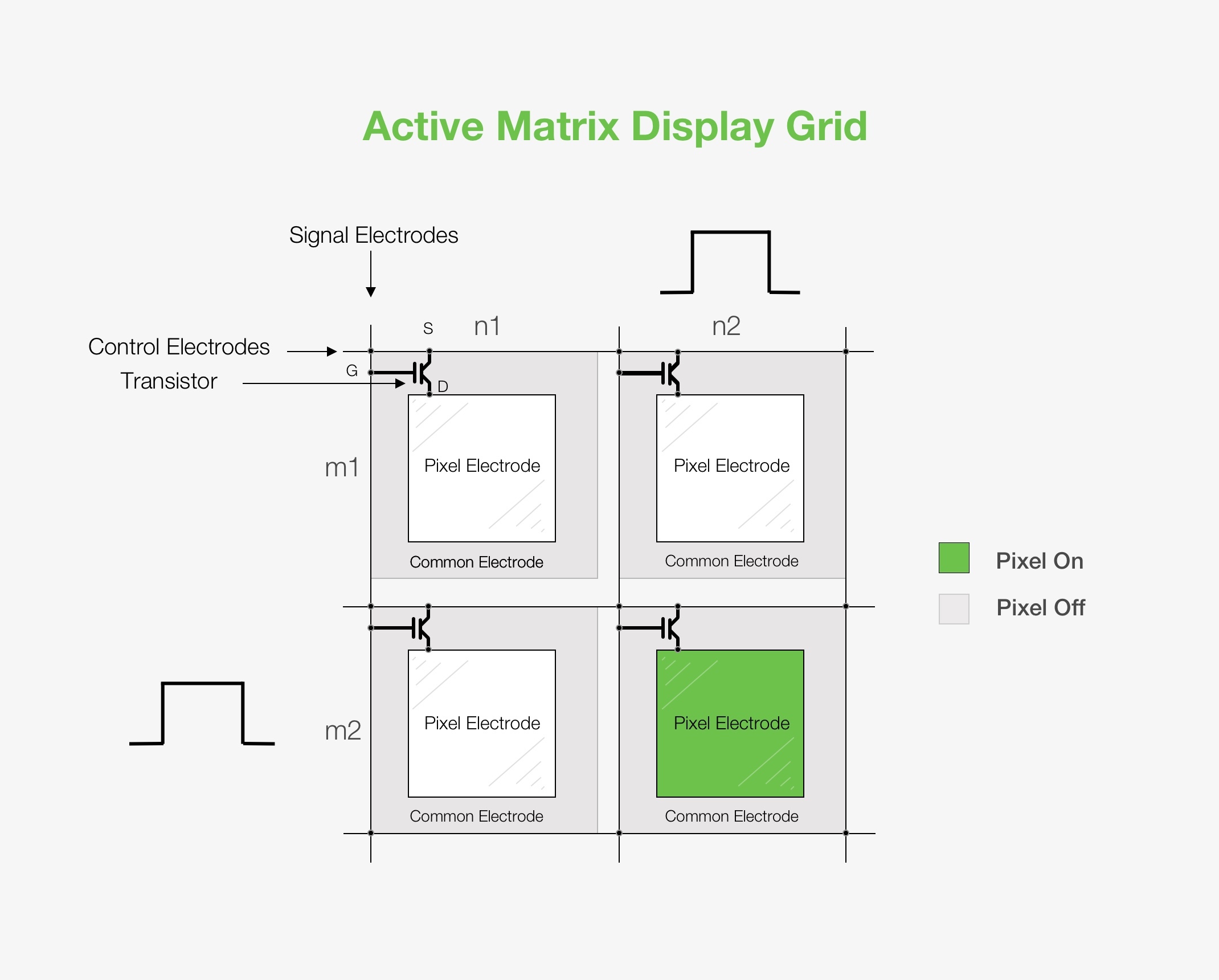
Active matrix displays are a type of display technology that provides better performance compared to passive matrix displays. The most common type of active matrix technology is TFT (Thin Film Transistor) technology. In these displays, each pixel is individually controlled by its own transistor. This configuration allows for direct control of each pixel, enabling faster response times and better image quality. The individual transistors ensure that each pixel maintains its state until the next refresh cycle, resulting in sharper and more stable images.
Structure of Active Matrix Displays
- Signal Electrodes: These columns carry the video signal and supply the voltage needed to control the transistors in each column.
- Control Electrodes: These are the rows in the matrix and are responsible for activating the transistors. The control electrodes are connected to the transistors' gates and turn them on and off.
- Thin Film Transistor (TFT): Each pixel in an active matrix display has a transistor that acts as a switch. The transistor's Source (S) and Drain (D) control the current flow, while the Gate (G) electrode regulates this flow. Applying a voltage to the gate turns the transistor on, allowing current to flow from the source to the drain and charge the pixel electrode. On the contrary, turning the transistor off stops the current flow, and the pixel electrode retains its charge, maintaining the image on the screen.
- Common Electrode: This electrode, commonly grounded, is shared by all pixels and works together with the pixel electrode to create the electric field needed to control the liquid crystal or light-emitting elements in the pixel.
- Pixel Electrode: Each pixel in the display has its own electrode, which is responsible for controlling the amount of light that passes through or is emitted by that pixel. The pixel electrode is addressed by the transistor.
How Active Matrix Displays Work
Active matrix displays operate using a grid of transistors and capacitors. Each pixel is paired with a dedicated transistor, allowing for precise control of its state. When a voltage is applied to the transistor, it charges the capacitor connected to the pixel, which maintains its state until the next refresh cycle.
Here's how it works:
- The control electrodes (rows) are sequentially activated, turning on the transistors in the selected row.
- The signal electrodes (columns) provide the voltage signal corresponding to the image data for each pixel in the row.
- When a row is selected, the corresponding transistors allow the signal voltage to charge the pixel electrodes.
- The pixel electrodes maintain the charge until the next refresh cycle, ensuring a stable display of the image.
Active Matrix Advantages:
- Superior image quality: The transistors ensure that each pixel maintains its state (on or off) until the next refresh cycle. This results in sharper and more stable images with better contrast.
- Fast response times: The individual control of pixels enable faster response times, which means the pixels can change color or brightness more quickly. This reduces blurring and ghosting effects, especially in fast-moving images or video.
- Better viewing angles: Active matrix displays provide superior viewing angles.
Learn more: All About Brightness Enhancement Films
Active Matrix Disadvantages:
- Higher cost: They are more complex to manufacture and, therefore, more expensive.
- Power consumption: Active matrix displays generally consume more power.
Active matrix applications
The superior performance of active matrix displays makes them ideal for almost all modern visual electronics, including high-end industrial screens, smartphones, tablets, monitors, and TVs.
Passive vs Active Matrix
Passive and active matrix displays both use grids of pixels, but they control each pixel differently. Passive matrix displays use a simple grid of electrodes, which makes them affordable but limits their responsiveness and viewing angles. Active matrix displays use transistors for individual pixel control, resulting in faster response times, sharper images, and wider viewing angles. However, this superior performance comes at the cost of higher power consumption and a higher price.
Passive matrix displays are suitable for basic, low-cost applications, while active matrix technology dominates high-resolution, high-performance displays in modern electronics.
Power Efficiency Considerations
Passive matrix displays typically use less power, especially when showing static content. Their simpler structure and lack of active components help reduce energy use in basic applications.
Active matrix displays consume more power due to constant pixel control, especially in larger or brighter screens. However, improvements in active matrix design have made them more efficient over time.
Power needs often come down to how often the screen updates and how complex the visuals are. Simpler displays benefit from passive matrix efficiency, while more advanced screens trade power for performance.
Impact on User Experience
The way each matrix manages pixel response has a direct effect on how a display looks and responds. Passive matrix displays can show noticeable blurring or ghosting during motion, and colors may shift when viewed from an angle. These trade-offs are less noticeable in simple interfaces or devices that display static content.
Active matrix displays offer smoother motion, sharper images, and consistent color across wider viewing angles. This makes them better suited for touch interfaces, video playback, and any application where clarity and responsiveness matter.
When to Choose Passive Matrix Over Active Matrix
Passive matrix displays make sense in devices where cost, simplicity, and low power use matter more than speed or image sharpness. They're a good fit for basic applications like thermometers, smaller control panels, wearables, and industrial meters that show limited or static information.
Active matrix is the better choice for any display that needs to handle motion or high-resolution content. If the screen is expected to refresh often or present detailed visuals, an active matrix will provide a noticeably better experience.
Comparison of Passive vs Active Matrix
| Aspect | Passive Matrix | Active Matrix |
|---|---|---|
| Pixel Control | Uses a grid of row and column electrodes. | Each pixel is controlled by its own transistor. |
| Image Quality | Lower contrast and sharpness. | Higher contrast, clearer images. |
| Temps de réponse | Slower, may show blurring. | Fast, better for video and motion. |
| Power Use | More efficient for static or simple content. | Higher due to constant control of pixels. |
| Complexité | Simple, fewer components. | More complex circuitry and design. |
| Coût | Lower production cost. | More expensive to manufacture. |
| Best Use Cases | Basic devices, static displays, cost-sensitive applications. | High-resolution displays, interactive and media-rich devices. |
Conclusion
Passive and active matrix displays serve different roles depending on the performance and design goals of a project. Passive matrix is a practical fit for simpler interfaces where power use and cost take priority. Active matrix is built for speed, clarity, and responsiveness, making it the preferred choice for modern, high-performance displays.
If you're weighing options for your next display design, connect with our team or request a same-day quote to explore solutions tailored to your specs.